Mod Menu Optional for The Backrooms Mod (OUTDATED) 1.4
optionalNo matching file

Modrinth · Minecraft mod
Explore THREE different levels as you fall deeper into madness. Watch out for what lurks in the darkness...
Quick answer
The Backrooms Mod (OUTDATED) 1.4 targets 1.20.1 with Fabric. Installation on the client is optional. Installation on the dedicated server is optional. 1 required mod needs a matching file.
Where it goes
Installation on the client is optional. Installation on the dedicated server is optional.
The source marks this as usable on both the client and server.
1.4. Change the file and its required mods may change too.
Install Cloth Config API (Fabric/Forge/NeoForge), [ETF] Entity Texture Features first, but 1 required mod has no matching file for this setup. Do not mix loader builds to force a match.
We only count dependency files that match this setup. A file for another loader does not fill the gap.
Before you install it
Built for The Backrooms Mod (OUTDATED) 1.4. Pick another file and the loader, install side or required mods may change.
Use 1.4. It targets 1.20.1 with Fabric; another release may have different loader, side or dependency requirements.
Install Cloth Config API (Fabric/Forge/NeoForge), [ETF] Entity Texture Features first, but 1 required mod has no matching file for this setup. Do not mix loader builds to force a match.
Installation on the client is optional. Installation on the dedicated server is optional.
Use the “Get this file” button beside 1.4. It opens that exact file at the source.
About this project
This is my first ever Mod for Java Edition. THERE WILL LIKELY BE A LOT OF BUGS. Don't expect a masterpiece :D
This Mod adds in 3 Levels for you and your friends to explore, with a few entities sprinkled in. Grab your lantern, head into the darkness, and try not to go insane!
The shaders and their settings are found on the Discord Modding Channel! (check the pinned comments)
Sodium
Iris
Cloth Config
Entity Texture Features
Dynamic Lights Especially for multiplayer
Camera Overhaul Needs to be enabled with mod menu
Mod Menu For changing some Backrooms game settings
and their dependencies.
DO NOT ADD SOUND PHYSICS REMASTERED
It will mess with the sounds of the game, making them too quiet. You can download it only if you're ok with messing around with the settings
DO NOT LEAVE THE WORLD WHILE PLAYING
It will reset your progress and cause a TON of issues. If you leave accidentally, start a new world.
This mod also disables the experience bar, the crosshair, and the F3 Menu which can be disabled using Mod Menu
If you are playing with friends, try to generally stick together, as splitting up can cause a lot of bugs.
Tip: If you are playing multiplayer, standing near another player that is holding a lantern will prevent the darkness from damaging you. So only one person needs a lantern for everyone to continue.
Create a new super flat world WITH THE REDSTONE READY PRESET (if the world isn't made of sandstone, you didn't use the preset) and generate structures turned OFF. Other settings will be set automatically
When you're in the world, type /reload and you'll see a menu appear in the chat.
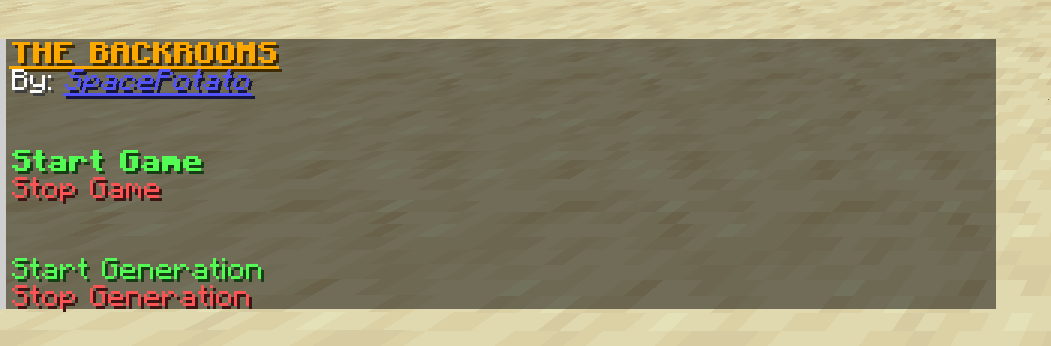
Click on Start Game to start the entire game. Clicking it again after the game has already started DOES NOT RESET THE GAME
Click on Stop Game to stop the entire game and generation. This will NOT get rid of the structures
Click on Start Generation to ONLY generate the rooms
Click on Stop Generation to ONLY stop generating the rooms
You will also see some extra options:
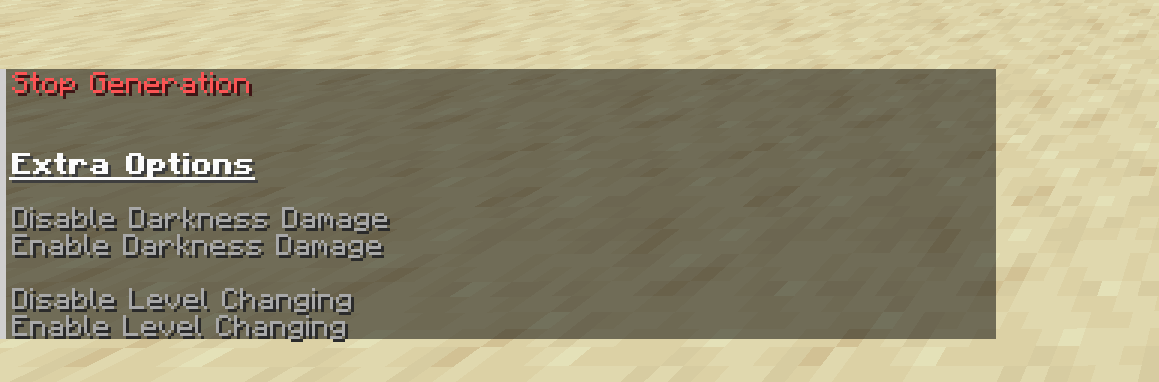
Hover over them for more info
Besides fixing a few bugs (see changelog), the mod is given as seen in the video, minus the ending. No additional features, items, monsters, herobrines, or events were added...
I will not be updating this specific mod further unless there are some absolutely game breaking bugs (This includes porting to other loaders or versions).
Although with the Sinytra Connector and Forgified Api, you may be able to play this on Forge. Haven't tested it yet.
I will however be creating a completely revamped backrooms mod in the future. So keep an eye out for that :D
You can use this mod in a video, as long as you credit my channel and this mod page.
Good luck >:D
Project description from Modrinth.
Pick your setup
Choose the version and loader you play, then open the matching release.
Check the dependencies, then try the file in a copied instance before changing a world you care about.
Recent files
SPBackroomsMod--1.4--1.20.1.jar
27 Jul 2024
SPBackroomsMod--1.3.1--1.20.1.jar
6 Jul 2024
SPBackroomsMod--1.3--1.20.1.jar
5 Jul 2024
Looking for an older file? The official Modrinth project page is in Resources.
 mod
modA vibrant remake of the original Animal Crossing style neighbors mod, with 350+ lines of dialog!
 mod
modBetter FireFlies (BFF) is a client-side mod that add ambiant Fireflies.
 mod
modA Minecraft mod bringing a stealth and alert system just like what in other games.