Cloth Config API Optional for Teams 2.0.2-b1
optionalMatching file found Matched file: 8.3.134+fabric

Modrinth · Minecraft mod
Adds functional teams to minecraft
Quick answer
Teams 2.0.2-b1 targets 1.19, 1.19.1, 1.19.2 with Fabric. Installation on the client is optional. Installation on the dedicated server is optional. No extra mods listed for this file.
Where it goes
Installation on the client is optional. Installation on the dedicated server is optional.
The source marks this as usable on both the client and server.
2.0.2-b1. Change the file and its required mods may change too.
This file does not list any required mods. Do not add a library just because a different file uses it.
We only count dependency files that match this setup. A file for another loader does not fill the gap.
Before you install it
Built for Teams 2.0.2-b1. Pick another file and the loader, install side or required mods may change.
Use 2.0.2-b1. It targets 1.19, 1.19.1, 1.19.2 with Fabric; another release may have different loader, side or dependency requirements.
This file does not list any required mods. Do not add a library just because a different file uses it.
Installation on the client is optional. Installation on the dedicated server is optional.
Use the “Get this file” button beside 2.0.2-b1. It opens that exact file at the source.
About this project
A simple mod extending vanilla teams with a management GUI and a HUD showing teammate health / hunger / position
Team Management GUI
Port of Teams by t2pellet for 1.18 to 1.19.
Originally under the CC0-1.0 license, now under the GPLv3 license.


There's a compass HUD showing location of nearby teammates, and a status HUD that live updates their health / hunger.

Uses Cloth Config API to provide the following options:
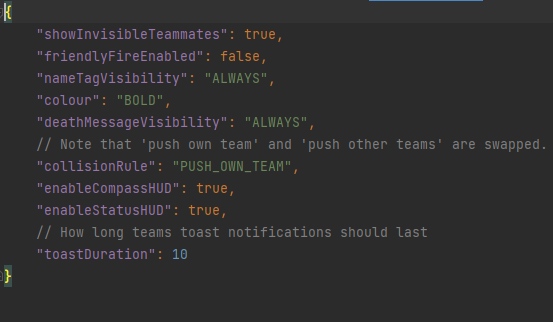
The first options are all setting defaults for teams.
Project description from Modrinth.
Pick your setup
Choose the version and loader you play, then open the matching release.
Check the dependencies, then try the file in a copied instance before changing a world you care about.
Recent files
teams-2.0.2-b1.jar
1 Oct 2022
Looking for an older file? The official Modrinth project page is in Resources.
 mod
A mod designed to enhance world generation and elevate the gameplay experience by smoothing out terrain with custom slabs, making exploration more seamless!
 mod
An API with features to make modding easier, including new Components, Particles, Weapon Skins, and Supporter Perks.
 mod
Low gravity for The End and atmospheric physics for the Overworld! Works with Sable!