Minecraft version
Back to mods 
Modrinth · Minecraft mod
Magic Moon
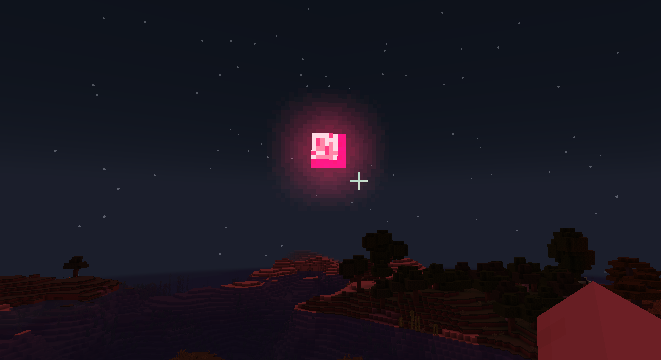
Just a blood moon
Choose a version Pick your version below, then grab the matching file.
Quick answer
Which Magic Moon release should I use?
Latest stable file 1.1+mc26.3-neoforge
Game version 26.3
Loader NeoForge
Magic Moon 1.1+mc26.3-neoforge targets 26.3 with NeoForge. Installation on the client is optional. Installation on the dedicated server is optional. No extra mods listed for this file.
Where it goes
Is Magic Moon required on the client, server, or both?
Installation on the client is optional. Installation on the dedicated server is optional.
Client Optional
Dedicated server Optional
Loader for this release NeoForge
Required install it here Optional supported, not mandatory Not supported do not install here Source doesn’t say do not assume
The source marks this as usable on both the client and server.
What else does Magic Moon 1.1+mc26.3-neoforge need?
1.1+mc26.3-neoforge. Change the file and its required mods may change too.
This file does not list any required mods. Do not add a library just because a different file uses it.
This file does not list any required or optional mods.
Before you install it
Add Magic Moon without breaking your instance.
Built for Magic Moon 1.1+mc26.3-neoforge. Pick another file and the loader, install side or required mods may change.
- 01
Stick to this file
Use 1.1+mc26.3-neoforge. It targets 26.3 with NeoForge; another release may have different loader, side or dependency requirements.
- 02
Bring the mods it needs
This file does not list any required mods. Do not add a library just because a different file uses it.
- 03
Put it on the correct side
Installation on the client is optional. Installation on the dedicated server is optional.
- 04
Pick the file you checked
Use the “Get this file” button beside 1.1+mc26.3-neoforge. It opens that exact file at the source.
About this project
What does Magic Moon add?
🌐 Language / 语言选择
English(expand/collapse)
If the light and shadow effect is turned on, the special moon color-changing effect will not be displayed.
Added 4 types of moons:
Blood Month: Thunderstorm weather during the day and a large number of monsters at night.
Magic Moon:Thunderstorm weather during the day ,and spawns hell monsters, predators, etc. at night
Yellow moon: There is a double chance of harvesting crops at night.
Blue moon: At night, the ground hardly brushes monsters.
Commands: day(/time setDay ),night(/time setDayNight )
Time command:
/time setDay ,
/time setDaySleeping ,
/time setDayNight , etc
Configure the file at the path: .minecraft\versions\saveWorld\config\magicmoon.json
{
  "magic_moon": {
    "custom_model": {
      "desc1:": "大于等于4; startDay greater than or equal to 4 ",
      "startDay": 4,
      "desc2:": "大于等于2;perDay greater than or equal to 2 ",
      "perDay": 2
    }
  }
}
中文(展开/收起)
如果开了光影,则不显示特殊月亮变色效果.
添加了4种月亮:
血月:白天雷暴天气,晚上大量怪物。
幻月:白天雷暴天气,晚上生成地狱怪物、掠夺者等
黄月:晚上收获农作物有几率双倍。
蓝月:晚上地面几乎不刷怪。
可用指令:白天(/time setDay ),晚上(/time setDayNight )
time指令修改:
/time setDay <天数>,
/time setDaySleeping <天数>,
/time setDayNight <天数>等
配置文件路径为 .minecraft\versions\saveWorld\config\magicmoon.json
{
  "magic_moon": {
    "custom_model": {
      "desc1:": "大于等于4; startDay greater than or equal to 4 ",
      "startDay": 4,
      "desc2:": "大于等于2;perDay greater than or equal to 2 ",
      "perDay": 2
    }
  }
}
Project description from Modrinth.
Pick your setup
Magic Moon by Minecraft version and loader
Choose the version and loader you play, then open the matching release.
Minecraft version
26.2
1 loader buildMinecraft version
26.1.2
1 loader buildMinecraft version
26.1.1
1 loader buildMinecraft version
26.1
1 loader buildMinecraft version
1.21.11
1 loader buildMinecraft version
1.21.1
1 loader buildMinecraft version
1.21
1 loader buildMinecraft version
1.20.6
1 loader buildMinecraft version
1.20.5
1 loader buildMinecraft version
1.20.1
1 loader buildMinecraft version
1.19.2
1 loader buildCheck the dependencies, then try the file in a copied instance before changing a world you care about.
Recent files
Magic Moon versions and loaders
1.7-mc26.3-fabric
magicmoon-1.7-mc26.3-fabric.jar
7 Nov 2026
Client Optional Server Optional Dependencies No extras listed Listed on Release listing
Check the 26.3 · Fabric setup 26.3Fabric beta
1.7-mc26.1.2-fabric
magicmoon-1.7-mc26.1.2-fabric.jar
7 Nov 2026
Client Optional Server Optional Dependencies No extras listed Listed on Release listing
Check the 26.1.2 · Fabric setup 26.1.2Fabric beta
1.7-mc1.21.1-fabric
MagicMoon-1.7-mc1.21.1-fabric.jar
7 Nov 2026
Client Optional Server Optional Dependencies No extras listed Listed on Release listing
Check the 1.21.1 · Fabric setup 1.21.1Fabric beta
1.6-mc26.3-fabric
magicmoon-1.6-mc26.3-fabric.jar
5 Nov 2026
Client Optional Server Optional Dependencies No extras listed Listed on Release listing
Check the 26.3 · Fabric setup 26.3Fabric beta
1.6-mc26.1.2-fabric
magicmoon-1.6-mc26.1.2-fabric.jar
5 Nov 2026
Client Optional Server Optional Dependencies No extras listed Listed on Release listing
Check the 26.1.2 · Fabric setup 26.1.2Fabric beta
1.6-mc1.21.1-fabric
MagicMoon-1.6-mc1.21.1-fabric.jar
5 Nov 2026
Client Optional Server Optional Dependencies No extras listed Listed on Release listing
Check the 1.21.1 · Fabric setup 1.21.1Fabric beta
1.5-mc26.3-fabric
magicmoon-1.5-mc26.3-fabric.jar
2 Nov 2026
Client Optional Server Optional Dependencies No extras listed Listed on Release listing
Check the 26.3 · Fabric setup 26.3Fabric beta
1.5-mc26.1.2-fabric
magicmoon-1.5-mc26.1.2-fabric.jar
2 Nov 2026
Client Optional Server Optional Dependencies No extras listed Listed on Release listing
Check the 26.1.2 · Fabric setup 26.1.2Fabric beta
1.5-mc1.21.1-fabric
MagicMoon-1.5-mc1.21.1-fabric.jar
2 Nov 2026
Client Optional Server Optional Dependencies No extras listed Listed on Release listing
Check the 1.21.1 · Fabric setup 1.21.1Fabric beta
1.4-mc26.3-fabric
magicmoon-1.4-mc26.3-fabric.jar
30 Oct 2026
Client Optional Server Optional Dependencies No extras listed Listed on Release listing
Check the 26.3 · Fabric setup 26.3Fabric beta
1.4-mc26.1.2-fabric
magicmoon-1.4-mc26.1.2-fabric.jar
30 Oct 2026
Client Optional Server Optional Dependencies No extras listed Listed on Release listing
Check the 26.1.2 · Fabric setup 26.1.2Fabric beta
1.4-mc1.21.1-fabric
MagicMoon-1.4-mc1.21.1-fabric.jar
30 Oct 2026
Client Optional Server Optional Dependencies No extras listed Listed on Release listing
Check the 1.21.1 · Fabric setup 1.21.1Fabric beta
Looking for an older file? The official Modrinth project page is in Resources.
 mod
CurseForge + Modrinth · Minecraft
Ariente
Ariente - a high-tech exploration and tech mod
 mod
Modrinth · Minecraft
Orc Invasion
Added lots of unique orcs and goblins, plus dynamic smart NPCs.
 mod
Modrinth · Minecraft
ZombiesEverywhere
Do you like zombie games? Are you troubled by the difficulty of the original Minecraft version being too simple? It's okay, now this Zombies Everywhere may meet your needs!