Minecraft version
Back to mods 
Modrinth · Minecraft mod
Custom FPS Display
Custom your FPS display in a modern way
Choose a version Pick your version below, then grab the matching file.
Quick answer
Which Custom FPS Display release should I use?
Latest stable file 2.0.0
Game version 1.21.1
Loader Forge
Custom FPS Display 2.0.0 targets 1.21.1 with Forge. It must be installed on the client. Do not install it on the dedicated server. No extra mods listed for this file.
Where it goes
Is Custom FPS Display required on the client, server, or both?
It must be installed on the client. Do not install it on the dedicated server.
Client Required
Dedicated server Not supported
Loader for this release Forge
Required install it here Optional supported, not mandatory Not supported do not install here Source doesn’t say do not assume
This file is marked client-only.
What else does Custom FPS Display 2.0.0 need?
2.0.0. Change the file and its required mods may change too.
This file does not list any required mods. Do not add a library just because a different file uses it.
This file does not list any required or optional mods.
Before you install it
Add Custom FPS Display without breaking your instance.
Built for Custom FPS Display 2.0.0. Pick another file and the loader, install side or required mods may change.
- 01
Stick to this file
Use 2.0.0. It targets 1.21.1 with Forge; another release may have different loader, side or dependency requirements.
- 02
Bring the mods it needs
This file does not list any required mods. Do not add a library just because a different file uses it.
- 03
Put it on the correct side
It must be installed on the client. Do not install it on the dedicated server.
- 04
Pick the file you checked
Use the “Get this file” button beside 2.0.0. It opens that exact file at the source.
About this project
What does Custom FPS Display add?
Custom FPS Display
Custom FPS Display allows you to see your FPS (in a rgb way).
You can customize the position of the FPS display as much as you want. Just use arrows to adjust its position. (see pictures) Default key is M to toggle the configuration pannel, but customizable in key settings
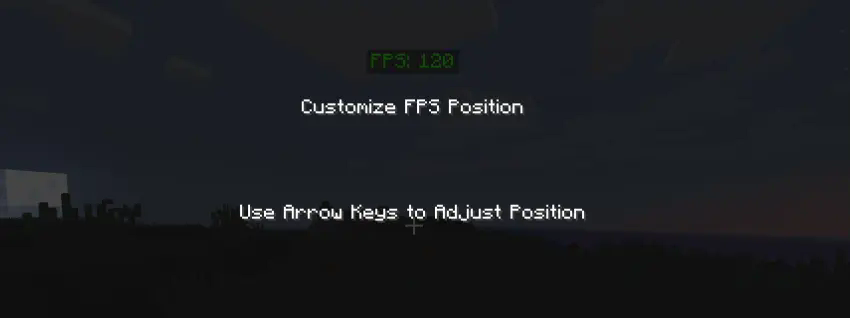

Coming soon: translations and persistent position of the configuration. (translations available on 1.21)
discord support server: https://discord.gg/M6bgbzEx
Project description from Modrinth.
Pick your setup
Custom FPS Display by Minecraft version and loader
Choose the version and loader you play, then open the matching release.
Minecraft version
1.20.6
1 loader buildMinecraft version
1.20.5
1 loader buildMinecraft version
1.20.4
1 loader buildMinecraft version
1.20.3
1 loader buildMinecraft version
1.20.2
1 loader buildMinecraft version
1.20.1
1 loader buildMinecraft version
1.12.2
1 loader buildMinecraft version
1.8.9
1 loader buildCheck the dependencies, then try the file in a copied instance before changing a world you care about.
Recent files
Custom FPS Display versions and loaders
2.0.0
[1.21.1]Custom FPS Display 2.0.jar
29 Oct 2024
Client Required Server Not supported Dependencies No extras listed Listed on Release listing
Check the 1.21.1 · Forge setup 1.21.1Forge release
2.0.0
[1.20.x]Custom FPS Display 2.0.jar
29 Oct 2024
Client Required Server Not supported Dependencies No extras listed Listed on Release listing
Check the 1.20.6 · Forge setup 1.20.11.20.21.20.31.20.4 release
2.0
1.12.2-CustomFpsDisplay-2.0.jar
29 Oct 2024
Client Required Server Not supported Dependencies No extras listed Listed on Release listing
Check the 1.12.2 · Forge setup 1.12.2Forge release
2.0
CustomFpsDisplay-2.0(1).jar
29 Oct 2024
Client Required Server Not supported Dependencies No extras listed Listed on Release listing
Check the 1.8.9 · Forge setup 1.8.9Forge release
Looking for an older file? The official Modrinth project page is in Resources.
 mod
mod Modrinth · Minecraft
Integrated Dynamics
A mod to take full and automated control of your appliances
 mod
mod Modrinth · Minecraft
LazyTrade
It adds a GUI which helps you get any trade you want from villagers.
 mod
mod Modrinth · Minecraft
ALOH (at least one hp)
A Fabric mod for Minecraft 1.21.1+ that prevents selected players from dying by keeping their health at a minimum of half a heart.