Cloth Config API Needed by simple-coordinate v1.4.0+neoforge-mc26.3
requiredMatching file found Matched file: 26.3.159+neoforge

Modrinth · Minecraft mod
the simplest plugin to display corrdinates
Quick answer
simple-coordinate v1.4.0+neoforge-mc26.3 targets 26.3 with NeoForge. It must be installed on the client. Do not install it on the dedicated server. All 1 required mods have matching files.
Where it goes
It must be installed on the client. Do not install it on the dedicated server.
This file is marked client-only.
v1.4.0+neoforge-mc26.3. Change the file and its required mods may change too.
Install Cloth Config API first. We found matching files for this game-version and loader setup.
We only count dependency files that match this setup. A file for another loader does not fill the gap.
Before you install it
Built for simple-coordinate v1.4.0+neoforge-mc26.3. Pick another file and the loader, install side or required mods may change.
Use v1.4.0+neoforge-mc26.3. It targets 26.3 with NeoForge; another release may have different loader, side or dependency requirements.
Install Cloth Config API first. We found matching files for this game-version and loader setup.
It must be installed on the client. Do not install it on the dedicated server.
Use the “Get this file” button beside v1.4.0+neoforge-mc26.3. It opens that exact file at the source.
About this project
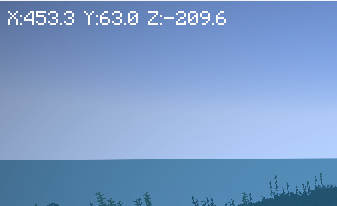
Simplest Coordinate plugin.
display current coordinate on HUD.
supported configurations: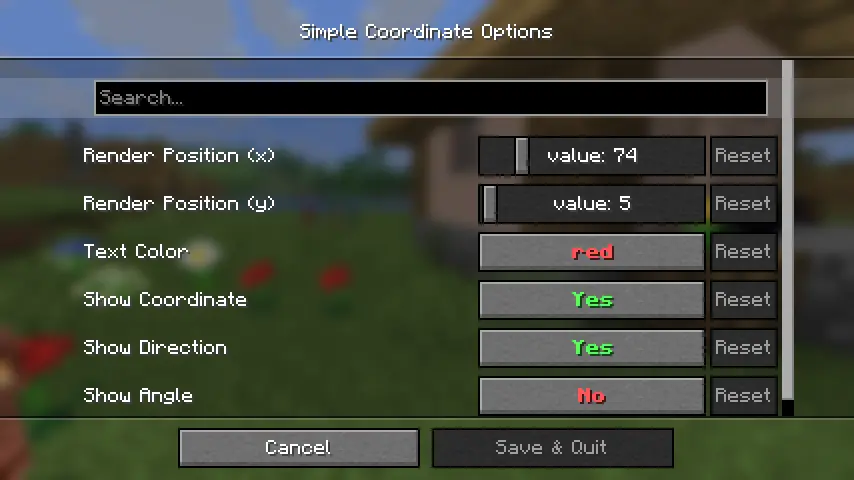
required followings (Fabric) :
required followings (NeoForge) :
Project description from Modrinth.
Pick your setup
Choose the version and loader you play, then open the matching release.
Check the dependencies, then try the file in a copied instance before changing a world you care about.
Recent files
simple-coordinates-1.4.0-neoforge-mc26.3.jar
20 Sept 2026
simple-coordinates-1.4.0-fabric-mc26.3.jar
20 Sept 2026
simple-coordinates-1.4.0-neoforge-mc26.2.jar
5 Jul 2026
simple-coordinates-1.4.0-fabric-mc26.2.jar
5 Jul 2026
simple-coordinates-1.4.0-neoforge-mc26.1.2.jar
6 Jun 2026
simple-coordinates-1.4.0-fabric-mc26.1.2.jar
6 Jun 2026
simple-coordinates-1.4.0-neoforge-mc26.1.1.jar
9 Apr 2026
simple-coordinates-1.4.0-fabric-mc26.1.1.jar
9 Apr 2026
simple-coordinates-1.4.0-neoforge.jar
16 Dec 2025
simple-coordinates-1.4.0-fabric.jar
16 Dec 2025
simple-coordinates-1.4.0-fabric.jar
13 Nov 2025
simple-coordinates-1.4.0-neoforge.jar
13 Nov 2025
Looking for an older file? The official Modrinth project page is in Resources.
 mod
Heartstones are items which come in sets, and allows for people to find eachother when in the inventory.
 mod
🏙 Sets the spawn point in a new world to the center of a village.
 mod
BET - Block’n’Entity Tooltip shows you the name of any block or entity you’re looking at in Minecraft, making it easy to identify what’s around you!