Best match for your filtersTesseract 1.0.38 for Forge 1.14
Game version1.14.4, 1.14.1, 1.14.3
LoaderForge
Tesseract 1.0.38 for Forge 1.14 targets 1.14.4, 1.14.1, 1.14.3 with Forge. The project page does not say whether this file belongs on the client, dedicated server, or both. 1 required mod needs a matching file.
Where it goes
Is Tesseract required on the client, server, or both?
The project page does not say whether this file belongs on the client, dedicated server, or both.
ClientSource doesn’t say
Dedicated serverSource doesn’t say
Loader for this releaseForge
Required install it hereOptional supported, not mandatoryNot supported do not install hereSource doesn’t say do not assume
The source does not explicitly classify this release as client-only or server-only.
What else does Tesseract 1.0.38 for Forge 1.14 need?
Tesseract 1.0.38 for Forge 1.14 on 1.14.2 Forge. Every mod below is checked against that same setup.
1 required mod needs a matching file
Install SuperMartijn642's Config Lib, SuperMartijn642's Core Lib, SuperMartijn642's Core Lib, SuperMartijn642's Config Lib first, but 1 required mod has no matching file for this setup. Do not mix loader builds to force a match.
Matching file found Matched file: 1.1.8-forge-mc1.14
We only count dependency files that match this setup. A file for another loader does not fill the gap.
Before you install it
Add Tesseract without breaking your instance.
Built for Tesseract 1.0.38 for Forge 1.14 on 1.14.2 Forge. Pick another file and the loader, install side or required mods may change.
01
Stick to this file
Use Tesseract 1.0.38 for Forge 1.14. It targets 1.14.4, 1.14.1, 1.14.3 with Forge; another release may have different loader, side or dependency requirements.
02
Bring the mods it needs
Install SuperMartijn642's Config Lib, SuperMartijn642's Core Lib, SuperMartijn642's Core Lib, SuperMartijn642's Config Lib first, but 1 required mod has no matching file for this setup. Do not mix loader builds to force a match.
03
Put it on the correct side
The project page does not say whether this file belongs on the client, dedicated server, or both.
04
Pick the file you checked
Use the “Get this file” button beside Tesseract 1.0.38 for Forge 1.14. It opens that exact file at the source.
About this project
What does Tesseract add?
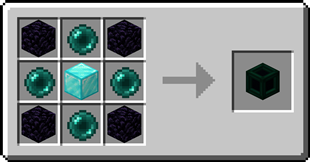
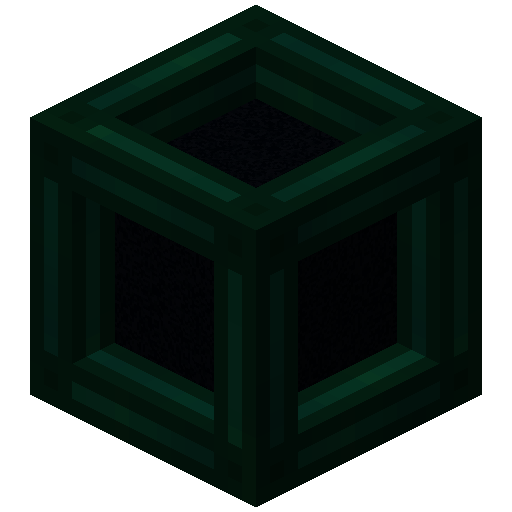
Tesseract allows you to transport Items, Fluid and Energy. Tesseracts work at any distance and even across dimensions! Use multiple channels to have different groups of Tesseracts!
Tesseract
The Tesseract allows for transportation of items, fluid and energy
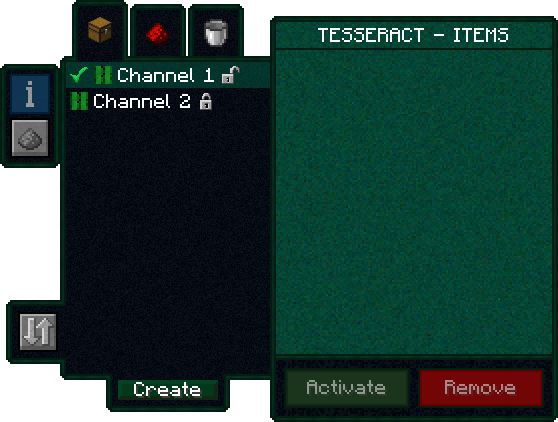
Right-click a Tesseract to open its gui
Items, fluid and energy will be transported between Tesseracts on the same channel
Step-by-step Guide:
Adding a channel
1. Right-Click a Tesseract to open its gui
2. Click on the desired category tab at the top of the gui
3. Click the 'Create' button to open a new gui
4. Select the text field and enter the channel name
5. Set the lock button to the desired state, locked means private, unlocked means public
6. Click the 'Create' button to confirm
Removing a channel
1. Right-Click a Tesseract to open its gui
2. Click on the category tab corresponding to the channel at the top of the gui
3. Click on the channel in the list
4. Click the 'Remove' button
Setting the channel on a Tesseract
1. Right-Click a Tesseract to open its gui
2. Click on the desired category tab at the top of the gui
3. Click on the desired channel in the list
4. Click the 'Activate' button
FAQ
Is there a distance limit between Tesseracts?
No, Tesseracts will work at any distance and across dimensions
Is there a limit on the amount of items, fluid and energy transfered?
No, Tesseracts will transfer as much as connected pipes and machines can send or receive
How many channels can I have?
Channel names can be 19 characters long and can contain 26 letters + 10 number keys, thus 36^19 = 371,319,292,745,659,279,662,190,166,016 channels
Can other players use my private channels?
No, your private channels are private
Can I use your mod in my modpack?
Yes, feel free to use my mod in your modpack
Discord
For future content, upcoming mods, and discussion, feel free to join the SuperMartijn642 discord server!
Project description from CurseForge.
Pick your setup
Tesseract by Minecraft version and loader
Choose the version and loader you play, then open the matching release.

 Tesseract