Create: Repackaged Optional for Create: Deployer API Deployer [0.1.2]
optionalMatching file found Matched file: Create: Repackaged [0.0.7]

CurseForge · Minecraft mod
Deployer is a Create library addon that extends logistics, gauges, and fluid systems while prioritizing stability over compatibility.
Quick answer
Create: Deployer API Deployer [0.1.2] targets 1.21.1 with NeoForge. The project page does not say whether this file belongs on the client, dedicated server, or both. All 1 required mods have matching files.
Where it goes
The project page does not say whether this file belongs on the client, dedicated server, or both.
The source does not explicitly classify this release as client-only or server-only.
Deployer [0.1.2]. Change the file and its required mods may change too.
Install Create first. We found matching files for this game-version and loader setup. 2 come through another mod in the chain.
2 extra mods were pulled in by other dependencies. Indented rows show who needs each one. We only count dependency files that match this setup. A file for another loader does not fill the gap.
Before you install it
Built for Create: Deployer API Deployer [0.1.2]. Pick another file and the loader, install side or required mods may change.
Use Deployer [0.1.2]. It targets 1.21.1 with NeoForge; another release may have different loader, side or dependency requirements.
Install Create first. We found matching files for this game-version and loader setup. 2 come through another mod in the chain.
The project page does not say whether this file belongs on the client, dedicated server, or both.
Use the “Get this file” button beside Deployer [0.1.2]. It opens that exact file at the source.
About this project
We know a lot of you still rely on 1.20.1, and we are not forgetting about you. Deployer is still in it's early stages, so we want to reach a point where we have fixed all the main issues/enhancement before porting!
Deployer is a library for create addons to easily handle logistics
These features are NOT included in the mod, but are possible to achieve with this API
| 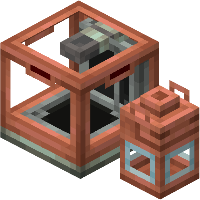 |Stock Inventory types is a new addition added to follow the 6.0 create update. You can register anything that you want to carry with packages, and deployer will simplify the process. Fluids, Energy, whatever you want! |
| Deployer provides a comprehensive API for creating custom gauges, evolved from the Extra Gauges addon. Deployer handles all the hard part, making it possible for different gauges to stay in the same block!
You can handle connections coming in and coming out from the gauge, and handle everything you want! |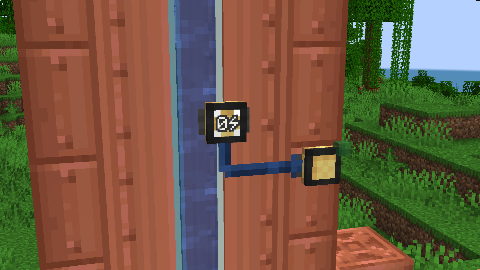 |
|
| Create's vanilla goggle overlay system only supports block entities, limiting what information can be displayed when players look at blocks or entities. Deployer extends this functionality through the DeployerGoggleInformation interface, enabling goggle information display for regular blocks without block entities and for entities in the world.
It's also possible to register your own goggle information through ClientRegisterHelpers, under your specific conditions |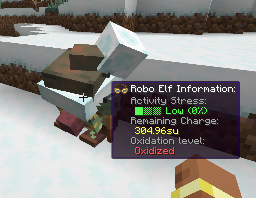 |
|
| With deployer you can create custom stock keeper and redstone requester tabs. Creating a tab is not necessarily linked to creating a stock inventory type. You can stor any data inside your tab and use it for whatever you want. We already have some ideas in mind for our mods Create: Extra Gauges! |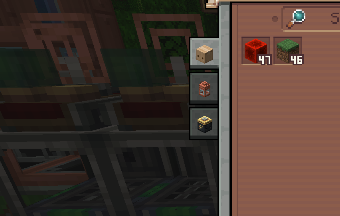 | |
| | 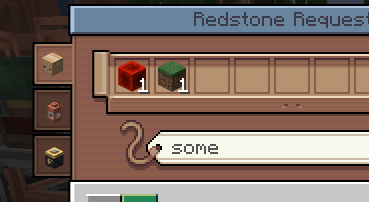 |On the other side, redstone requesters can also have tabs which are specifically intended to order items! |
We also include a bunch of fixes and optimizations, and we want to focus the second part of this API on that, improving some useless and expensive algorithms that create for some reason has
Project description from CurseForge.
Pick your setup
Choose the version and loader you play, then open the matching release.
Check the dependencies, then try the file in a copied instance before changing a world you care about.
Recent files
deployer-0.1.2.jar
25 Apr 2026
deployer-0.1.1.jar
23 Apr 2026
deployer-0.1.0.jar
22 Apr 2026
deployer-0.0.8.jar
20 Apr 2026
deployer-0.0.7.jar
20 Apr 2026
deployer-0.0.6.jar
19 Apr 2026
deployer-0.0.5.jar
17 Apr 2026
deployer-0.0.4.jar
17 Apr 2026
Looking for an older file? The official CurseForge project page is in Resources.
 mod
modA multiloader fork of Backpacks for Dummies: A bare-bones backpack mod without any extra keybinds, menus or slots!
 mod
modMaking fishing fun with a minigame directly inspired by Stardew Valley(fabric version of Stardew Fishing)!
 mod
modA data-driven power system that's build for custom abilities, mechanics, and entire origin systems from JSON alone.