Minecraft version
Back to mods 
Modrinth · Minecraft mod
BTETerraRenderer
Renders various external maps for the BuildTheEarth project.
Choose a version Pick your version below, then grab the matching file.
Quick answer
Which BTETerraRenderer release matches 1.12.2 Forge?
Best match for your filters 1.03.4
Game version 1.12.2
Loader Forge
BTETerraRenderer 1.03.4 targets 1.12.2 with Forge. It must be installed on the client. Do not install it on the dedicated server. No extra mods listed for this file.
Where it goes
Is BTETerraRenderer required on the client, server, or both?
It must be installed on the client. Do not install it on the dedicated server.
Client Required
Dedicated server Not supported
Loader for this release Forge
Required install it here Optional supported, not mandatory Not supported do not install here Source doesn’t say do not assume
This file is marked client-only.
What else does BTETerraRenderer 1.03.4 need?
1.03.4 on 1.12.2 Forge. Every mod below is checked against that same setup.
This file does not list any required mods. Do not add a library just because a different file uses it.
This file does not list any required or optional mods.
Before you install it
Add BTETerraRenderer without breaking your instance.
Built for BTETerraRenderer 1.03.4 on 1.12.2 Forge. Pick another file and the loader, install side or required mods may change.
- 01
Stick to this file
Use 1.03.4. It targets 1.12.2 with Forge; another release may have different loader, side or dependency requirements.
- 02
Bring the mods it needs
This file does not list any required mods. Do not add a library just because a different file uses it.
- 03
Put it on the correct side
It must be installed on the client. Do not install it on the dedicated server.
- 04
Pick the file you checked
Use the “Get this file” button beside 1.03.4. It opens that exact file at the source.
About this project
What does BTETerraRenderer add?
BTETerraRenderer



A map hologram rendering tool for the BuildTheEarth project.
Use this mod to easily map accurate road details and building tops.
Logo by vicrobex
Supported maps
- Global
- (And many others)
You can add other map services by adding/editing configuration files.
Visit the wiki page for more information.
How to use
- Download the latest version of the mod
- Put the mod in the
modsfolder- Open Minecraft Launcher and go to the
Installationstab - Find the installation profile, hover your mouse on it, and click the folder icon
- The
modsfolder is there
- Open Minecraft Launcher and go to the
- Run Minecraft
Controls
| Key | Description |
|---|---|
`(Backtick) |
Opens render settings UI |
R |
Toggles map rendering |
Y |
Moves map up along the Y-axis by 0.5 blocks |
I |
Moves map down along the Y-axis by 0.5 blocks |
Screenshots

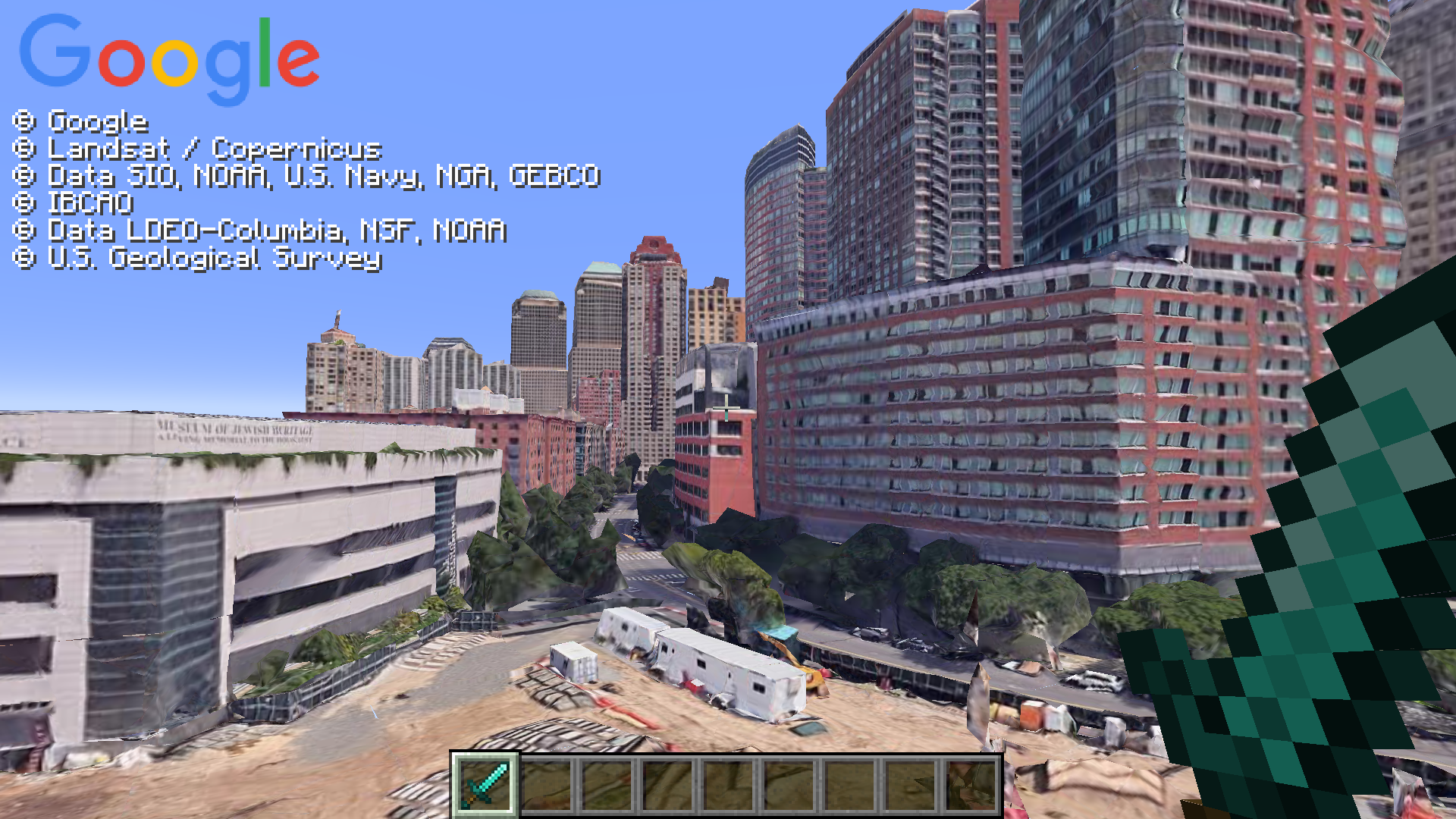
Visit this wiki page for more information on how to add Google Earth as a map source.
Project description from Modrinth.
Pick your setup
BTETerraRenderer by Minecraft version and loader
Choose the version and loader you play, then open the matching release.
Minecraft version
1.21.4
1 loader buildMinecraft version
1.21.1
1 loader buildMinecraft version
1.21
1 loader buildMinecraft version
1.20.6
1 loader buildMinecraft version
1.20.4
1 loader buildMinecraft version
1.20.2
1 loader buildMinecraft version
1.20.1
1 loader buildMinecraft version
1.19.4
1 loader buildMinecraft version
1.18.2
2 loader buildsMinecraft version
1.12.2
1 loader buildCheck the dependencies, then try the file in a copied instance before changing a world you care about.
Recent files
BTETerraRenderer versions and loaders
1.03.4
bteterrarenderer-1.03.4-forge1.12.2.jar
5 Feb 2025
Client Required Server Not supported Dependencies No extras listed Listed on Release listing
Check the 1.12.2 · Forge setup 1.12.2Forge release
1.03.3
bteterrarenderer-1.03.3-forge1.12.2.jar
26 Jan 2025
Client Required Server Not supported Dependencies No extras listed Listed on Release listing
Check the 1.12.2 · Forge setup 1.12.2Forge release
1.03.2
bteterrarenderer-1.03.2-forge1.12.2.jar
15 Jan 2024
Client Required Server Not supported Dependencies 1 required · 1 unchecked Listed on Release listing
Check the 1.12.2 · Forge setup 1.12.2Forge release
Looking for an older file? The official Modrinth project page is in Resources.
 mod
CurseForge + Modrinth · Minecraft
Reliquary Reincarnations
Many magical items to help you in your minecraft world
 mod
CurseForge + Modrinth · Minecraft
Tinkers' Gadgets
A lightweight Tinkers' Construct addon featuring tools, new materials, and exclusive projectile traits.
 mod
Modrinth · Minecraft
RFTools Control
Automation and logic computer addon for the RFTools mods