Cloth Config API Needed by Black Bar Concealer 1.0.10
requiredMatching file found Matched file: 26.3.159+fabric

Modrinth · Minecraft mod
Conceals black bars of slim skins used on the wide model.
Quick answer
Black Bar Concealer 1.0.10 targets 26.3 with Fabric. It must be installed on the client. Do not install it on the dedicated server. All 4 required mods have matching files.
Where it goes
It must be installed on the client. Do not install it on the dedicated server.
This file is marked client-only.
1.0.10. Change the file and its required mods may change too.
Install Cloth Config API, Fabric API, Mod Menu, Text Placeholder API first. We found matching files for this game-version and loader setup. 1 comes through another mod in the chain.
1 extra mod was pulled in by another dependency. Indented rows show who needs each one. We only count dependency files that match this setup. A file for another loader does not fill the gap.
Before you install it
Built for Black Bar Concealer 1.0.10. Pick another file and the loader, install side or required mods may change.
Use 1.0.10. It targets 26.3 with Fabric; another release may have different loader, side or dependency requirements.
Install Cloth Config API, Fabric API, Mod Menu, Text Placeholder API first. We found matching files for this game-version and loader setup. 1 comes through another mod in the chain.
It must be installed on the client. Do not install it on the dedicated server.
Use the “Get this file” button beside 1.0.10. It opens that exact file at the source.
About this project
This mod adds several options to fix faulty skin uploads of other players.
The default behavior is to switch the player model from wide to slim if black bars are detected. But there is also an option to stretch the arm texture to fit the wide model. And it's also possible to replace all slim models with the wide model.
Here is an example with default options (see gallery for all possibilities):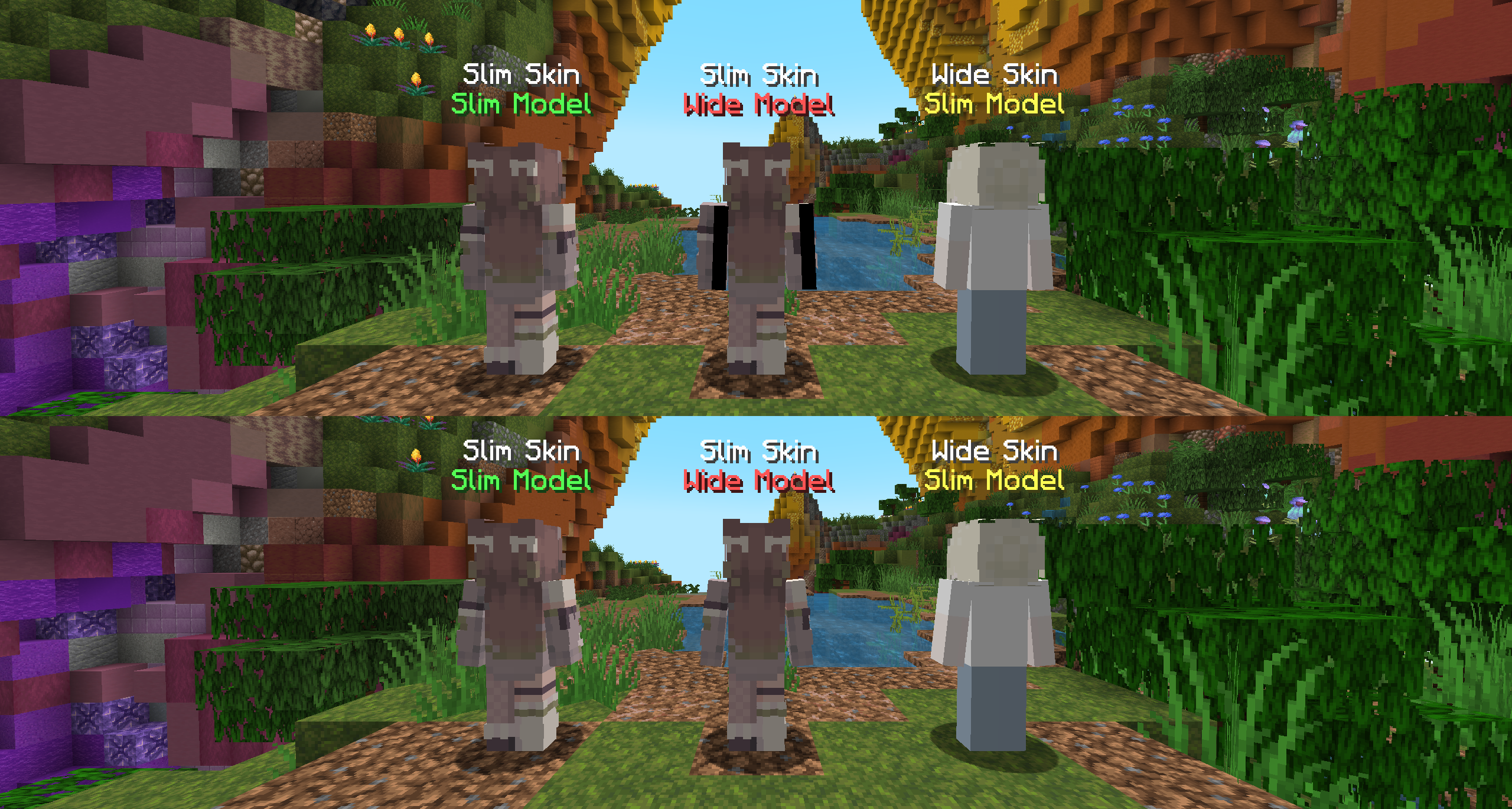
Project description from Modrinth.
Pick your setup
Choose the version and loader you play, then open the matching release.
Showing the newest 12 of 15 game versions. Older files are in the list below.
Check the dependencies, then try the file in a copied instance before changing a world you care about.
Recent files
blackbarconcealer-1.0.10.jar
17 Sept 2026
blackbarconcealer-1.0.9.jar
29 Jun 2026
blackbarconcealer-1.0.8.jar
26 Mar 2026
blackbarconcealer-1.0.7.jar
18 Dec 2025
blackbarconcealer-1.0.6.jar
2 Oct 2025
blackbarconcealer-1.0.5.jar
1 Aug 2025
blackbarconcealer-1.0.4.jar
17 Jun 2025
blackbarconcealer-1.0.3.jar
30 Mar 2025
blackbarconcealer-1.0.2.jar
22 Dec 2024
blackbarconcealer-1.0.1.jar
26 Oct 2024
blackbarconcealer-1.0.0.jar
21 Jun 2024
Looking for an older file? The official Modrinth project page is in Resources.
 mod
modEasily Add, Remove and Upgrade Enchantments on an Enchantable Item.
 mod
modToolracks to have your tools and weapons at arm's reach. Crafting tables with easy access to nearby chests and barrels, etc.
 mod
modAdds the use of casing on Create: Connected blocks