Minecraft version
Back to mods 
Modrinth · Minecraft mod
Showcase Item
Allows showcasing items from the inventory in chat
Choose a version Pick your version below, then grab the matching file.
Quick answer
Which Showcase Item release should I use?
Latest stable file 26.1-2.0.3
Game version 26.1
Loader NeoForge
Showcase Item 26.1-2.0.3 targets 26.1 with NeoForge. Installation on the client is optional. Installation on the dedicated server is optional. No extra mods listed for this file.
Where it goes
Is Showcase Item required on the client, server, or both?
Installation on the client is optional. Installation on the dedicated server is optional.
Client Optional
Dedicated server Optional
Loader for this release NeoForge
Required install it here Optional supported, not mandatory Not supported do not install here Source doesn’t say do not assume
The source marks this as usable on both the client and server.
What else does Showcase Item 26.1-2.0.3 need?
26.1-2.0.3. Change the file and its required mods may change too.
This file does not list any required mods. Do not add a library just because a different file uses it.
This file does not list any required or optional mods.
Before you install it
Add Showcase Item without breaking your instance.
Built for Showcase Item 26.1-2.0.3. Pick another file and the loader, install side or required mods may change.
- 01
Stick to this file
Use 26.1-2.0.3. It targets 26.1 with NeoForge; another release may have different loader, side or dependency requirements.
- 02
Bring the mods it needs
This file does not list any required mods. Do not add a library just because a different file uses it.
- 03
Put it on the correct side
Installation on the client is optional. Installation on the dedicated server is optional.
- 04
Pick the file you checked
Use the “Get this file” button beside 26.1-2.0.3. It opens that exact file at the source.
About this project
What does Showcase Item add?
This mod allows showcasing items from the inventory in chat. This is a standalone port of the Quark feature which means it likely won't work together.
You have to click the item in your inventory with Shift + X (by default) to showcase it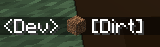
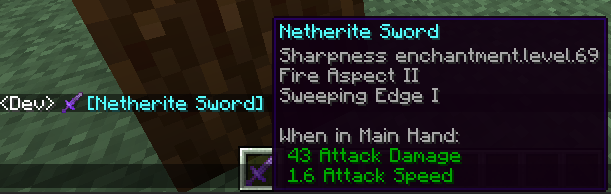
Project description from Modrinth.
Pick your setup
Showcase Item by Minecraft version and loader
Choose the version and loader you play, then open the matching release.
Minecraft version
1.21.2
1 loader buildMinecraft version
1.21.1
1 loader buildMinecraft version
1.21
1 loader buildMinecraft version
1.20.1
1 loader buildMinecraft version
1.19.4
1 loader buildMinecraft version
1.19.2
1 loader buildMinecraft version
1.18.2
1 loader buildMinecraft version
1.16.5
1 loader buildCheck the dependencies, then try the file in a copied instance before changing a world you care about.
Recent files
Showcase Item versions and loaders
26.1-2.0.3
showcaseitem-26.1-2.0.3.jar
7 Apr 2026
Client Optional Server Optional Dependencies No extras listed Listed on Release listing
Check the 26.1 · NeoForge setup 26.1NeoForge release
26.1-2.0.2
showcaseitem-26.1-2.0.2.jar
4 Apr 2026
Client Optional Server Optional Dependencies No extras listed Listed on Release listing
Check the 26.1 · NeoForge setup 26.1NeoForge release
26.1-2.0.1
showcaseitem-26.1-2.0.1.jar
4 Apr 2026
Client Optional Server Optional Dependencies No extras listed Listed on Release listing
Check the 26.1 · NeoForge setup 26.1NeoForge release
26.1-2.0.0
showcaseitem-26.1-2.0.0.jar
4 Apr 2026
Client Optional Server Optional Dependencies No extras listed Listed on Release listing
Check the 26.1 · NeoForge setup 26.1NeoForge release
1.21.1-1.1.0
showcaseitem-1.21.1-1.1.0.jar
15 Apr 2025
Client Optional Server Optional Dependencies No extras listed Listed on Release listing
Check the 1.21.1 · NeoForge setup 1.211.21.1NeoForge release
1.21-1.0.1
showcaseitem-1.21-1.0.1.jar
18 Jan 2025
Client Optional Server Optional Dependencies No extras listed Listed on Release listing
Check the 1.21.1 · NeoForge setup 1.211.21.1NeoForge release
1.21.2-1.0.0
showcaseitem-1.21.2-1.0.0.jar
23 Oct 2024
Client Optional Server Optional Dependencies No extras listed Listed on Release listing
Check the 1.21.2 · NeoForge setup 1.21.2NeoForge release
1.21-1.0.0
showcaseitem-1.21-1.0.0.jar
22 Jun 2024
Client Optional Server Optional Dependencies No extras listed Listed on Release listing
Check the 1.21.1 · NeoForge setup 1.211.21.1NeoForge release
1.20.1-1.2
showcaseitem-1.20.1-1.2.jar
14 Feb 2024
Client Optional Server Optional Dependencies No extras listed Listed on Release listing
Check the 1.20.1 · Forge setup 1.20.1Forge release
1.20.1-1.1
showcaseitem-1.20.1-1.1.jar
14 Feb 2024
Client Optional Server Optional Dependencies No extras listed Listed on Release listing
Check the 1.20.1 · Forge setup 1.20.1Forge release
1.20.1-1.0
showcaseitem-1.20.1-1.0.jar
21 Nov 2023
Client Optional Server Optional Dependencies No extras listed Listed on Release listing
Check the 1.20.1 · Forge setup 1.20.1Forge release
1.19.4-1.1
showcaseitem-1.19.4-1.1.jar
21 Nov 2023
Client Optional Server Optional Dependencies No extras listed Listed on Release listing
Check the 1.19.4 · Forge setup 1.19.4Forge release
Looking for an older file? The official Modrinth project page is in Resources.
 mod
mod Modrinth · Minecraft
Starfield Pastoral
This mod brings a near full-scale Stardew-style life sim experience into Minecraft. Find the Wizard’s Tower in the overworld, travel to the Stardew dimension, inherit your grandfather’s farm, and begin a long, relaxing life.
 mod
mod CurseForge · Minecraft
Simple Warp Stone
A lightweight teleportation mod allowing players to save waypoints, link custom-named locations, and warp instantly across dimensions.
 mod
mod CurseForge · Minecraft
Mob Loot Booster
Mob Loot Booster is a loot enhancement mod for Minecraft 1.20.1 (Forge) that boosts entity drop rates, restores dropped mob gear to full durability, and adds high-value rewards to bosses.