Minecraft version
Back to mods 
Modrinth · Minecraft mod
Slide Show Pro
A simple slideshow(pro) projector in Minecraft.
Choose a version Pick your version below, then grab the matching file.
Quick answer
Which Slide Show Pro release should I use?
Latest stable file 1.1.0
Game version 1.21.6, 1.21.7, 1.21.8
Loader NeoForge
Slide Show Pro 1.1.0 targets 1.21.6, 1.21.7, 1.21.8 with NeoForge. Installation on the client is optional. Installation on the dedicated server is optional. No extra mods listed for this file.
Where it goes
Is Slide Show Pro required on the client, server, or both?
Installation on the client is optional. Installation on the dedicated server is optional.
Client Optional
Dedicated server Optional
Loader for this release NeoForge
Required install it here Optional supported, not mandatory Not supported do not install here Source doesn’t say do not assume
The source marks this as usable on both the client and server.
What else does Slide Show Pro 1.1.0 need?
1.1.0. Change the file and its required mods may change too.
This file does not list any required mods. Do not add a library just because a different file uses it.
This file does not list any required or optional mods.
Before you install it
Add Slide Show Pro without breaking your instance.
Built for Slide Show Pro 1.1.0. Pick another file and the loader, install side or required mods may change.
- 01
Stick to this file
Use 1.1.0. It targets 1.21.6, 1.21.7, 1.21.8 with NeoForge; another release may have different loader, side or dependency requirements.
- 02
Bring the mods it needs
This file does not list any required mods. Do not add a library just because a different file uses it.
- 03
Put it on the correct side
Installation on the client is optional. Installation on the dedicated server is optional.
- 04
Pick the file you checked
Use the “Get this file” button beside 1.1.0. It opens that exact file at the source.
About this project
What does Slide Show Pro add?
Based on Slideshow(Fabric)
Slideshow is a Minecraft mod that adds a Slideshow Projector block. This block can project online images (including GIF's) into the world.
This project has more functions:
- Load image from local resource packs.
- Export Image Items and put them in an container block under a Projector and make it load image from them.
- Switch images with a Flipper to make it like a genuine slide show.
- WebP support.
How to use a Projector?
- In Creative Inventory, Projector and Flipper items are located in “Tools” or “Tools and Utilities” tab.
- Only Creative mode players with permission level of 2 can use a Projector.
- Notice that a Projector has 6 orientations.
Place a Projector.
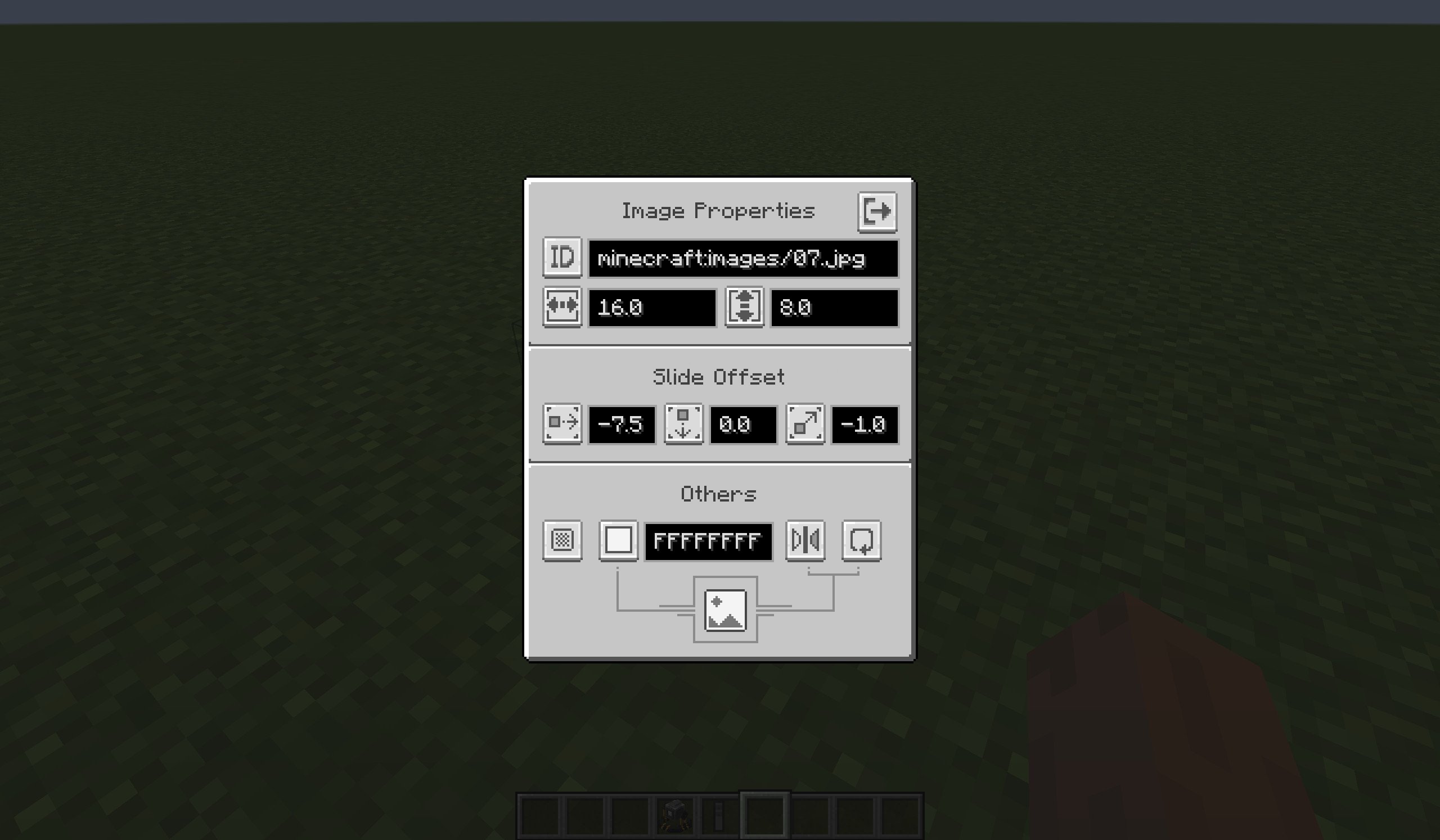
Right-click this Projector then you can configure the Image Properties in the Projector Screen. New properties will only be applied when you close the Projector Screen.
Use upper-left button to switch modes of the Projector, then enter the attribute in the input field on the right (see the table below):
The descriptions of each mode are as follows:
Mode Description Enter in the input field URL Fetch ONE online image from the Internet and render it. The URL of the Image. ID Fetch ONE local image from the game resoureces and render it.
Other players can not see this image if they had no this image in their game resources.The ID of the Image.
(e.g.minecraft:images/01.png)Container Block Read Image items in the specified Container and render them.
See more infomation at below.The position of the Container Block.
Default is the block under it.
Use ^ to indicate relative position.
(e.g.1 5 13)
(e.g.^ ^1 ^1)
How to use Container Block mode?
Get Image Item through:
the Export button in Projector Screen (in URL or ID mode).
/imagecommand (requires permission level of 2).
Put Image Items in a container block (like Chest).
Switch to Container Block mode in Projector Screen, and enter the position of the container block.
Close the Projector Screen, the Projector render the first image in the container block.
Get a Flipper Item (requires survival or creative mode), use it on the Projector to bind them. Then you can operatethe Projector using this Flipper Item:
- Left click(Attack, Break Key): switch to the previous image.
- Right click(Use, Interact Key): switch to the next image.
- Shift + Right click(Sneak + Use, Interact Key): switch to the first image.
If you have permission level of 2, you can also use command
/projectorto flip a projector.
Multi-screen
A projector can hava multi screens to show same images, while their positions, angles and sizes are different.
Note: This new feature in 1.1.0 make it a little incompatible with older versions.
Configs
Client-side
Path: <minecraft_root>/config/slideshow.json.
You can specify:
- proxy to get image from Internet.
- image's view distance.
Client-side config is loaded when the client started or it reloaded resources.
Server-side
Path: <minecraft_root>/saves/<your_save>/config/slideshow.json.
(If dedicated server: <server_root>/world/config/slideshow.json)
You can specify: permisson levels of some behavior or the commands.
Server-side config is loaded when the server started(world loaded) or it reloaded resources.
Project description from Modrinth.
Pick your setup
Slide Show Pro by Minecraft version and loader
Choose the version and loader you play, then open the matching release.
Minecraft version
1.21.7
2 loader buildsMinecraft version
1.21.6
2 loader buildsMinecraft version
1.21.5
2 loader buildsMinecraft version
1.21.4
2 loader buildsMinecraft version
1.21.1
2 loader buildsMinecraft version
1.21
2 loader buildsMinecraft version
1.20.6
2 loader buildsMinecraft version
1.20.5
2 loader buildsMinecraft version
1.20.4
2 loader buildsMinecraft version
1.20.3
1 loader buildMinecraft version
1.20.1
3 loader buildsShowing the newest 12 of 19 game versions. Older files are in the list below.
Check the dependencies, then try the file in a copied instance before changing a world you care about.
Recent files
Slide Show Pro versions and loaders
1.1.0
slideshow_pro-neoforge-1.21.8-1.1.0.jar
21 Jul 2025
Client Optional Server Optional Dependencies No extras listed Listed on Release listing
Check the 1.21.8 · NeoForge setup 1.21.61.21.71.21.8NeoForge release
1.1.0
slideshow_pro-fabric-1.21.8-1.1.0.jar
21 Jul 2025
Client Optional Server Optional Dependencies 1 required · 1 unchecked Listed on Release listing
Check the 1.21.8 · Fabric setup 1.21.61.21.71.21.8Fabric release
1.1.0
slideshow_pro-neoforge-1.21.7-1.1.0.jar
13 Jul 2025
Client Optional Server Optional Dependencies No extras listed Listed on Release listing
Check the 1.21.7 · NeoForge setup 1.21.61.21.7NeoForge release
1.1.0
slideshow_pro-neoforge-1.21.5-1.1.0.jar
13 Jul 2025
Client Optional Server Optional Dependencies No extras listed Listed on Release listing
Check the 1.21.5 · NeoForge setup 1.21.5NeoForge release
1.1.0
slideshow_pro-neoforge-1.21.4-1.1.0.jar
13 Jul 2025
Client Optional Server Optional Dependencies No extras listed Listed on Release listing
Check the 1.21.4 · NeoForge setup 1.21.4NeoForge release
1.1.0
slideshow_pro-neoforge-1.21.1-1.1.0.jar
13 Jul 2025
Client Optional Server Optional Dependencies No extras listed Listed on Release listing
Check the 1.21.1 · NeoForge setup 1.211.21.1NeoForge release
1.1.0
slideshow_pro-neoforge-1.20.6-1.1.0.jar
13 Jul 2025
Client Optional Server Optional Dependencies No extras listed Listed on Release listing
Check the 1.20.6 · NeoForge setup 1.20.51.20.6NeoForge release
1.1.0
slideshow_pro-forge-1.20.4-1.1.0.jar
13 Jul 2025
Client Optional Server Optional Dependencies No extras listed Listed on Release listing
Check the 1.20.4 · Forge setup 1.20.4Forge release
1.1.0
slideshow_pro-forge-1.20.1-1.1.0.jar
13 Jul 2025
Client Optional Server Optional Dependencies No extras listed Listed on Release listing
Check the 1.20.1 · Forge setup 1.201.20.1ForgeNeoForge release
1.1.0
slideshow_pro-forge-1.19.2-1.1.0.jar
13 Jul 2025
Client Optional Server Optional Dependencies No extras listed Listed on Release listing
Check the 1.19.2 · Forge setup 1.19.11.19.2Forge release
1.1.0
slideshow_pro-forge-1.18.2-1.1.0.jar
13 Jul 2025
Client Optional Server Optional Dependencies No extras listed Listed on Release listing
Check the 1.18.2 · Forge setup 1.18.2Forge release
1.1.0
slideshow_pro-forge-1.17.1-1.1.0.jar
13 Jul 2025
Client Optional Server Optional Dependencies No extras listed Listed on Release listing
Check the 1.17.1 · Forge setup 1.17.1Forge release
Looking for an older file? The official Modrinth project page is in Resources.
 mod
CurseForge + Modrinth · Minecraft
Ariente
Ariente - a high-tech exploration and tech mod
 mod
Modrinth · Minecraft
Through Item Frame
A lightweight client-side mod that allows you to open containers behind item frames with a simple right-click.
 mod
Modrinth · Minecraft
Punchy!
A mod that adds various first person animations and visible hands with held items!