Minecraft version
Back to mods 
Modrinth · Minecraft mod
AutoSprint Mod
Sprint without holding or double-tapping the key. Client side only, with an /autosprint command and a settings screen for customising the on-screen notification.
Choose a version Pick your version below, then grab the matching file.
Quick answer
Which AutoSprint Mod release should I use?
Latest stable file 2.0.0
Game version 1.17.1
Loader Fabric
AutoSprint Mod 2.0.0 targets 1.17.1 with Fabric. It must be installed on the client. Do not install it on the dedicated server. No extra mods listed for this file.
Where it goes
Is AutoSprint Mod required on the client, server, or both?
It must be installed on the client. Do not install it on the dedicated server.
Client Required
Dedicated server Not supported
Loader for this release Fabric
Required install it here Optional supported, not mandatory Not supported do not install here Source doesn’t say do not assume
This file is marked client-only.
What else does AutoSprint Mod 2.0.0 need?
2.0.0. Change the file and its required mods may change too.
This file does not list any required mods. Do not add a library just because a different file uses it.
This file does not list any required or optional mods.
Before you install it
Add AutoSprint Mod without breaking your instance.
Built for AutoSprint Mod 2.0.0. Pick another file and the loader, install side or required mods may change.
- 01
Stick to this file
Use 2.0.0. It targets 1.17.1 with Fabric; another release may have different loader, side or dependency requirements.
- 02
Bring the mods it needs
This file does not list any required mods. Do not add a library just because a different file uses it.
- 03
Put it on the correct side
It must be installed on the client. Do not install it on the dedicated server.
- 04
Pick the file you checked
Use the “Get this file” button beside 2.0.0. It opens that exact file at the source.
About this project
What does AutoSprint Mod add?
AutoSprint
Never hold or double-tap the sprint key again.
Autosprint holds your sprint key down for you. That is all it does, so
sprinting still works exactly the way it normally would.
Getting started
Both keybinds start unbound, so the mod never takes a key you already use. Run/autosprint settings to open the settings screen and choose your own.
Commands
/autosprinttoggles it on or off/autosprint onand/autosprint offset it directly/autosprint settingsopens the settings screen
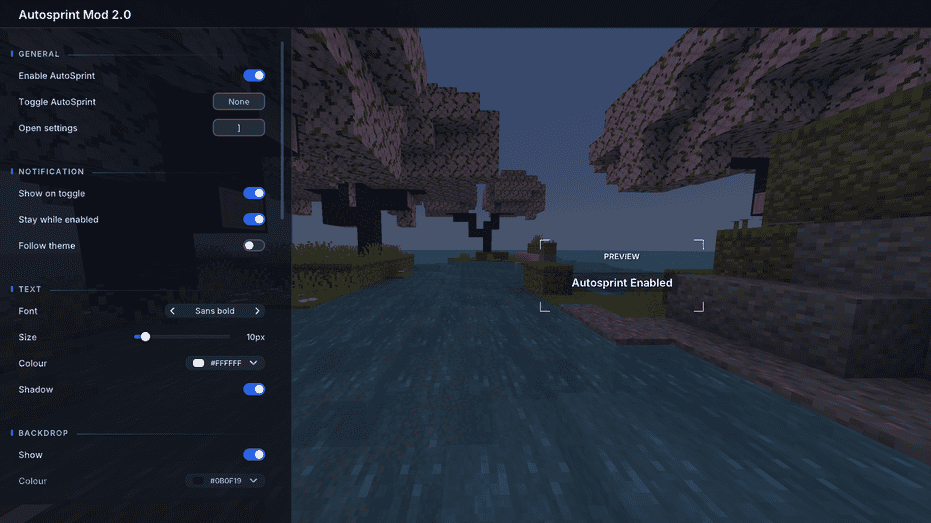
Settings
A notification appears when you toggle it. You can change its font, size,
colour, backdrop, position, timing, wording and theme, or drag it anywhere on
screen. Everything saves between sessions.
Mod Menu will open the settings too, but it is not required.
Supported versions
Every Minecraft release from 1.17 to 26.2. Snapshots are not
supported, so download the file matching your version.
Needs Fabric Loader and Fabric API. Client side only, so it works on any server.
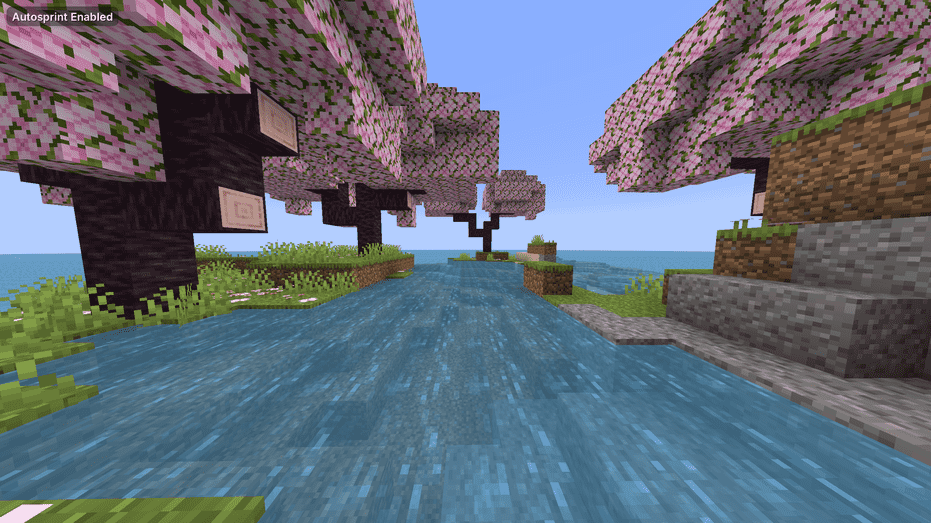
Showcase of GUIs and commands
(All taken with default settings)
Preview of GUI:
Preview of settings:
Project description from Modrinth.
Pick your setup
AutoSprint Mod by Minecraft version and loader
Choose the version and loader you play, then open the matching release.
Minecraft version
26.1.2
1 loader buildMinecraft version
26.1.1
1 loader buildMinecraft version
26.1
1 loader buildMinecraft version
1.21.11
1 loader buildMinecraft version
1.21.10
1 loader buildMinecraft version
1.21.9
1 loader buildMinecraft version
1.21.8
1 loader buildMinecraft version
1.21.7
1 loader buildMinecraft version
1.21.6
1 loader buildMinecraft version
1.21.5
1 loader buildMinecraft version
1.21.4
1 loader buildShowing the newest 12 of 33 game versions. Older files are in the list below.
Check the dependencies, then try the file in a copied instance before changing a world you care about.
Recent files
AutoSprint Mod versions and loaders
2.0.0
autosprint-2.0.0+1.17.1.jar
28 Aug 2026
Client Required Server Not supported Dependencies No extras listed Listed on Release listing
Check the 1.17.1 · Fabric setup 1.17.1Fabric release
2.0.0
autosprint-2.0.0+1.17.jar
28 Aug 2026
Client Required Server Not supported Dependencies No extras listed Listed on Release listing
Check the 1.17.1 · Fabric setup 1.171.17.1Fabric release
2.0.0
autosprint-2.0.0+1.18.1.jar
28 Aug 2026
Client Required Server Not supported Dependencies No extras listed Listed on Release listing
Check the 1.18.1 · Fabric setup 1.18.1Fabric release
2.0.0
autosprint-2.0.0+1.18.2.jar
28 Aug 2026
Client Required Server Not supported Dependencies No extras listed Listed on Release listing
Check the 1.18.2 · Fabric setup 1.18.2Fabric release
2.0.0
autosprint-2.0.0+1.18.jar
28 Aug 2026
Client Required Server Not supported Dependencies No extras listed Listed on Release listing
Check the 1.18.2 · Fabric setup 1.181.18.11.18.2Fabric release
2.0.0
autosprint-2.0.0+1.19.1.jar
28 Aug 2026
Client Required Server Not supported Dependencies No extras listed Listed on Release listing
Check the 1.19.1 · Fabric setup 1.19.1Fabric release
2.0.0
autosprint-2.0.0+1.19.2.jar
28 Aug 2026
Client Required Server Not supported Dependencies No extras listed Listed on Release listing
Check the 1.19.2 · Fabric setup 1.19.2Fabric release
2.0.0
autosprint-2.0.0+1.19.3.jar
28 Aug 2026
Client Required Server Not supported Dependencies No extras listed Listed on Release listing
Check the 1.19.3 · Fabric setup 1.19.3Fabric release
2.0.0
autosprint-2.0.0+1.19.4.jar
28 Aug 2026
Client Required Server Not supported Dependencies No extras listed Listed on Release listing
Check the 1.19.4 · Fabric setup 1.19.4Fabric release
2.0.0
autosprint-2.0.0+1.19.jar
28 Aug 2026
Client Required Server Not supported Dependencies No extras listed Listed on Release listing
Check the 1.19.4 · Fabric setup 1.191.19.11.19.21.19.3 release
2.0.0
autosprint-2.0.0+1.20.1.jar
28 Aug 2026
Client Required Server Not supported Dependencies No extras listed Listed on Release listing
Check the 1.20.1 · Fabric setup 1.20.1Fabric release
2.0.0
autosprint-2.0.0+1.20.2.jar
28 Aug 2026
Client Required Server Not supported Dependencies No extras listed Listed on Release listing
Check the 1.20.2 · Fabric setup 1.20.2Fabric release
Looking for an older file? The official Modrinth project page is in Resources.
 mod
mod CurseForge + Modrinth · Minecraft
Koreanify
Improves Korean chat and IME compatibility as a client-side utility. (mc26.1+)
 mod
mod CurseForge + Modrinth · Minecraft
Fireball Predictor
Predicts and visualizes the trajectory and explosive impact of fireballs, wither skulls and wind charges in real-time.
 mod
mod CurseForge + Modrinth · Minecraft
Wynnventory
View Wynncraft trademarket data, lootrun and raid lootpools!