Minecraft version
Back to mods 
CurseForge · Minecraft mod
Simple HUD Enhanced
A Minecraft mod that enhances the game's Heads-Up Display (HUD) by introducing customizable elements and features to display information.
Choose a version Pick your version below, then grab the matching file.
Quick answer
Which Simple HUD Enhanced release should I use?
Latest stable file simple-hud-enhanced+1.21.11-4.7.5.jar
Game version 1.21.11
Loader Fabric
Simple HUD Enhanced simple-hud-enhanced+1.21.11-4.7.5.jar targets 1.21.11 with Fabric. The project page does not say whether this file belongs on the client, dedicated server, or both. No extra mods listed for this file.
Where it goes
Is Simple HUD Enhanced required on the client, server, or both?
The project page does not say whether this file belongs on the client, dedicated server, or both.
Client Source doesn’t say
Dedicated server Source doesn’t say
Loader for this release Fabric
Required install it here Optional supported, not mandatory Not supported do not install here Source doesn’t say do not assume
The source does not explicitly classify this release as client-only or server-only.
What else does Simple HUD Enhanced simple-hud-enhanced+1.21.11-4.7.5.jar need?
simple-hud-enhanced+1.21.11-4.7.5.jar. Change the file and its required mods may change too.
This file does not list any required mods. Do not add a library just because a different file uses it.
This file does not list any required or optional mods.
Before you install it
Add Simple HUD Enhanced without breaking your instance.
Built for Simple HUD Enhanced simple-hud-enhanced+1.21.11-4.7.5.jar. Pick another file and the loader, install side or required mods may change.
- 01
Stick to this file
Use simple-hud-enhanced+1.21.11-4.7.5.jar. It targets 1.21.11 with Fabric; another release may have different loader, side or dependency requirements.
- 02
Bring the mods it needs
This file does not list any required mods. Do not add a library just because a different file uses it.
- 03
Put it on the correct side
The project page does not say whether this file belongs on the client, dedicated server, or both.
- 04
Pick the file you checked
Use the “Get this file” button beside simple-hud-enhanced+1.21.11-4.7.5.jar. It opens that exact file at the source.
About this project
What does Simple HUD Enhanced add?
Supports Versions 26.3 to 1.17
Make Any HUD You Want
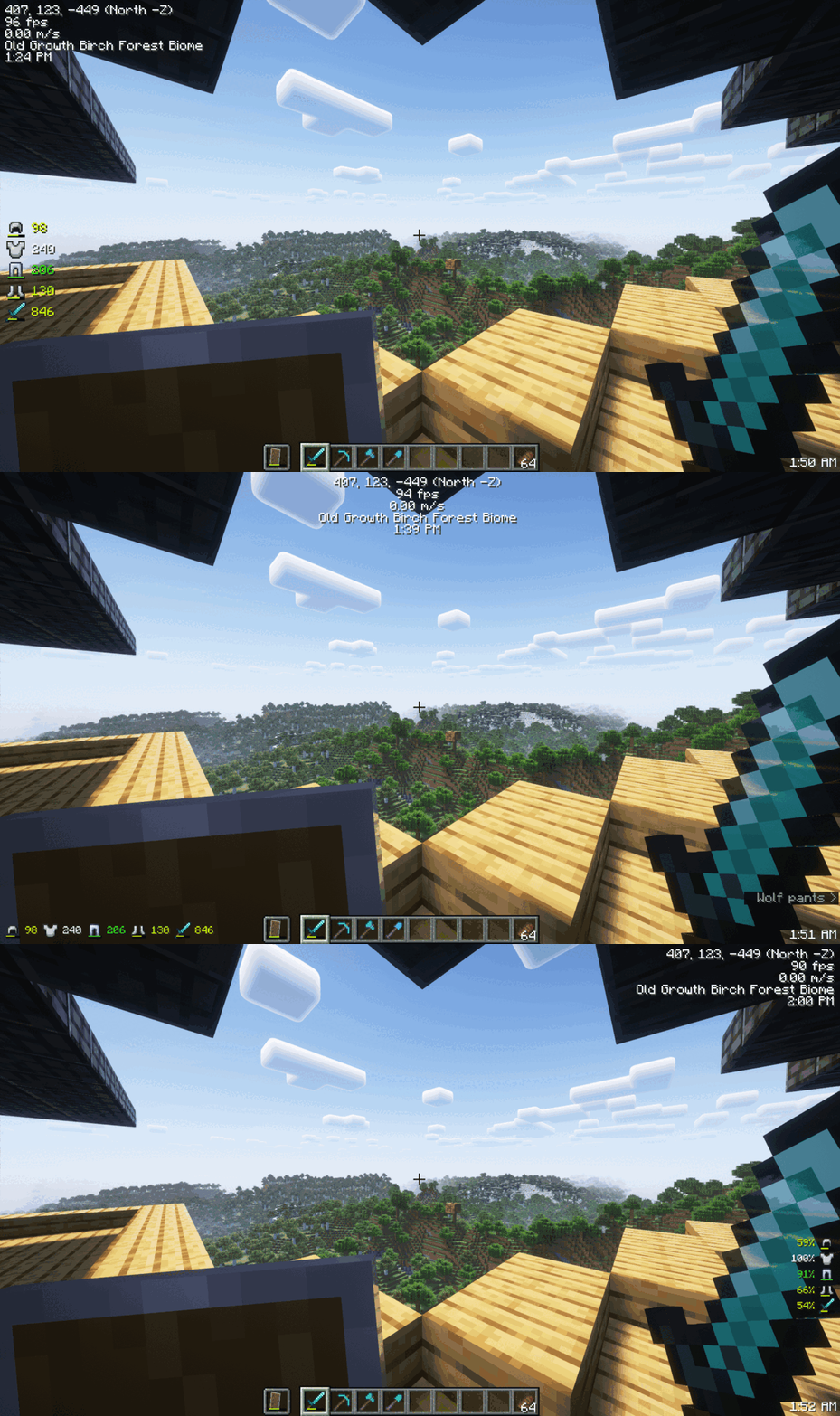
Monitor Effects Duration a Glance

Mod Menu
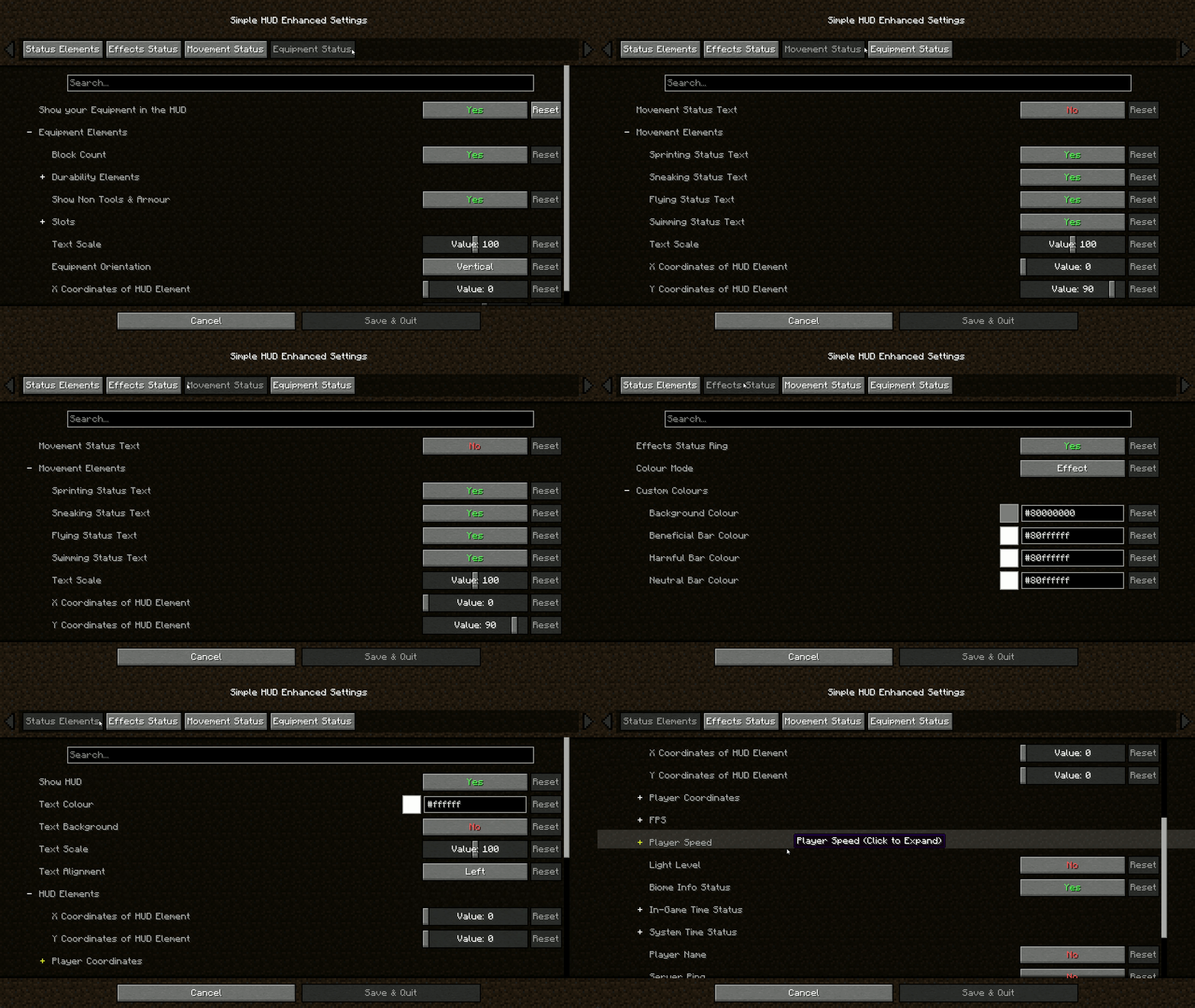
Features:
- Coordinates (With Directions): Always know where you are heading.
- Customizable Elements: Modify the presentation of various in-game information.
- Customizable Position: Move the HUD anywhere on your screen.
- Customizable HUD Size: Adjust the size to suit your visual preferences.
- FPS: Keep an eye on your game's performance.
- TPS Client-Side Compatibility: Experience smooth performance with TPS tracking.
- Velocity (Vertical & Horizontal): Track your movement speed.
- Light Level: Stay aware of your surroundings.
- Server Ping: Monitor your connection to the server.
- Current Biome: Know the biome you're exploring.
- In-Game Time (12 & 24 Hour Format): Never lose track of time.
- In-Game Day Counter: Keep track of the number of days passed in the game.
- System Time (12 & 24 Hour Format): Real-world time at a glance.
- Nether Conversation: Seamless transition monitoring.
- Chunk Coordinates: Track your position in the world with chunk-level precision.
- Sub-Chunk Coordinates: Dive deeper with detailed sub-chunk positioning.
- Player Status Effects Ring Timer: Time your buffs and debuffs.
- Player Movement Status: Sprinting, swimming, flying, sneaking – keep track of it all.
- Player Armour and Items Durabilities & Count on the HUD: Manage your equipment efficiently.
- Trinkets API Support: Integrate seamlessly with Trinkets to enhance your gameplay.
- Paper Doll: Your dynamic avatar, showcasing in-game moves, gear, and status at a glance.
Download the mod now and take control of your HUD like never before!
Join The Discord!

Project description from CurseForge.
Pick your setup
Simple HUD Enhanced by Minecraft version and loader
Choose the version and loader you play, then open the matching release.
Minecraft version
26.2
1 loader buildMinecraft version
26.1.2
1 loader buildMinecraft version
26.1.1
1 loader buildMinecraft version
26.1
1 loader buildMinecraft version
1.21.11
1 loader buildMinecraft version
1.21.10
1 loader buildMinecraft version
1.21.9
1 loader buildMinecraft version
1.21.8
1 loader buildMinecraft version
1.21.7
1 loader buildMinecraft version
1.21.6
1 loader buildMinecraft version
1.21.5
1 loader buildShowing the newest 12 of 34 game versions. Older files are in the list below.
Check the dependencies, then try the file in a copied instance before changing a world you care about.
Recent files
Simple HUD Enhanced versions and loaders
simple-hud-enhanced+26.3-4.7.5.jar
17 Sept 2026
Client Source doesn’t say Server Source doesn’t say Dependencies 1 required · 1 unchecked Listed on Release listing
Check the 26.3 · Fabric setup Fabric26.3 beta
simple-hud-enhanced+26.2-4.7.5-beta14.jar
18 Jun 2026
Client Source doesn’t say Server Source doesn’t say Dependencies 1 required · 1 unchecked Listed on Release listing
Check the 26.2 · Fabric setup Fabric26.2 beta
simple-hud-enhanced+26.1-26.1.2-4.7.5-beta14.jar
18 Jun 2026
Client Source doesn’t say Server Source doesn’t say Dependencies 1 required · 1 unchecked Listed on Release listing
Check the 26.1.2 · Fabric setup Fabric26.126.1.126.1.2 beta
simple-hud-enhanced+26.1-26.1.2-4.7.5-beta12.jar
12 May 2026
Client Source doesn’t say Server Source doesn’t say Dependencies 1 required · 1 unchecked Listed on Release listing
Check the 26.1.2 · Fabric setup Fabric26.126.1.126.1.2 beta
simple-hud-enhanced+1.21.11-4.7.5.jar
21 Dec 2025
Client Source doesn’t say Server Source doesn’t say Dependencies No extras listed Listed on Release listing
Check the 1.21.11 · Fabric setup Fabric1.21.11 release
simple-hud-enhanced+1.21.9-1.21.10-4.7.5.jar
15 Oct 2025
Client Source doesn’t say Server Source doesn’t say Dependencies 1 required · 1 unchecked Listed on Release listing
Check the 1.21.10 · Fabric setup Fabric1.21.91.21.10 release
simple-hud-enhanced+1.21.6-1.21.8-4.7.5.jar
20 Jul 2025
Client Source doesn’t say Server Source doesn’t say Dependencies 1 required · 1 unchecked Listed on Release listing
Check the 1.21.8 · Fabric setup Fabric1.21.81.21.71.21.6 release
simple-hud-enhanced+1.21.6-1.21.7-4.7.5.jar
2 Jul 2025
Client Source doesn’t say Server Source doesn’t say Dependencies 1 required · 1 unchecked Listed on Release listing
Check the 1.21.7 · Fabric setup Fabric1.21.71.21.6 release
simple-hud-enhanced+1.21.6-4.7.5.jar
24 Jun 2025
Client Source doesn’t say Server Source doesn’t say Dependencies 1 required · 1 unchecked Listed on Release listing
Check the 1.21.6 · Fabric setup Fabric1.21.6 release
simple-hud-enhanced+1.21.5-4.7.5.jar
27 Mar 2025
Client Source doesn’t say Server Source doesn’t say Dependencies 1 required · 1 unchecked Listed on Release listing
Check the 1.21.5 · Fabric setup 1.21.5Fabric release
simple-hud-enhanced+1.21.4-4.7.5.jar
25 Mar 2025
Client Source doesn’t say Server Source doesn’t say Dependencies 1 required · 1 unchecked Listed on Release listing
Check the 1.21.4 · Fabric setup Fabric1.21.4 release
simple-hud-enhanced+1.21.2-1.21.3-4.7.5.jar
25 Mar 2025
Client Source doesn’t say Server Source doesn’t say Dependencies 1 required · 1 unchecked Listed on Release listing
Check the 1.21.3 · Fabric setup Fabric1.21.31.21.2 release
Looking for an older file? The official CurseForge project page is in Resources.
 mod
mod CurseForge · Minecraft
Loot Particles
**Loot Particles** is a lightweight Minecraft mod that makes it easier to locate items dropped on the ground by adding a subtle glowing particle effect around them.
 mod
mod CurseForge · Minecraft
Beat Lamp
Real-time music visualizer lamps with equalizer modes, RGB effects, and particles.
 mod
mod CurseForge · Minecraft
Key Items
An RPG inspired configurable inventory for keeping and using important items.