Minecraft version
Back to mods 
Modrinth · Minecraft mod
EaseonCS - Core
A client-side core that serves as the shared foundation for all Easeon modules.
Choose a version Pick your version below, then grab the matching file.
Quick answer
Which EaseonCS - Core release should I use?
Latest stable file 26.3.2.0+mc26.3
Game version 26.3
Loader Fabric
EaseonCS - Core 26.3.2.0+mc26.3 targets 26.3 with Fabric. It must be installed on the client. Do not install it on the dedicated server. No extra mods listed for this file.
Where it goes
Is EaseonCS - Core required on the client, server, or both?
It must be installed on the client. Do not install it on the dedicated server.
Client Required
Dedicated server Not supported
Loader for this release Fabric
Required install it here Optional supported, not mandatory Not supported do not install here Source doesn’t say do not assume
This file is marked client-only.
What else does EaseonCS - Core 26.3.2.0+mc26.3 need?
26.3.2.0+mc26.3. Change the file and its required mods may change too.
This file does not list any required mods. Do not add a library just because a different file uses it.
This file does not list any required or optional mods.
Before you install it
Add EaseonCS - Core without breaking your instance.
Built for EaseonCS - Core 26.3.2.0+mc26.3. Pick another file and the loader, install side or required mods may change.
- 01
Stick to this file
Use 26.3.2.0+mc26.3. It targets 26.3 with Fabric; another release may have different loader, side or dependency requirements.
- 02
Bring the mods it needs
This file does not list any required mods. Do not add a library just because a different file uses it.
- 03
Put it on the correct side
It must be installed on the client. Do not install it on the dedicated server.
- 04
Pick the file you checked
Use the “Get this file” button beside 26.3.2.0+mc26.3. It opens that exact file at the source.
About this project
What does EaseonCS - Core add?
🌿 Easeon
Overview
A client-side core that serves as the shared foundation for all Easeon modules, freely available for any mod to reference and use.
Example
Spoiler
Feature Definition
package com.example;

import com.easeon.cs.core.api.EaseonFeatureEnumLike;
import com.easeon.cs.core.config.model.*;

public enum FeatureExample implements EaseonFeatureEnumLike {
    // ✅ Toggle Example: Enable or disable the minimap
    SHOW_MINIMAP("featuredemo.show_minimap",
            new ToggleConfig() {{ Enabled = true; }}),

    // ✅ Slider Example: Adjust screen brightness (1–10)
    SCREEN_BRIGHTNESS("featuredemo.screen_brightness",
            new SliderConfig() {{ Enabled = true; Value = 5; }}, 1, 10) {
        @Override public String getValueFormat() { return "featuredemo.screen_brightness.format"; }
    },

    // ✅ Hotkey Example: Toggle fullscreen with a shortcut
    TOGGLE_FULLSCREEN("featuredemo.toggle_fullscreen",
            new HotkeyConfig() {{ Enabled = true; Key = 70; Mod = 2; }}); // Example: Ctrl + F

    private final String title;
    private final Object defaultConfig;
    private final int min, max;

    FeatureExample(String title, Object defaultConfig) { this(title, defaultConfig, 0, 0); }
    FeatureExample(String title, Object defaultConfig, int min, int max) {
        this.title = title; this.defaultConfig = defaultConfig; this.min = min; this.max = max;
    }

    @Override public String id() { return name(); }
    @Override public String title() { return title; }
    @Override public Object getDefaultConfig() { return defaultConfig; }
    @Override public int getMin() { return min; }
    @Override public int getMax() { return max; }
}
Mod Initialization
package com.example;

import com.easeon.cs.core.EaseonClientCore;
import net.fabricmc.api.ClientModInitializer;

public class TemplateModClient implements ClientModInitializer {
    @Override
    public void onInitializeClient() {
         EaseonClientCore
            .init("feature-demo", "feature.demo.config.json")
                .category("UI", "featuredemo.ui")
                .section("GENERAL", "featuredemo.ui.general")
                    .slider(FeatureExample.SCREEN_BRIGHTNESS)
                .section("CONTROL", "featuredemo.ui.control")
                    .toggle(FeatureExample.SHOW_MINIMAP)
                    .hotkey(FeatureExample.TOGGLE_FULLSCREEN)
            .build();
    }
}
Accessing Config Values
   var config = EaseonClientCore.getSliderConfig(FeatureExample.SCREEN_BRIGHTNESS);
   if (!config.Enabled) return;
   System.out.println(config.value);
Settings Screen Usage
   // Open settings screen directly
   EaseonClientCore.openSettingsScreen();

   // Or manually open the screen returned by getSettingsScreen()
   MinecraftClient.getInstance().setScreen(EaseonClientCore.getSettingsScreen());
en_us.json
{
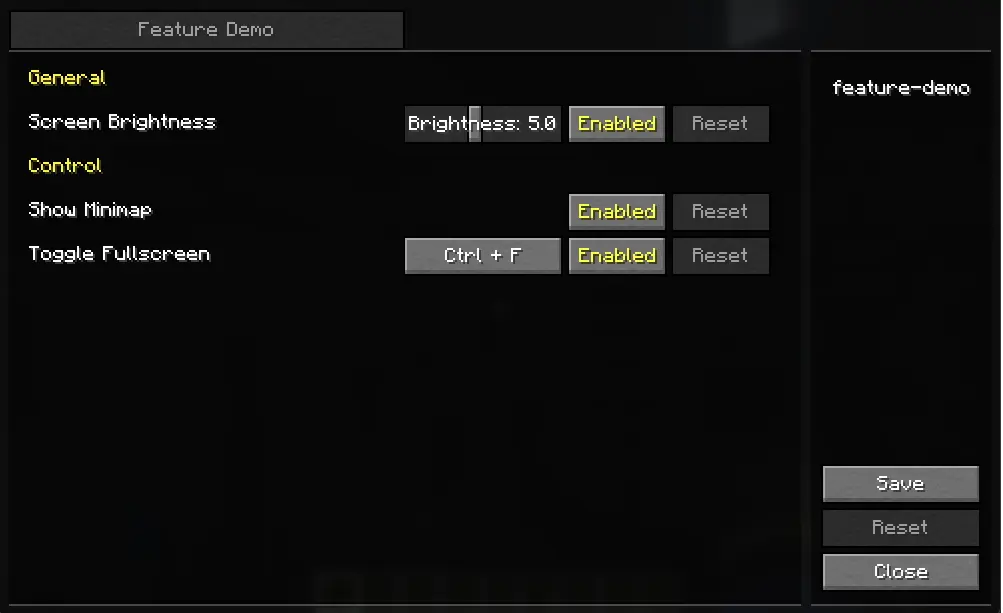
  "featuredemo.ui": "Feature Demo",
  "featuredemo.ui.general": "General",
  "featuredemo.ui.control": "Control",

  "featuredemo.screen_brightness": "Screen Brightness",
  "featuredemo.screen_brightness.format": "Brightness: %.0f",
  "featuredemo.show_minimap": "Show Minimap",
  "featuredemo.toggle_fullscreen": "Toggle Fullscreen"
}
Preview Image
🔗 More Easeon Mods
Looking for more lightweight and practical mods in the same style?
Check out other Easeon series mods here.
Project description from Modrinth.
Pick your setup
EaseonCS - Core by Minecraft version and loader
Choose the version and loader you play, then open the matching release.
Minecraft version
26.1.2
1 loader buildMinecraft version
26.1.1
1 loader buildMinecraft version
26.1
1 loader buildMinecraft version
1.21.11
1 loader buildMinecraft version
1.21.10
1 loader buildMinecraft version
1.21.9
1 loader buildCheck the dependencies, then try the file in a copied instance before changing a world you care about.
Recent files
EaseonCS - Core versions and loaders
26.3.2.0+mc26.3
easeon.cs.core.teron.fabric-26.3.2.0+mc26.3.jar
6 Oct 2026
Client Required Server Not supported Dependencies No extras listed Listed on Release listing
Check the 26.3 · Fabric setup 26.3Fabric release
26.1.2.0+mc26.1-26.1.2
easeon.cs.core.teron.fabric-26.1.2.0+mc26.1.jar
29 Mar 2026
Client Required Server Not supported Dependencies No extras listed Listed on Release listing
Check the 26.1.2 · Fabric setup 26.126.1.126.1.2Fabric release
1.1.2.1+1.21.11
easeon.cs.core.teron.fabric-1.1.2.1+1.21.11.jar
12 Dec 2025
Client Required Server Not supported Dependencies No extras listed Listed on Release listing
Check the 1.21.11 · Fabric setup 1.21.11Fabric release
1.1.2.0+1.21.11
easeon.cs.core.teron.fabric-1.1.2.0+1.21.11.jar
12 Dec 2025
Client Required Server Not supported Dependencies No extras listed Listed on Release listing
Check the 1.21.11 · Fabric setup 1.21.11Fabric release
1.0.2.2+1.21.9-1.21.10
easeon.cs.core.teron.fabric-1.0.2.2+1.21.9-1.21.10.jar
12 Nov 2025
Client Required Server Not supported Dependencies No extras listed Listed on Release listing
Check the 1.21.10 · Fabric setup 1.21.91.21.10Fabric release
1.0.2.2+1.21.9-1.21.10
easeon.cs.core.teron.fabric-1.0.2.2+1.21.9-1.21.10.jar
12 Nov 2025
Client Required Server Not supported Dependencies No extras listed Listed on Release listing
Check the 1.21.10 · Fabric setup 1.21.91.21.10Fabric release
1.0.2.1+1.21.9-1.21.10
easeon.cs.core.teron.fabric-1.0.2.1+1.21.9-1.21.10.jar
29 Oct 2025
Client Required Server Not supported Dependencies No extras listed Listed on Release listing
Check the 1.21.10 · Fabric setup 1.21.91.21.10Fabric release
1.0.2+1.21.9-1.21.10
easeon.cs.core.teron.fabric-1.0.2+1.21.9-1.21.10.jar
26 Oct 2025
Client Required Server Not supported Dependencies No extras listed Listed on Release listing
Check the 1.21.10 · Fabric setup 1.21.91.21.10Fabric release
Looking for an older file? The official Modrinth project page is in Resources.
 mod
mod CurseForge + Modrinth · Minecraft
[VSE]Visual Set Edit
This mod lets you edit custom set effects through a visual GUI with intuitive operations.
 mod
mod CurseForge · Minecraft
Energy Meter
Easily measure your energy rates.
mod
Modrinth · Minecraft
Caldris
A refined collection of quality-of-life improvements designed to make every Minecraft adventure smoother.