Fabric API Needed by Combind 1.0.0+26.2
requiredMatching file found Matched file: 0.152.2+26.2

Modrinth · Minecraft mod
Expand vanilla key binds with combo support
Quick answer
Combind 1.0.0+26.2 targets 26.2 with Fabric. It must be installed on the client. Do not install it on the dedicated server. All 1 required mods have matching files.
Where it goes
It must be installed on the client. Do not install it on the dedicated server.
This file is marked client-only.
1.0.0+26.2 on 26.2 Fabric. Every mod below is checked against that same setup.
Install Fabric API first. We found matching files for this game-version and loader setup.
We only count dependency files that match this setup. A file for another loader does not fill the gap.
Before you install it
Built for Combind 1.0.0+26.2 on 26.2 Fabric. Pick another file and the loader, install side or required mods may change.
Use 1.0.0+26.2. It targets 26.2 with Fabric; another release may have different loader, side or dependency requirements.
Install Fabric API first. We found matching files for this game-version and loader setup.
It must be installed on the client. Do not install it on the dedicated server.
Use the “Get this file” button beside 1.0.0+26.2. It opens that exact file at the source.
About this project
This mod expands vanilla keybinds with combo support, letting you bind any action to a chord or a key sequence instead of a single key.
It is client-side only and requires no server-side installation.
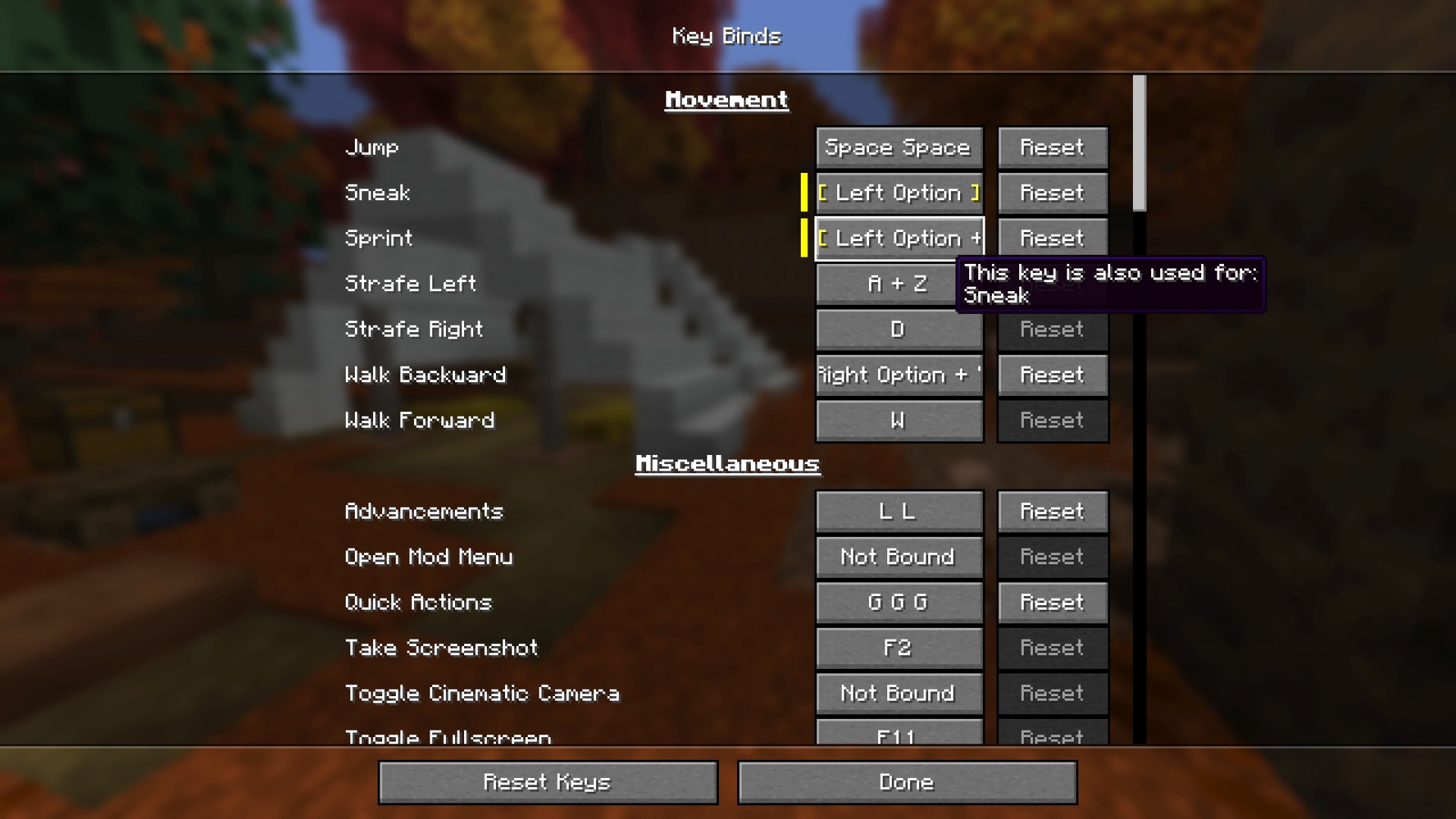
config/combind.jsonThis mod shines in modpacks where keys are scarce and every binding needs to be deliberate, but works just as well in vanilla for extra flexibility.
Double-tap Q (Q Q) (or even triple-tap Q (Q Q Q)!) to drop items instead of a single press. No more accidental drops.
This mod has no required dependencies beyond Fabric API. It works with:
config/combind.jsonkey:"Left Shift + E" or key:"Q Q". Unsupported as of combind-v1.0.0+26.3, until both mods release a version compatible with 26.3Note: Some niche vanilla interactions are tied to a specific input type and may not work when rebound. For example, a mouse button bound to "Open Inventory" will not close it the way a key would, and a key bound to "Pick Block" will not support block duplication dragging inside containers the way a mouse button would.
Note: If you encounter any compatibility issues, please report them on the GitHub Issues page.
Combind exposes three API classes under net.pemiridosa.combind.api that let your mod register key bindings with full combo support.
Add Combind as a compile-time dependency via the Modrinth Maven repository:
// build.gradle
repositories {
    maven { url "https://api.modrinth.com/maven" }
}

dependencies {
    compileOnly "maven.modrinth:combind:VERSION"
    localRuntime "maven.modrinth:combind:VERSION" // optional: for dev runs
}
Declare the dependency in fabric.mod.json. Use depends if your mod requires Combind, or suggests if it is optional:
"depends": {
    "combind": "*"
}
| Class | Purpose |
|---|---|
CombindKeyBinding |
Wraps a vanilla KeyMapping with combo support — the main entry point |
KeyCombo |
Describes a combo: single key, chord, sequence, or chord + sequence |
InputKey |
Represents one physical input — InputKey.keyboard(scancode) or InputKey.mouse(button) |
Bind an action to Left Shift + E:
KeyMapping.Category category = KeyMapping.Category.register(
    Identifier.fromNamespaceAndPath("mymod", "mymod")
);

KeyMapping someActionMapping = KeyMappingHelper.registerKeyMapping(
    new KeyMapping("key.mymod.someaction", InputConstants.KEY_E, category)
);

// Left Shift + E
CombindKeyBinding someActionBinding = CombindKeyBinding.of(someActionMapping,
    new KeyCombo(
        InputKey.keyboard(InputConstants.KEY_E),
        new InputKey[]{ InputKey.keyboard(InputConstants.KEY_LSHIFT) }
    )
);

someActionBinding
    .onPress(ctx -> LOGGER.info("Some action PRESSED — combo: {}", ctx.combo().getDisplayName()))
    .onRelease(ctx -> LOGGER.info("Some action RELEASED — combo: {}", ctx.combo().getDisplayName()));
Bind an action to Left Control + Left Shift + E:
KeyMapping someActionMapping = KeyMappingHelper.registerKeyMapping(
    new KeyMapping("key.mymod.someaction", InputConstants.KEY_E, category)
);

// Left Control + Left Shift + E
CombindKeyBinding someActionBinding = CombindKeyBinding.of(someActionMapping,
    new KeyCombo(
        InputKey.keyboard(InputConstants.KEY_E),
        new InputKey[]{
            InputKey.keyboard(InputConstants.KEY_LCONTROL),
            InputKey.keyboard(InputConstants.KEY_LSHIFT)
        }
    )
);

someActionBinding
    .onPress(ctx -> LOGGER.info("Some action PRESSED — combo: {}", ctx.combo().getDisplayName()))
    .onRelease(ctx -> LOGGER.info("Some action RELEASED — combo: {}", ctx.combo().getDisplayName()));
Bind an action to M M (double-tap) or M M M (triple-tap):
KeyMapping someActionMapping = KeyMappingHelper.registerKeyMapping(
    new KeyMapping("key.mymod.someaction", InputConstants.KEY_M, category)
);

// Double-tap M (M M)
CombindKeyBinding someActionBinding = CombindKeyBinding.of(someActionMapping,
    KeyCombo.sequence(InputKey.keyboard(InputConstants.KEY_M), 2)
);

// Triple-tap M (M M M) — even safer
CombindKeyBinding someActionBinding = CombindKeyBinding.of(someActionMapping,
    KeyCombo.sequence(InputKey.keyboard(InputConstants.KEY_M), 3)
);

someActionBinding
    .onPress(ctx -> LOGGER.info("Some action PRESSED — combo: {}", ctx.combo().getDisplayName()))
    .onRelease(ctx -> LOGGER.info("Some action RELEASED — combo: {}", ctx.combo().getDisplayName()));
Bind an action to Left Shift + Q Q (double-tap Q while holding Shift):
// Left Shift + Q Q
CombindKeyBinding binding = CombindKeyBinding.of(mapping,
    new KeyCombo(
        InputKey.keyboard(InputConstants.KEY_Q),
        new InputKey[]{ InputKey.keyboard(InputConstants.KEY_LSHIFT) },
        2
    )
);
Bind an action to Left Control + Left Button:
// Left Control + Left Mouse Button
CombindKeyBinding binding = CombindKeyBinding.of(mapping,
    new KeyCombo(
        InputKey.mouse(InputConstants.MOUSE_BUTTON_LEFT),
        new InputKey[]{ InputKey.keyboard(InputConstants.KEY_LCONTROL) }
    )
);
CombindKeyBinding.of(mapping) infers the initial combo from the KeyMapping's default key:
CombindKeyBinding binding = CombindKeyBinding.of(mapping); // defaults to the KeyMapping's key
// Player must configure this in the Controls > Key Binds screen
CombindKeyBinding binding = CombindKeyBinding.of(mapping, KeyCombo.unbound());
If you prefer the standard tick-polling pattern instead of callbacks, it works unchanged via the vanilla KeyMapping:
ClientTickEvents.END_CLIENT_TICK.register(client -> {
    while (someActionMapping.consumeClick()) {
        // handle each queued click
    }

    if (someActionMapping.isDown()) {
        // binding is currently held
    }
});
For more details, see the full implementation at src/client/java/net/pemiridosa/combind/api.
Project description from Modrinth.
Pick your setup
Choose the version and loader you play, then open the matching release.
Check the dependencies, then try the file in a copied instance before changing a world you care about.
Recent files
combind-1.0.0+26.2.jar
19 Jun 2026
Looking for an older file? The official Modrinth project page is in Resources.