Minecraft version
Back to mods 
Modrinth · Minecraft mod
Flat Lighting
Adds a video setting to make block lighting flatter.
Choose a version Pick your version below, then grab the matching file.
Quick answer
Which Flat Lighting release should I use?
Latest stable file 1.4.2
Game version 26.3
Loader Fabric
Flat Lighting 1.4.2 targets 26.3 with Fabric. It must be installed on the client. Do not install it on the dedicated server. No extra mods listed for this file.
Where it goes
Is Flat Lighting required on the client, server, or both?
It must be installed on the client. Do not install it on the dedicated server.
Client Required
Dedicated server Not supported
Loader for this release Fabric
Required install it here Optional supported, not mandatory Not supported do not install here Source doesn’t say do not assume
This file is marked client-only.
What else does Flat Lighting 1.4.2 need?
1.4.2. Change the file and its required mods may change too.
This file does not list any required mods. Do not add a library just because a different file uses it.
This file does not list any required or optional mods.
Before you install it
Add Flat Lighting without breaking your instance.
Built for Flat Lighting 1.4.2. Pick another file and the loader, install side or required mods may change.
- 01
Stick to this file
Use 1.4.2. It targets 26.3 with Fabric; another release may have different loader, side or dependency requirements.
- 02
Bring the mods it needs
This file does not list any required mods. Do not add a library just because a different file uses it.
- 03
Put it on the correct side
It must be installed on the client. Do not install it on the dedicated server.
- 04
Pick the file you checked
Use the “Get this file” button beside 1.4.2. It opens that exact file at the source.
About this project
What does Flat Lighting add?
Flat Lighting 💡
Adds a new video setting to make lighting flatter. It does this by removing the shading differences between the sides and top of blocks, which gives the game's lighting a softer or flat appearance.
The effect is similar to the Old Lighting setting from Optifine's internal shaders.
Comparison 🎨
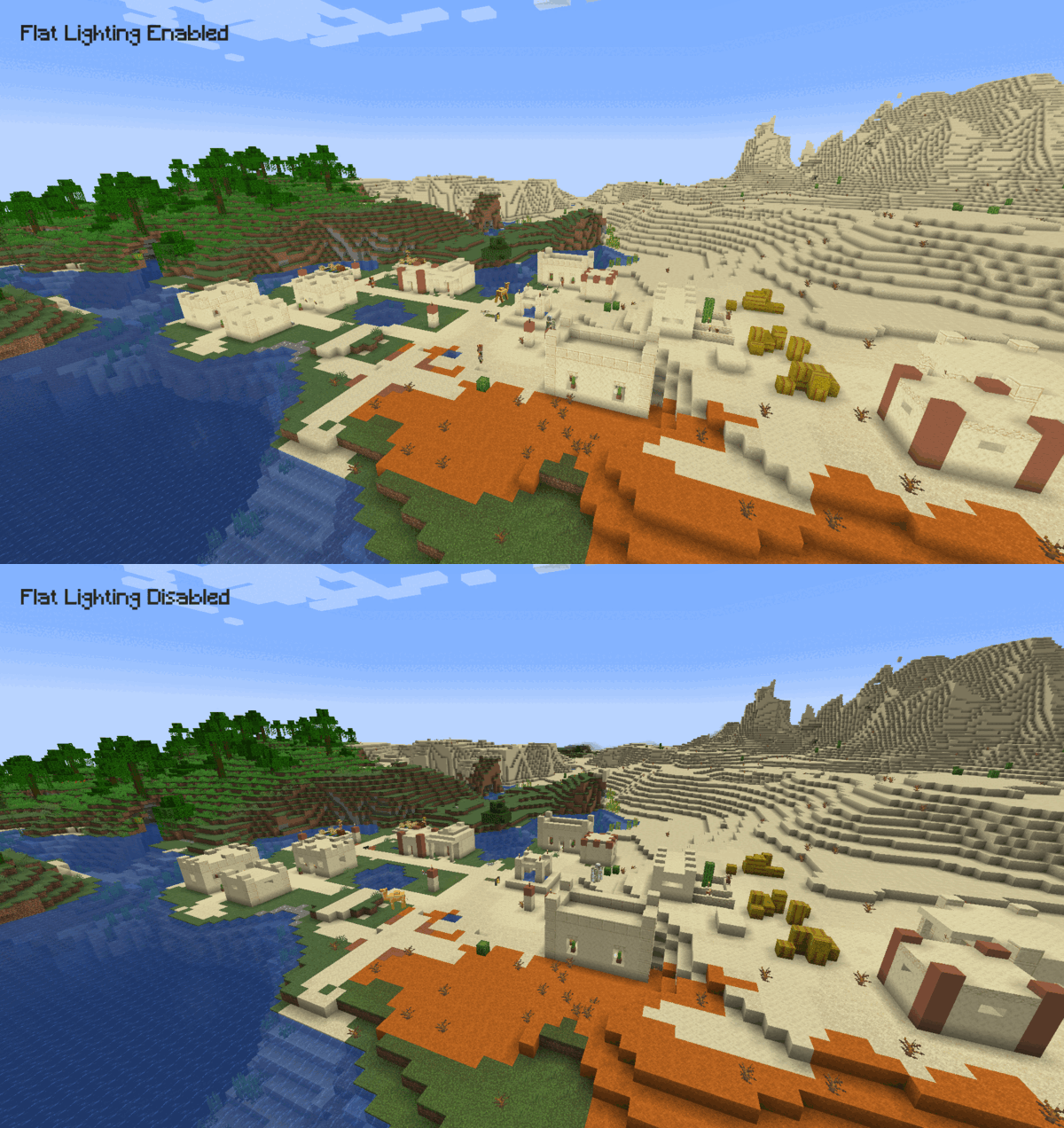
Usage 👤
After installing the mod, navigate to the game's video settings and set Cardinal Lighting to off to make the lighting flatter. Keeping the setting on will keep lighting identical to the vanilla game.
Dependencies & Compatibility 🔌
This mod has no dependencies. It is compatible with Fabric API, Sodium and Iris.
Project description from Modrinth.
Pick your setup
Flat Lighting by Minecraft version and loader
Choose the version and loader you play, then open the matching release.
Minecraft version
26.2
1 loader buildMinecraft version
26.1.2
1 loader buildMinecraft version
26.1.1
1 loader buildMinecraft version
26.1
1 loader buildMinecraft version
1.21.11
1 loader buildMinecraft version
1.21.10
1 loader buildMinecraft version
1.21.9
1 loader buildMinecraft version
1.21.8
1 loader buildMinecraft version
1.21.7
1 loader buildMinecraft version
1.21.6
1 loader buildMinecraft version
1.21.5
1 loader buildShowing the newest 12 of 30 game versions. Older files are in the list below.
Check the dependencies, then try the file in a copied instance before changing a world you care about.
Recent files
Flat Lighting versions and loaders
1.4.2
flat-lighting-1.4.2.jar
1 Oct 2026
Client Required Server Not supported Dependencies No extras listed Listed on Release listing
Check the 26.3 · Fabric setup 26.3Fabric release
1.4.1
flat-lighting-1.4.1.jar
16 Jun 2026
Client Required Server Not supported Dependencies No extras listed Listed on Release listing
Check the 26.2 · Fabric setup 26.2Fabric release
1.4.0
flat-lighting-1.4.0.jar
21 Apr 2026
Client Required Server Not supported Dependencies No extras listed Listed on Release listing
Check the 26.1.2 · Fabric setup 26.126.1.126.1.2Fabric release
1.3.1
flat-lighting-1.3.1.jar
25 Mar 2025
Client Required Server Not supported Dependencies No extras listed Listed on Release listing
Check the 1.21.11 · Fabric setup 1.21.101.21.111.21.51.21.6 release
1.3.0
flat-lighting-1.3.0.jar
24 Sept 2024
Client Required Server Not supported Dependencies No extras listed Listed on Release listing
Check the 1.21.4 · Fabric setup 1.211.21.11.21.21.21.3 release
1.2.0
flat-lighting-1.2.0.jar
30 Sept 2023
Client Required Server Not supported Dependencies No extras listed Listed on Release listing
Check the 1.21.1 · Fabric setup 1.20.21.20.31.20.41.20.5 release
1.1.0
flat-lighting-1.1.0.jar
10 Sept 2022
Client Required Server Not supported Dependencies No extras listed Listed on Release listing
Check the 1.20.1 · Fabric setup 1.19.11.19.21.19.31.19.4 release
1.0
flat-lighting-1.0.jar
25 May 2022
Client Required Server Not supported Dependencies No extras listed Listed on Release listing
Check the 1.19 · Fabric setup 1.18.21.19Fabric release
Looking for an older file? The official Modrinth project page is in Resources.
 mod
CurseForge + Modrinth · Minecraft
librarianroller
a pure client-side mod that automates breaking and placing lecterns, causing librarian villagers to continuously refresh their trades for efficient farming of specific enchanted books.
 mod
Modrinth · Minecraft
MCSR Ranked
Minecraft Live Speedrunning Match Mod!
 mod
Modrinth · Minecraft
Mo' Bends
If you think that Minecraft characters could be more realistic, instead of steady and rigid animations, this mod is just for you! It makes players seem alive, and adds epic sword animations!