Minecraft version
Back to mods 
Modrinth · Minecraft mod
Create Fly: Connected (Unofficial Port)
This is the Unofficial Fabric version of Create: Connected. For Create Fly
Choose a version Pick your version below, then grab the matching file.
Quick answer
Which Create Fly: Connected (Unofficial Port) release should I use?
Latest stable file 1.3.3.3+fly-mc26.1
Game version 26.1, 26.1.1, 26.1.2
Loader Fabric
Create Fly: Connected (Unofficial Port) 1.3.3.3+fly-mc26.1 targets 26.1, 26.1.1, 26.1.2 with Fabric. Installation on the client is optional. Installation on the dedicated server is optional. No extra mods listed for this file.
Where it goes
Is Create Fly: Connected (Unofficial Port) required on the client, server, or both?
Installation on the client is optional. Installation on the dedicated server is optional.
Client Optional
Dedicated server Optional
Loader for this release Fabric
Required install it here Optional supported, not mandatory Not supported do not install here Source doesn’t say do not assume
The source marks this as usable on both the client and server.
What else does Create Fly: Connected (Unofficial Port) 1.3.3.3+fly-mc26.1 need?
1.3.3.3+fly-mc26.1. Change the file and its required mods may change too.
This file does not list any required mods. Do not add a library just because a different file uses it.
This file does not list any required or optional mods.
Before you install it
Add Create Fly: Connected (Unofficial Port) without breaking your instance.
Built for Create Fly: Connected (Unofficial Port) 1.3.3.3+fly-mc26.1. Pick another file and the loader, install side or required mods may change.
- 01
Stick to this file
Use 1.3.3.3+fly-mc26.1. It targets 26.1, 26.1.1, 26.1.2 with Fabric; another release may have different loader, side or dependency requirements.
- 02
Bring the mods it needs
This file does not list any required mods. Do not add a library just because a different file uses it.
- 03
Put it on the correct side
Installation on the client is optional. Installation on the dedicated server is optional.
- 04
Pick the file you checked
Use the “Get this file” button beside 1.3.3.3+fly-mc26.1. It opens that exact file at the source.
About this project
What does Create Fly: Connected (Unofficial Port) add?
Unofficial Port of Create: Connected by Lysine. All credit for the mod goes to the original author.
Quality-of-life additions for Create: gearboxes, clutches, item silos, fluid vessels, kinetic batteries, copycat blocks and fan catalysts.
Usage
Many blocks have an in-game Ponder scene for a walkthrough on how to use it!
Power transmission
Adds more gearboxes:
| Brass Gearbox | Pick which of its four sides reverse with a wrench |
| 6-way Gearbox | Shafts on all six sides |
| Parallel Gearbox | Keeps direction around corners, reverses straight through |
| Encased Chain Cogwheel | Carries rotation along a row |
| Cross Connector | Relays rotation in two directions independently |
| Kinetic Bridge | Moves stress capacity between two separate networks |
| Crank Wheel / Large Crank Wheel | Hand cranks in a wheel shape |
Gearboxes
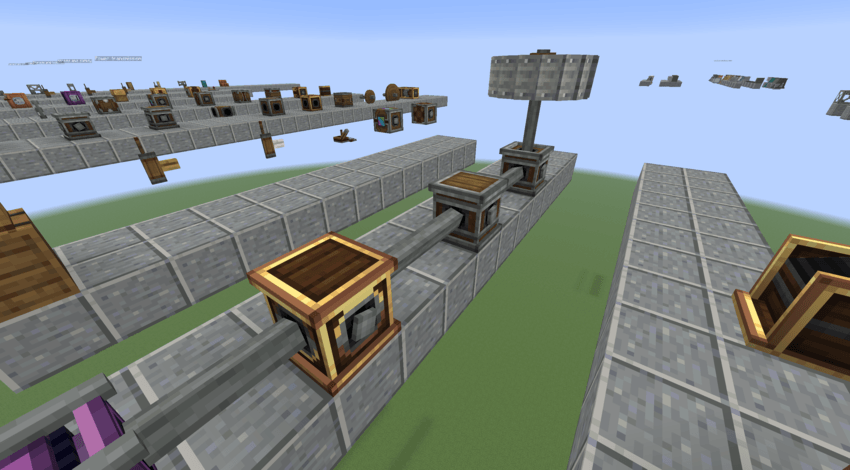
Stress and safety
Overstressing a network:
| Overstress Clutch | Uncouples when the network is overstressed |
| Centrifugal Clutch | Only couples above a set RPM |
| Freewheel Clutch | Only couples when the input spins the right way |
| Shear Pin | Breaks when the network is overstressed |
| Brake | Brakes using a redstone signal |
| Inverted Clutch / Inverted Gearshift | Create's clutch and gearshift with the redstone signal flipped |
Storage and logistics
Better vaults and tanks:
| Item Silo | Vertical item vault |
| Fluid Vessel | Horizontal fluid tank |
| Brass Chute | chute that moves stacks |
| Inventory Access Port / Inventory Bridge | Reach the inventory behind them |
| Kinetic Battery | Charges from rotation and gives it back. Shows its charge on the item |
Redstone
Combine transmitter and input:
| Linked Buttons / Linked Lever | Redstone Links to directly use a switch as the transmitter. |
| Redstone Link Wildcard | Wildcards any frequency |
| Sequenced Pulse Generator | Up to 7 instructions |
| Dashboard | Shows four lines on the screen of seated players |
Copycat decoration
Copycats convert any full block into a decorative shape that keeps the original blocks texture.
- Beam, Block, Board, Box, Catwalk, Fence, Fence Gate, Slab, Stairs, Vertical Step and Wall
Copycat
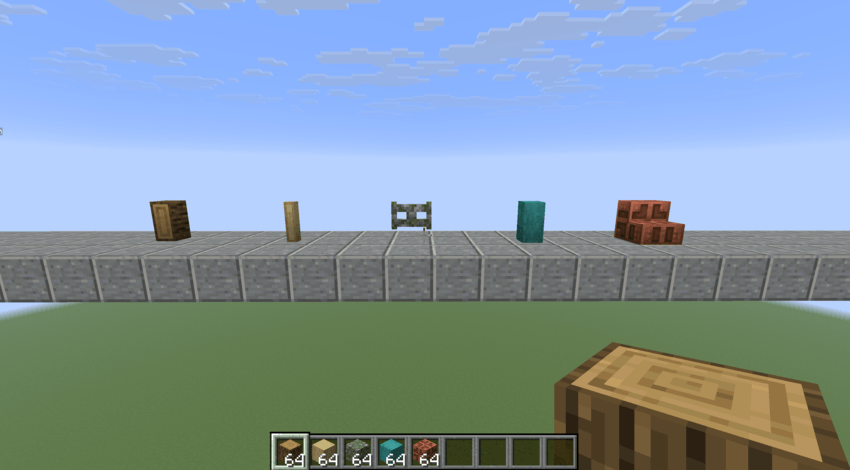
Fan catalysts
A fan blowing through a catalyst processes items, no fire, lava or water needed:
- Blasting, Smoking, Washing and Haunting catalysts, plus an empty one
Create tweaks
- Menus, jukeboxes and note blocks work on contraptions
- Sequenced Gearshift screen knows the three extra instructions
- Schematic sub-folders
- More Attribute Filter options: item id, damage and count
Config
config/create_connected-common.json create_connected-server.json
Known Issues
- No in-game config screen, use config folder
- With Copycats+ installed, copycats already placed are not converted
- A creative instant schematic print resets battery charge and blanks Dashboard text
- Not compatible with Better Block Entities
- On Create Fly 6.0.9-2, some gearboxes and cogwheels keep the older look
- 26.3: make a backup before upgrading worlds from older versions
Requirements
| Minecraft | Create Fly | Fabric Loader | Fabric API |
|---|---|---|---|
| 26.3 | 6.0.9-2+ | 0.20.1+ | Any |
| 26.2 | 6.0.9-1+ | 0.19.3+ | Any |
| 26.1, 26.1.1, 26.1.2 | 6.0.9-4+ | 0.19.3+ | Any |
- Java 25
- For JEI: install JEI on both server and client.
Credits and licence
- Create: Connected by Lysine.
- Create Fly by ZurrTum. Create by the Create Team.
- Music: "Casa Bossa Nova" and "Local Forecast - Elevator" by Kevin MacLeod, CC BY 3.0.
- Licence: AGPL-3.0
Project description from Modrinth.
Pick your setup
Create Fly: Connected (Unofficial Port) by Minecraft version and loader
Choose the version and loader you play, then open the matching release.
Minecraft version
26.2
1 loader buildMinecraft version
26.1.2
1 loader buildMinecraft version
26.1.1
1 loader buildMinecraft version
26.1
1 loader buildCheck the dependencies, then try the file in a copied instance before changing a world you care about.
Recent files
Create Fly: Connected (Unofficial Port) versions and loaders
1.3.3.3+fly-mc26.3
create_connected-1.3.3.3+fly-mc26.3.jar
9 Nov 2026
Client Optional Server Optional Dependencies No extras listed Listed on Release listing
Check the 26.3 · Fabric setup 26.3Fabric beta
1.3.3.3+fly-mc26.1
create_connected-1.3.3.3+fly-mc26.1.jar
9 Nov 2026
Client Optional Server Optional Dependencies No extras listed Listed on Release listing
Check the 26.1.2 · Fabric setup 26.126.1.126.1.2Fabric release
1.3.3.3+fly-mc26.2
create_connected-1.3.3.3+fly-mc26.2.jar
9 Nov 2026
Client Optional Server Optional Dependencies No extras listed Listed on Release listing
Check the 26.2 · Fabric setup 26.2Fabric release
1.3.3.1+fly-mc26.1
create_connected-1.3.3.1+fly-mc26.1.jar
29 Oct 2026
Client Optional Server Optional Dependencies No extras listed Listed on Release listing
Check the 26.1.2 · Fabric setup 26.126.1.126.1.2Fabric release
1.3.3.2+fly-mc26.2
create_connected-1.3.3.2+fly-mc26.2.jar
29 Oct 2026
Client Optional Server Optional Dependencies No extras listed Listed on Release listing
Check the 26.2 · Fabric setup 26.2Fabric release
1.3.3+fly-mc26.1
create_connected-1.3.3+fly-mc26.1.jar
8 Oct 2026
Client Optional Server Optional Dependencies No extras listed Listed on Release listing
Check the 26.1.2 · Fabric setup 26.126.1.126.1.2Fabric release
1.3.3+fly-mc26.2
create_connected-1.3.3+fly-mc26.2.jar
8 Oct 2026
Client Optional Server Optional Dependencies No extras listed Listed on Release listing
Check the 26.2 · Fabric setup 26.2Fabric release
1.3.2-fly.26.2-beta.12
create_connected-1.3.2-fly.26.2-beta.12+fabric-mc26.2.jar
23 Sept 2026
Client Optional Server Optional Dependencies 1 required · 1 unchecked Listed on Release listing
Check the 26.2 · Fabric setup 26.2Fabric beta
1.3.2-fly.26.1.2-beta.4
create_connected-1.3.2-fly.26.1.2-beta.4+fabric-mc26.1.2.jar
23 Sept 2026
Client Optional Server Optional Dependencies 1 required · 1 unchecked Listed on Release listing
Check the 26.1.2 · Fabric setup 26.126.1.126.1.2Fabric beta
1.3.2-fly.26.1-beta.3
create_connected-1.3.2-fly.26.1.2-beta.3+fabric-mc26.1.2.jar
21 Sept 2026
Client Optional Server Optional Dependencies 2 required · 2 unchecked Listed on Release listing
Check the 26.1.2 · Fabric setup 26.1.2Fabric beta
1.3.2-fly.26.2-beta.11
create_connected-1.3.2-fly.26.2-beta.11+fabric-mc26.2.jar
10 Sept 2026
Client Optional Server Optional Dependencies 2 required · 2 unchecked Listed on Release listing
Check the 26.2 · Fabric setup 26.2Fabric beta
1.3.2-fly.26.2-beta.8
create_connected-1.3.2-fly.26.2-beta.8+fabric-mc26.2.jar
5 Sept 2026
Client Optional Server Optional Dependencies No extras listed Listed on Release listing
Check the 26.2 · Fabric setup 26.2Fabric beta
Looking for an older file? The official Modrinth project page is in Resources.
 mod
CurseForge + Modrinth · Minecraft
Jodek's Mob Heads
Mobs can drop their head when killed by a player, easy drop rate config, drop messages, advancement collection and more
 mod
CurseForge + Modrinth · Minecraft
NEEPMeat
A tech mod with pipes, computers, guns, rusty machinery and meat.
 mod
CurseForge · Minecraft
Ages Progression
Ages adds configurable progression with milestones to advance and gain access to selected equipment, items, and workstations