


Minecraft version
Back to mods 
Modrinth · Minecraft mod
Reconnect
Reconnect anywhere you want! This mod allows you to reconnect via the "/reconnect" command, or inside your in-game menu screen while in Multiplayer or Realms, and more.
Choose a version Pick your version below, then grab the matching file.
Quick answer
Which Reconnect release matches 26.2 Forge?
Best match for your filters 3.0-26.2
Game version 26.2
Loader Forge
Reconnect 3.0-26.2 targets 26.2 with Forge. It must be installed on the client. Do not install it on the dedicated server. No extra mods listed for this file.
Where it goes
Is Reconnect required on the client, server, or both?
It must be installed on the client. Do not install it on the dedicated server.
Client Required
Dedicated server Not supported
Loader for this release Forge
Required install it here Optional supported, not mandatory Not supported do not install here Source doesn’t say do not assume
This file is marked client-only.
What else does Reconnect 3.0-26.2 need?
3.0-26.2 on 26.2 Forge. Every mod below is checked against that same setup.
This file does not list any required mods. Do not add a library just because a different file uses it.
This file does not list any required or optional mods.
Before you install it
Add Reconnect without breaking your instance.
Built for Reconnect 3.0-26.2 on 26.2 Forge. Pick another file and the loader, install side or required mods may change.
- 01
Stick to this file
Use 3.0-26.2. It targets 26.2 with Forge; another release may have different loader, side or dependency requirements.
- 02
Bring the mods it needs
This file does not list any required mods. Do not add a library just because a different file uses it.
- 03
Put it on the correct side
It must be installed on the client. Do not install it on the dedicated server.
- 04
Pick the file you checked
Use the “Get this file” button beside 3.0-26.2. It opens that exact file at the source.
About this project
What does Reconnect add?

Reconnect
A mod that supersedes HiWord9's Reconnect Button mod, supporting Minecraft 1.20.1–1.21.11 and 26.1–26.3.
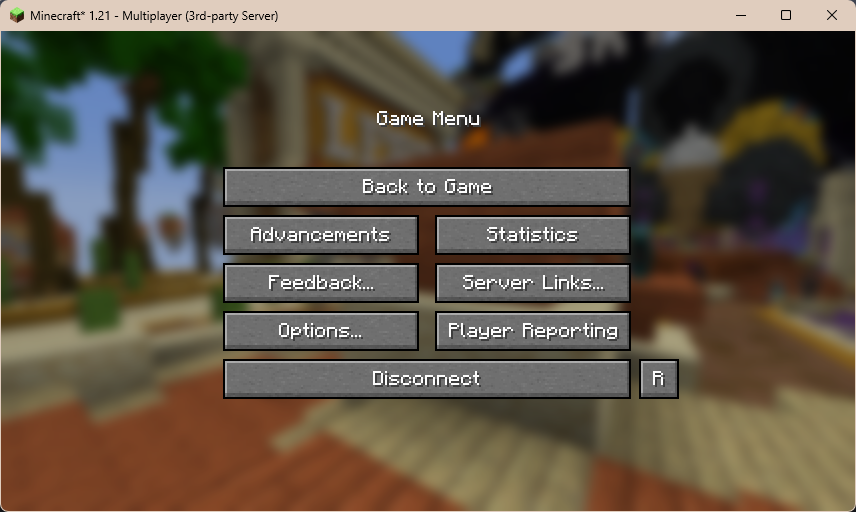
- This mod adds a reconnect button on your in-game menu screen while in a Multiplayer world.
- NEW: The disconnected screen includes a Reconnect Now button which automatically retries after 3, 10, 30 and 60 seconds, stopping after four failed attempts. The ∞ button toggles unlimited retries every 3 seconds. Returning to the server list or cancelling a connection stops retries.
- You can also reconnect to a server by typing
/reconnectin chat. - You can finally reconnect to a Realms server starting with version
1.4.
Supported versions
| Minecraft | Fabric | NeoForge | Forge | Java |
|---|---|---|---|---|
| 1.20.1–1.20.4 | Yes | Yes | Yes | 17 |
| 1.20.5 | Yes | Yes | No release | 21 |
| 1.20.6, 1.21, 1.21.1 | Yes | Yes | Yes | 21 |
| 1.21.2 | Yes | Yes | No release | 21 |
| 1.21.3–1.21.11 | Yes | Yes | Yes | 21 |
| 26.1, 26.1.1, 26.1.2, 26.2, 26.3 | Yes | Yes | Yes | 25 |
Please use the JAR file matching your Minecraft version and loader.
Will this mod come to CurseForge?
- There are currently no plans of bringing this mod to Curseforge. For now this mod is available for download on releases page or on Modrinth
Dependencies and Incompatibilities
- There are currently no incompatibilities seen with this mod at the moment.
Known issues
- N/A
Building the project
Please run Gradle with Java 25. Gradle resolves the Java 17 and Java 21 toolchains required by older targets automatically.
To get the files from this repository:
git clone https://github.com/59xa/reconnect-mod-reloaded/
cd reconnect-mod-reloaded

./gradlew build
The build uses Stonecutter to build all supported versions from the shared common, fabric, neoforge and forge source trees. Finished jars are written to build/libs/<minecraft-version>/.
To build one version or a selection of versions:
./gradlew -Pbuild_versions=26.3 build
./gradlew -Pbuild_versions=26.1,26.2,26.3 build
./gradlew -Pbuild_versions=1.20.1 -Pbuild_loaders=fabric build
On Windows, use ./gradlew.bat and quote the property argument, for example ./gradlew.bat "-Pbuild_versions=26.3" build.
Run a development client with ./gradlew -Pbuild_versions=1.20.1 :fabric:1.20.1:runClient, ./gradlew -Pbuild_versions=1.20.1 :neoforge:1.20.1:runClient or ./gradlew -Pbuild_versions=1.20.1 :forge:1.20.1:runClient.
Version dependencies live in versions/<minecraft-version>/gradle.properties. API differences live in version-selected compat source directories. Reconnect behaviour and command registration are shared across loaders. Fabric jars for obfuscated game versions are remapped to intermediary names, and Forge jars through 1.20.4 use SRG names. The Forge and NeoForge 1.20.1 builds include Mixin refmaps; NeoForge 1.20.1 uses the original Forge packages. CI builds every Minecraft target and checks the contents and metadata of the packaged jars.
Forge 1.20.3 uses a separate ForgeGradle build script because its original Loom development bootstrap is unpublished.
The 26.x Forge builds target Java 21 bytecode and Mixin compatibility because Forge ships Mixin 0.8.7. They compile and run with Java 25, as required by Minecraft.
The active IDE version defaults to 26.3. Change it with ./gradlew "Set active project to 26.1", then run ./gradlew "Reset active project" before committing. Targeted builds using build_versions leave the active IDE version unchanged.
Credits
Project description from Modrinth.
Pick your setup
Reconnect by Minecraft version and loader
Choose the version and loader you play, then open the matching release.
Minecraft version
26.2
3 loader buildsMinecraft version
26.1.2
3 loader buildsMinecraft version
26.1.1
3 loader buildsMinecraft version
26.1-snapshot-10
1 loader buildMinecraft version
26.1-rc-3
2 loader buildsMinecraft version
26.1-rc-2
1 loader buildMinecraft version
26.1-pre-2
1 loader buildMinecraft version
26.1
3 loader buildsMinecraft version
1.21.11
3 loader buildsMinecraft version
1.21.10
3 loader buildsMinecraft version
1.21.9
3 loader buildsShowing the newest 12 of 27 game versions. Older files are in the list below.
Check the dependencies, then try the file in a copied instance before changing a world you care about.
Recent files
Reconnect versions and loaders
3.0-26.2
reconnect-forge-3.0-26.2.jar
31 Oct 2026
Client Required Server Not supported Dependencies No extras listed Listed on Release listing
Check the 26.2 · Forge setup 26.2Forge release
Looking for an older file? The official Modrinth project page is in Resources.
 mod
Modrinth · Minecraft
Physics Mod
Welcome to a more destructive Minecraft than you've ever seen before!
 mod
CurseForge + Modrinth · Minecraft
Jodek's Mob Heads
Mobs can drop their head when killed by a player, easy drop rate config, drop messages, advancement collection and more
 mod
Modrinth · Minecraft
Simple Voice Chat
A working voice chat in Minecraft!