Minecraft version
Back to mods 
Modrinth · Minecraft mod
Mewsic-Bridge
Bridges the Mewsic desktop music player with Minecraft via a local WebSocket server. Displays the currently playing track on the Game Menu Screen.
Choose a version Pick your version below, then grab the matching file.
Quick answer
Which Mewsic-Bridge release should I use?
Latest stable file 2.0
Game version 26.3
Loader Fabric
Mewsic-Bridge 2.0 targets 26.3 with Fabric. It must be installed on the client. Do not install it on the dedicated server. No extra mods listed for this file.
Where it goes
Is Mewsic-Bridge required on the client, server, or both?
It must be installed on the client. Do not install it on the dedicated server.
Client Required
Dedicated server Not supported
Loader for this release Fabric
Required install it here Optional supported, not mandatory Not supported do not install here Source doesn’t say do not assume
This file is marked client-only.
What else does Mewsic-Bridge 2.0 need?
2.0. Change the file and its required mods may change too.
This file does not list any required mods. Do not add a library just because a different file uses it.
This file does not list any required or optional mods.
Before you install it
Add Mewsic-Bridge without breaking your instance.
Built for Mewsic-Bridge 2.0. Pick another file and the loader, install side or required mods may change.
- 01
Stick to this file
Use 2.0. It targets 26.3 with Fabric; another release may have different loader, side or dependency requirements.
- 02
Bring the mods it needs
This file does not list any required mods. Do not add a library just because a different file uses it.
- 03
Put it on the correct side
It must be installed on the client. Do not install it on the dedicated server.
- 04
Pick the file you checked
Use the “Get this file” button beside 2.0. It opens that exact file at the source.
About this project
What does Mewsic-Bridge add?
Bridges the Mewsic desktop music player with Minecraft via a local WebSocket server. Displays the currently playing track on the Game Menu Screen.
This mod is made to schowcase the plugin functionality of the Mewsic App by using a plugin and a minecraft mod to connect and control the mewsic app within minecraft itself. This can be useful if you're just chilling and dont want to switch apps to change mewsic or if you're recording and dont want to reveal your desktop to viewers.
Installation
Mewsic App >=v0.9.4 is REQUIRED for this mod to work.
Download Mewsic here.
- In mewsic go to the Plugins tab.
- Enable The Minecraft Bridge built-in Plugin.
- Open Minecraft with this mod installed.
- It Should automatically connect. if not, click reconnect in the plugin manager.
Screenshots
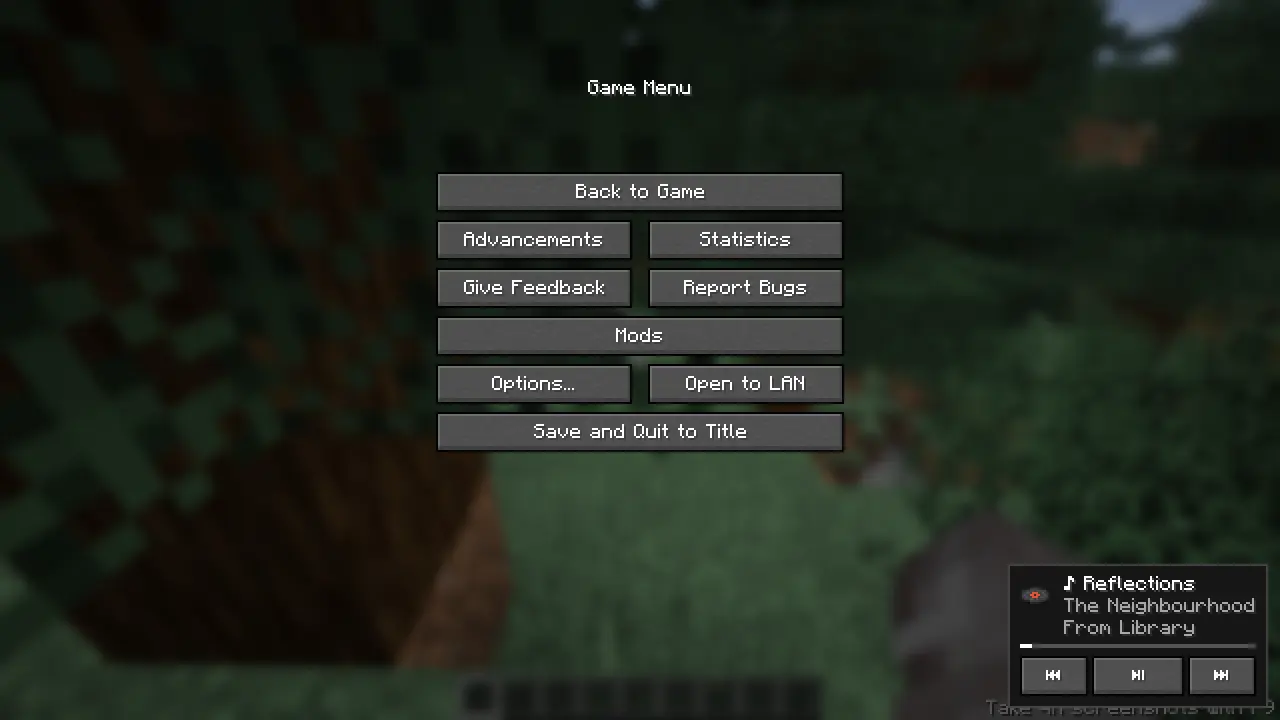
Auto-Adjusting control UI based on track details.
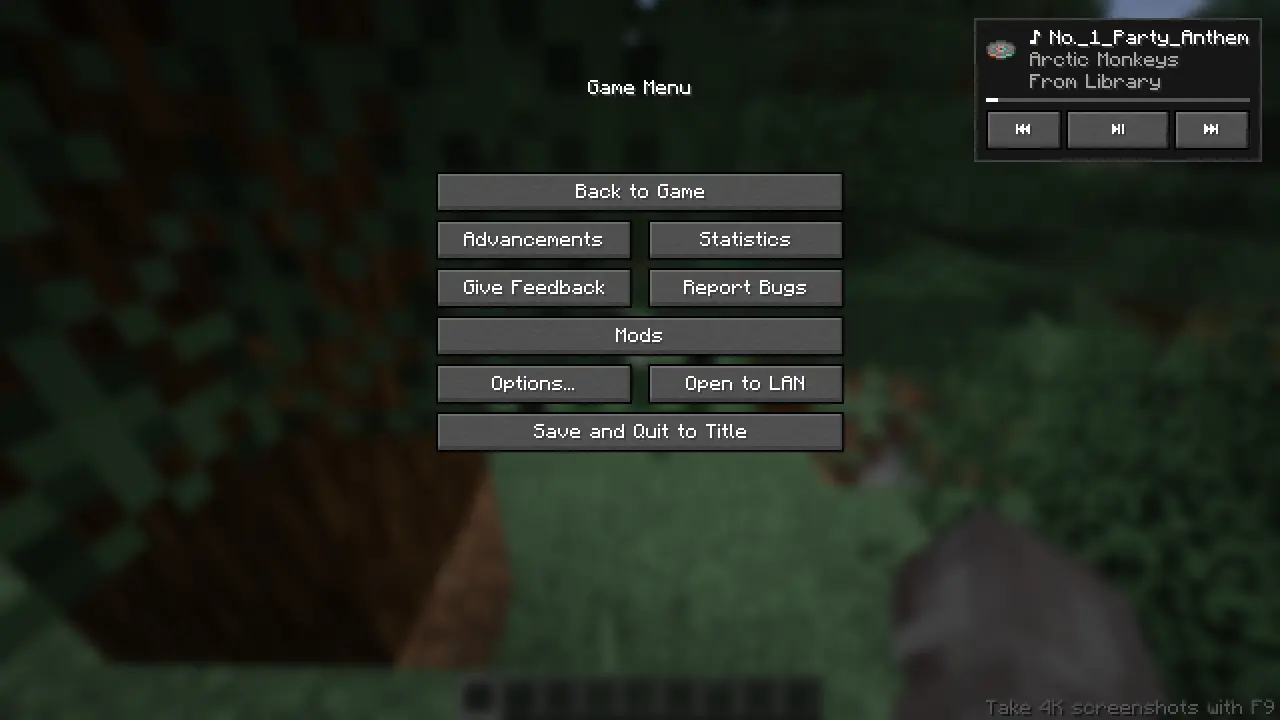
Move the control UI to your preferred place with your mouse!
Features
Commands are available to use the player.
/mewsic play
/mewsic pause
/mewsic next
/mewsic previous
/mewsic shuffle
/mewsic repeat <mode> (where mode can be "on","off","one")
/mewsic playlist <playlistname> (playlist names are auto parsed on first connection)
/mewsic track <trackname> (track names are parsed on first connection)
/mewsic reconnect (drop the existing connection witht the app and re-initiates the websocket, use after adding/removing songs, adding/removing playlists)
Issues related to this mod is accepted in the Mewsic github issue tracker!
Project description from Modrinth.
Pick your setup
Mewsic-Bridge by Minecraft version and loader
Choose the version and loader you play, then open the matching release.
Minecraft version
26.2
1 loader buildMinecraft version
26.1.2
1 loader buildMinecraft version
26.1.1
1 loader buildMinecraft version
26.1
1 loader buildMinecraft version
1.21.11
1 loader buildCheck the dependencies, then try the file in a copied instance before changing a world you care about.
Recent files
Mewsic-Bridge versions and loaders
2.0
mewsic-bridge-v2.0+26.3.jar
21 Nov 2026
Client Required Server Not supported Dependencies No extras listed Listed on Release listing
Check the 26.3 · Fabric setup 26.3Fabric release
1.1
mewsic-bridge-1.1+26.1.x.jar
21 Jun 2026
Client Required Server Not supported Dependencies 1 required · 1 unchecked Listed on Release listing
Check the 26.2 · Fabric setup 26.126.1.126.1.226.2 release
1.0
mewsic-bridge-1.0.jar
21 Jun 2026
Client Required Server Not supported Dependencies 1 required · 1 unchecked Listed on Release listing
Check the 1.21.11 · Fabric setup 1.21.11Fabric release
Looking for an older file? The official Modrinth project page is in Resources.
 mod
CurseForge + Modrinth · Minecraft
Neo ECO AE Extension
Neo ECO AE Extension is an addon for Applied Energistics 2, Provides higher-performance components
 mod
CurseForge + Modrinth · Minecraft
Sodium/Embeddium Leaf Culling
A continuation of SodiumLeafCulling for Sodium/Embeddium. (Old: SodiumLeafCulling-Unofficial)
 mod
Modrinth · Minecraft
Progressionism
Aims to add evolutionary mechanics and aspects of real-life. Still in development!