Fabric API Needed by old-gui 0.0.2
requiredMatching file found Matched file: 0.166.0+26.3
Modrinth · Minecraft mod
this adds the old Gui look to it
Quick answer
old-gui 0.0.2 targets 26.3 with Fabric. It must be installed on the client. Do not install it on the dedicated server. All 1 required mods have matching files.
Where it goes
It must be installed on the client. Do not install it on the dedicated server.
This file is marked client-only.
0.0.2 on 26.3. Every mod below is checked against that same setup.
Install Fabric API first. We found matching files for this game-version and loader setup.
We only count dependency files that match this setup. A file for another loader does not fill the gap.
Before you install it
Built for old-gui 0.0.2 on 26.3. Pick another file and the loader, install side or required mods may change.
Use 0.0.2. It targets 26.3 with Fabric; another release may have different loader, side or dependency requirements.
Install Fabric API first. We found matching files for this game-version and loader setup.
It must be installed on the client. Do not install it on the dedicated server.
Use the “Get this file” button beside 0.0.2. It opens that exact file at the source.
About this project
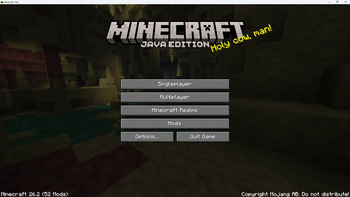
Old GUI brings back the classic text-button menus that were replaced in Minecraft 26.2, restoring both the Title Screen and the Pause Menu to their familiar pre-26.2 layouts.
Restores the classic vertical button stack: Singleplayer → Multiplayer → Minecraft Realms
Options and Quit sit side-by-side at the bottom, just like they used to
If ModMenu is installed, a full-width Mods button is added between Realms and the Options row
Pause Menu
be prepare there will be bugs for now
Project description from Modrinth.
Pick your setup
Choose the version and loader you play, then open the matching release.
Check the dependencies, then try the file in a copied instance before changing a world you care about.
Recent files
old-gui-1.1.0.jar
17 Sept 2026
Looking for an older file? The official Modrinth project page is in Resources.
 mod
This mod displays your inventory directly on the HUD without needing to open it.
 mod
A soulslike RPG overhaul: earn runes, level eight attributes at Ember Shrines, wield 74 scaling armaments and hunt seven Sovereigns.
 mod
Sick of wasting time with Minecraft’s slow launcher just to change your skin? Quick Skin lets you swap skins instantly even on “offline” servers and gives you access to every official Minecraft cape.