Minecraft version
Back to mods 
Modrinth · Minecraft mod
Hardcore Revive+ Classic
An add-on to your world that allows you to revive your friends in Hardcore Mode.
Choose a version Pick your version below, then grab the matching file.
Quick answer
Which Hardcore Revive+ Classic release matches 1.21.3 Forge?
Best match for your filters 1.7.4+mod
Game version 1.21.2, 1.21.3, 1.21.4
Loader Fabric, Forge, NeoForge
Hardcore Revive+ Classic 1.7.4+mod targets 1.21.2, 1.21.3, 1.21.4 with Fabric, Forge, NeoForge. Installation on the client is optional. Installation on the dedicated server is optional. No extra mods listed for this file.
Where it goes
Is Hardcore Revive+ Classic required on the client, server, or both?
Installation on the client is optional. Installation on the dedicated server is optional.
Client Optional
Dedicated server Optional
Loader for this release Fabric, Forge, NeoForge
Required install it here Optional supported, not mandatory Not supported do not install here Source doesn’t say do not assume
The source marks this as usable on both the client and server.
What else does Hardcore Revive+ Classic 1.7.4+mod need?
1.7.4+mod on 1.21.3 Forge. Every mod below is checked against that same setup.
This file does not list any required mods. Do not add a library just because a different file uses it.
This file does not list any required or optional mods.
Before you install it
Add Hardcore Revive+ Classic without breaking your instance.
Built for Hardcore Revive+ Classic 1.7.4+mod on 1.21.3 Forge. Pick another file and the loader, install side or required mods may change.
- 01
Stick to this file
Use 1.7.4+mod. It targets 1.21.2, 1.21.3, 1.21.4 with Fabric, Forge, NeoForge; another release may have different loader, side or dependency requirements.
- 02
Bring the mods it needs
This file does not list any required mods. Do not add a library just because a different file uses it.
- 03
Put it on the correct side
Installation on the client is optional. Installation on the dedicated server is optional.
- 04
Pick the file you checked
Use the “Get this file” button beside 1.7.4+mod. It opens that exact file at the source.
About this project
What does Hardcore Revive+ Classic add?
Overview
You need Hardcore mode enabled for this to work!
Have you ever played Hardcore mode with your friends and one of you died unfairly or in a silly way? Instead of restarting your world, Hardcore Revive+ aims to keep the thrill of Hardcore mode while making death less punishing.
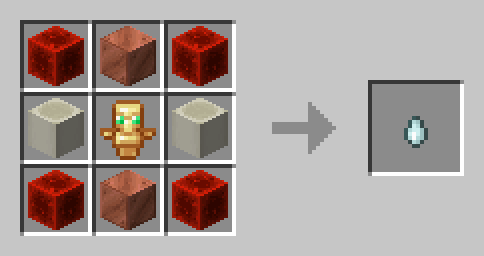
Instead of permanently being in spectator mode after dying, you become a ghost -- a spectator that is still able to interact with the world and other players. To be revived, another player (if they like you) must craft a Soul Charm and throw it at your ghost.
Soul Charm Recipe
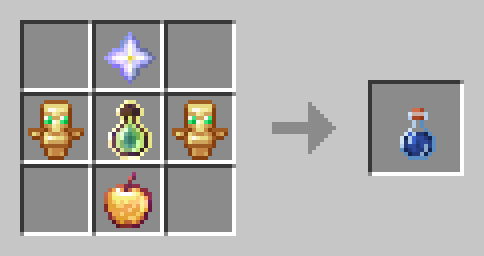
Players can also craft a Life Jelly, a potion that grants the player two extra hearts until death. Upon consumption, the potion also grants Absorption 4 and Regeneration 5. (The recipe includes an enchanted golden apple)
Life Jelly Recipe
Configuration
You can configure settings in-game via the command /function hcrplus:_settings.
Features
- You can can revive other players who have died in Hardcore mode
- Ghosts can possess other players or mobs to grant either buffs or debuffs
- Health is reduced after being revived or crafting a Soul Charm
- Friends not included
Incompatibilities
- Hardcore Revive Reloaded
- Any "Unlock all recipes" data pack or mod
Project description from Modrinth.
Pick your setup
Hardcore Revive+ Classic by Minecraft version and loader
Choose the version and loader you play, then open the matching release.
Minecraft version
1.21.3
5 loader buildsMinecraft version
1.21.2
5 loader buildsMinecraft version
1.21.1
5 loader buildsMinecraft version
1.21
5 loader buildsMinecraft version
1.20.6
5 loader buildsMinecraft version
1.20.5
5 loader buildsMinecraft version
1.20.4
5 loader buildsMinecraft version
1.20.3
5 loader buildsMinecraft version
1.20.2
5 loader buildsMinecraft version
1.20.1
5 loader buildsMinecraft version
1.20
5 loader buildsShowing the newest 12 of 20 game versions. Older files are in the list below.
Check the dependencies, then try the file in a copied instance before changing a world you care about.
Recent files
Hardcore Revive+ Classic versions and loaders
1.7.4+mod
hardcore-revive-plus-1.7.4.jar
7 Jan 2025
Client Optional Server Optional Dependencies No extras listed Listed on Release listing
Check the 1.21.3 · Forge setup 1.21.21.21.31.21.4Fabric release
1.7.3+mod
hardcore-revive-plus-1.7.3.jar
3 Jan 2025
Client Optional Server Optional Dependencies No extras listed Listed on Release listing
Check the 1.21.3 · Forge setup 1.21.21.21.31.21.4Fabric release
1.7.2+mod
hardcore-revive-plus-1.7.2.jar
5 Dec 2024
Client Optional Server Optional Dependencies No extras listed Listed on Release listing
Check the 1.21.3 · Forge setup 1.21.21.21.31.21.4Fabric release
1.7.1+mod
hardcore-revive-plus-1.7.1.jar
2 Dec 2024
Client Optional Server Optional Dependencies No extras listed Listed on Release listing
Check the 1.21.3 · Forge setup 1.21.21.21.3FabricForge release
1.7+mod
hardcore-revive-plus-1.7.jar
2 Dec 2024
Client Optional Server Optional Dependencies No extras listed Listed on Release listing
Check the 1.21.3 · Forge setup 1.21.21.21.3FabricForge release
1.6.2+mod
hardcore-revive-plus-1.6.2.jar
23 Oct 2024
Client Optional Server Optional Dependencies No extras listed Listed on Release listing
Check the 1.21.3 · Forge setup 1.21.21.21.3FabricForge release
Looking for an older file? The official Modrinth project page is in Resources.
 mod
Modrinth · Minecraft
Extreme Randomizer
Randomises block drops, mob drops, chest loot, fishing, crafting and smelting. Seed rolls itself, settings by click. Datapack, Fabric and Paper.
 mod
Modrinth · Minecraft
Redbyte
Adds robots that can be programmed in-game using a custom simple language.
 mod
Modrinth · Minecraft
Afterburner
An all-in-one performance mod that makes Minecraft run smoother and faster by optimizing everything from chunk rendering to world simulation.