Minecraft version
Back to mods 
Modrinth · Minecraft mod
AsteorBar
A simple mod to display player's status in HUD and mob's health using slim bars.
Choose a version Pick your version below, then grab the matching file.
This page is having a moment, so a few details may be a little behind.
Quick answer
Which AsteorBar release should I use?
Latest stable file 1.5.3
Game version 1.21.11
Loader NeoForge
AsteorBar 1.5.3 targets 1.21.11 with NeoForge. Installation on the client is optional. Installation on the dedicated server is optional. No extra mods listed for this file.
Where it goes
Is AsteorBar required on the client, server, or both?
Installation on the client is optional. Installation on the dedicated server is optional.
Client Optional
Dedicated server Optional
Loader for this release NeoForge
Required install it here Optional supported, not mandatory Not supported do not install here Source doesn’t say do not assume
The source marks this as usable on both the client and server.
What else does AsteorBar 1.5.3 need?
1.5.3. Change the file and its required mods may change too.
This file does not list any required mods. Do not add a library just because a different file uses it.
This file does not list any required or optional mods.
Before you install it
Add AsteorBar without breaking your instance.
Built for AsteorBar 1.5.3. Pick another file and the loader, install side or required mods may change.
- 01
Stick to this file
Use 1.5.3. It targets 1.21.11 with NeoForge; another release may have different loader, side or dependency requirements.
- 02
Bring the mods it needs
This file does not list any required mods. Do not add a library just because a different file uses it.
- 03
Put it on the correct side
Installation on the client is optional. Installation on the dedicated server is optional.
- 04
Pick the file you checked
Use the “Get this file” button beside 1.5.3. It opens that exact file at the source.
About this project
What does AsteorBar add?
AsteorBar
A simple mod to display player's status using slim bars and display entity's status using bars.
Get support: discord
See changelog here.
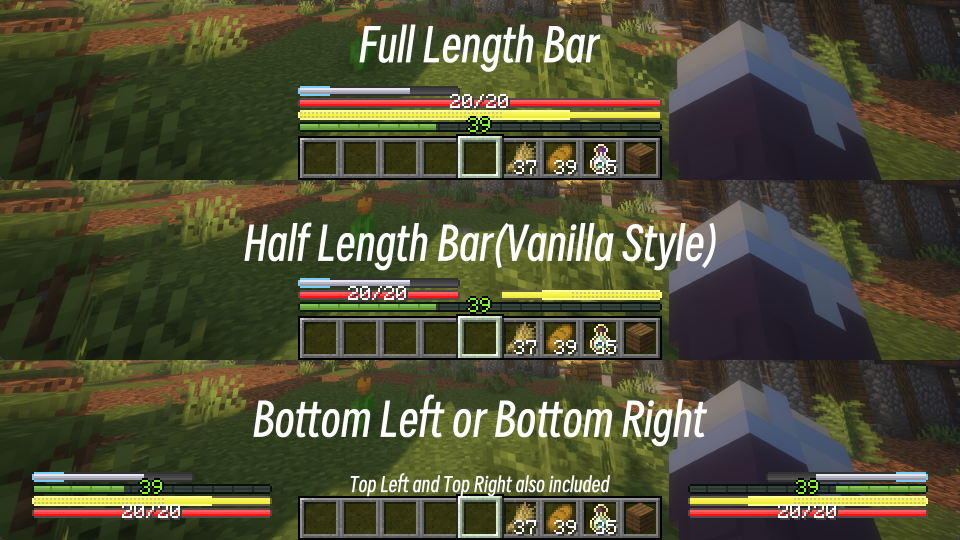
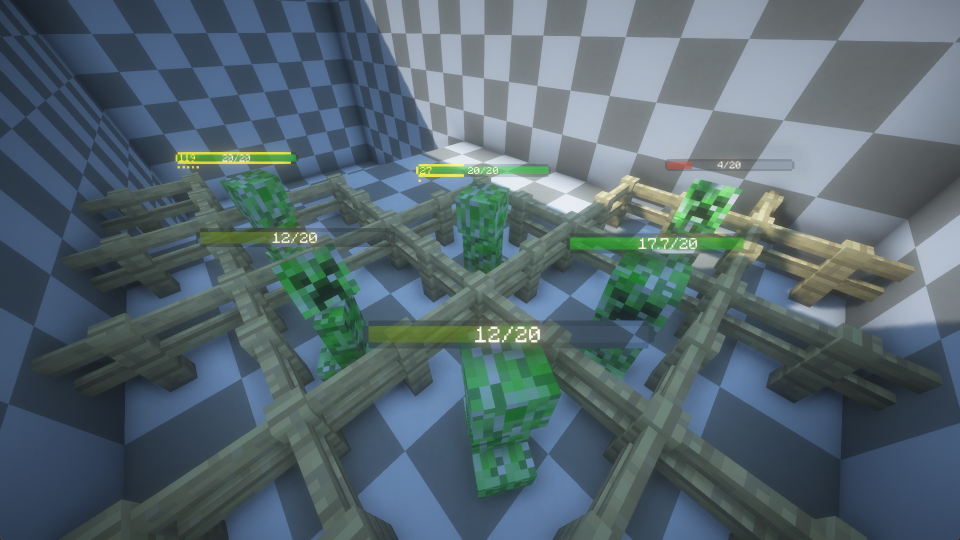
Features
HUD Overlay
- Vanilla feel. Bars can blink as vanilla hearts do(on regen health, on hurt, and so on).
- Display health, hunger, mount health and more.
- Change the color of the bars while be with regeneration, poison, wither or starvation effects. Frozen also supported.
- Won't be affected by max health. Suitable for situations with high max health.
- Display health and absorption together.
- Display saturation and exhaustion together with hunger.
- Display experience value.
- Bars will flash and shake when the player has low health or hunger.
- Use stacked bars to display health.
- Multiple layout, vanilla and corner included.
- Hide bars when the value has not changed for a while.
- Configurable. You can change whether to display some bars.
Entity info
- Display living entity's health and max health.
- Display absorption of living entity.
- Very simple with good look.
- Dynamic color of health bar. The color will change when the entity's health is low.
- Highly configurable. You can change whether to display bars in many situations. And you can change many properties of the bars(e.g. color,
scale, offset...).
Compatibility
- Mekanism: Forge(1.18.2, 1.19.2, 1.20.1)
- Tough As Nails: Forge(1.18.2, 1.19.2, 1.20.1, 1.20.2, 1.20.4), Fabric(1.19.2, 1.20.1, 1.20.2, 1.20.4, 1.20.6), NeoForge(1.20.2, 1.20.4,
1.20.6) - Thirst Was Taken: Forge(1.18.2, 1.19.2, 1.20.1)
- Dehydration: Fabric(1.18.2, 1.19.2, 1.20.1)
- Iron's Spells 'n Spellbooks: Forge(1.18.2, 1.19.2, 1.20.1)
- Light Shield: Forge(1.20.1), NeoForge(1.20.4)
- Parcool: Forge(1.18.2, 1.19.2, 1.19.3, 1.19.4, 1.20.1, 1.20.2)
- Feathers: Forge(1.18.2, 1.19.2, 1.19.3, 1.19.4, 1.20.1)
- Apple Skin: Forge(1.18.2, 1.19.2, 1.19.3, 1.19.4, 1.20.1, 1.20.2, 1.20.4), Fabric(1.18.2,1.19.2,1.19.4, 1.20.1, 1.20.2, 1.20.4, 1.20.6),
NeoForge(1.20.2, 1.20.4, 1.20.6) - Vampirism: Forge(1.18.2, 1.19.2, 1.19.3, 1.19.4, 1.20.1), NeoForge(1.20.4)
- Superior Shields: Forge(1.18.2, 1.19.2, 1.20.1)
- Homeostatic: Forge(1.18.2, 1.19.2, 1.19.4, 1.20.1)
- TerraFirmaCraft: Forge(1.18.2, 1.20.1)
- Botania: Forge(1.18.2, 1.19.2, 1.20.1)
- Ars Nouveau: Forge(1.18.2, 1.19.2, 1.20.1)
Notes
Data Sync
The following features will not take effect on servers because they are not synced in vanilla Minecraft
- Saturation and exhaustion
- Absorption of living entities
This plugin for Spigot/Paper server can sync saturation and exhaustion to client.
Compatibility
Due to the limitation of the API, this mod couldn't automatically turn off some third party's mod.
For a better experience, you will need to turn off their HUD manually.
Usually you can achieve this by setting the enable option in their config file to false.
For those mods that don't provide such an option, you may find offset or location options in their config file.
By setting these values to a large number(above 1000 is enough in most cases), you can move their HUD out of the screen, which is equivalent
to turning them off.
Known Incompatibility
Here are some known incompatibility with other mods, and currently there is no solution for them.
- Oculus: while using shaders, living entity's health bar may not display correctly.
Q&A
How to change the layout of HUD?
Press F8 by default, the HUD style will be cycled, include vanilla layout.
How to disable HUD or Entity Bar, I do only need one of the features?
HUD can be closed by pressing F8, Entity Bar can be close by pressing F10, you can also disable these features in the config file.
How to configure the mod in game?
For Fabric version, you'll need to install Mod Menu. For Other version, you can use any in-game configuration editor, such as configured.
The bars are too close and the text is stacking on each other.
You can change the text scale in config, 1.0 should be well with force Unicode, and I recommend 0.75 if you are using vanilla font.
How to change color in config, I don't understand what these numbers mean.
Colors are in ARGB hex format, but displayed as dec values. You can use Windows calculator, switch to programmer mode, click the 'QWORD' until it becomes 'DWORD', then click on HEX and input your ARGB color. The DEC value is just what you needed.
Project description from Modrinth.
Pick your setup
AsteorBar by Minecraft version and loader
Choose the version and loader you play, then open the matching release.
Minecraft version
1.21.10
3 loader buildsMinecraft version
1.21.9
3 loader buildsMinecraft version
1.21.8
3 loader buildsMinecraft version
1.21.7
3 loader buildsMinecraft version
1.21.6
3 loader buildsMinecraft version
1.21.5
3 loader buildsMinecraft version
1.21.4
3 loader buildsMinecraft version
1.21.3
3 loader buildsMinecraft version
1.21.1
3 loader buildsMinecraft version
1.21
3 loader buildsMinecraft version
1.20.6
3 loader buildsShowing the newest 12 of 18 game versions. Older files are in the list below.
Check the dependencies, then try the file in a copied instance before changing a world you care about.
Recent files
AsteorBar versions and loaders
1.5.3
asteorbar-neoforge-1.21.11-1.5.3.jar
20 Feb 2026
Client Optional Server Optional Dependencies No extras listed Listed on Release listing
Check the 1.21.11 · NeoForge setup 1.21.11NeoForge release
1.5.3
asteorbar-fabric-1.21.11-1.5.3.jar
20 Feb 2026
Client Optional Server Optional Dependencies No extras listed Listed on Release listing
Check the 1.21.11 · Fabric setup 1.21.11Fabric release
1.5.3
asteorbar-forge-1.21.11-1.5.3.jar
20 Feb 2026
Client Optional Server Optional Dependencies No extras listed Listed on Release listing
Check the 1.21.11 · Forge setup 1.21.11Forge release
1.5.3
asteorbar-neoforge-1.21.9-1.5.3.jar
18 Oct 2025
Client Optional Server Optional Dependencies No extras listed Listed on Release listing
Check the 1.21.10 · NeoForge setup 1.21.91.21.10NeoForge release
1.5.3
asteorbar-fabric-1.21.9-1.5.3.jar
18 Oct 2025
Client Optional Server Optional Dependencies No extras listed Listed on Release listing
Check the 1.21.10 · Fabric setup 1.21.91.21.10Fabric release
1.5.3
asteorbar-forge-1.21.9-1.5.3.jar
18 Oct 2025
Client Optional Server Optional Dependencies No extras listed Listed on Release listing
Check the 1.21.10 · Forge setup 1.21.91.21.10Forge release
1.5.3
asteorbar-neoforge-1.21.6-1.5.3.jar
18 Oct 2025
Client Optional Server Optional Dependencies No extras listed Listed on Release listing
Check the 1.21.8 · NeoForge setup 1.21.61.21.71.21.8NeoForge release
1.5.3
asteorbar-fabric-1.21.6-1.5.3.jar
18 Oct 2025
Client Optional Server Optional Dependencies No extras listed Listed on Release listing
Check the 1.21.8 · Fabric setup 1.21.61.21.71.21.8Fabric release
1.5.3
asteorbar-forge-1.21.6-1.5.3.jar
18 Oct 2025
Client Optional Server Optional Dependencies No extras listed Listed on Release listing
Check the 1.21.8 · Forge setup 1.21.61.21.71.21.8Forge release
1.5.3
asteorbar-neoforge-1.21.5-1.5.3.jar
18 Oct 2025
Client Optional Server Optional Dependencies No extras listed Listed on Release listing
Check the 1.21.5 · NeoForge setup 1.21.5NeoForge release
1.5.3
asteorbar-fabric-1.21.5-1.5.3.jar
18 Oct 2025
Client Optional Server Optional Dependencies No extras listed Listed on Release listing
Check the 1.21.5 · Fabric setup 1.21.5Fabric release
1.5.3
asteorbar-forge-1.21.5-1.5.3.jar
18 Oct 2025
Client Optional Server Optional Dependencies No extras listed Listed on Release listing
Check the 1.21.5 · Forge setup 1.21.5Forge release
Looking for an older file? The official Modrinth project page is in Resources.