Quick answer
Which Slotted Armor HUD release should I use?
Latest stable file 1.2.5
Game version 1.20, 1.20.1
Loader Fabric
Slotted Armor HUD 1.2.5 targets 1.20, 1.20.1 with Fabric. It must be installed on the client. Do not install it on the dedicated server. No extra mods listed for this file.
Where it goes
Is Slotted Armor HUD required on the client, server, or both?
It must be installed on the client. Do not install it on the dedicated server.
Client Required
Dedicated server Not supported
Loader for this release Fabric
Required install it here Optional supported, not mandatory Not supported do not install here Source doesn’t say do not assume
This file is marked client-only.
What else does Slotted Armor HUD 1.2.5 need?
1.2.5. Change the file and its required mods may change too.
This file does not list any required mods. Do not add a library just because a different file uses it.
Mod Menu Optional for Slotted Armor HUD 1.2.5 optionalMatching file found Matched file: 7.2.2
Matching file found Matched file: 11.1.136+fabric
We only count dependency files that match this setup. A file for another loader does not fill the gap.
Before you install it
Add Slotted Armor HUD without breaking your instance.
Built for Slotted Armor HUD 1.2.5. Pick another file and the loader, install side or required mods may change.
- 01
Stick to this file
Use 1.2.5. It targets 1.20, 1.20.1 with Fabric; another release may have different loader, side or dependency requirements.
- 02
Bring the mods it needs
This file does not list any required mods. Do not add a library just because a different file uses it.
- 03
Put it on the correct side
It must be installed on the client. Do not install it on the dedicated server.
- 04
Pick the file you checked
Use the “Get this file” button beside 1.2.5. It opens that exact file at the source.
About this project
What does Slotted Armor HUD add?
Slotted Armor HUD
This mod adds an armor HUD that retains Minecraft's default appearance, without the extra text and numbers, and adapts to resource packs that change the hotbar's appearance. The armor HUD can be easily configured when paired with the Cloth Config and Mod Menu mods.
If the mod hasn't been updated for the latest Minecraft version but you've found that it still works without issue, let me know with this GitHub template. (No guarantees though, since I have shifted my focus to other work.)

An aesthetic that blends right in to Minecraft's HUD
Features
- A customizable interface
- Orient it vertically or horizontally.
- Place it to the left or right, and to the top or bottom.
- Choose when and how the armor HUD shows itself.
- Move it anywhere by offsetting it!
- Adaptive elements
- The armor HUD will shift away from the hotbar to allow room for the offhand slot.
- The chat box, boss bars, status effect icons, and subtitles will make room for the armor HUD when needed.
- Extra customization
- If resource packs do not work, try experimenting with these settings. :D
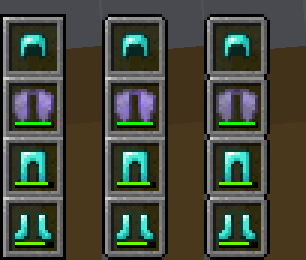
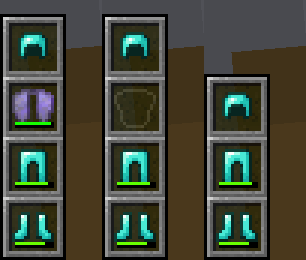
Forked from BerdinskiyBear's Armor HUD mod, updated and with new features.
Configuration
This mod can be configured with the Cloth Config and Mod Menu mods.
With these mods installed, a "Mods" button will appear on the title and pause screens, and clicking on it should show a list of installed mods. This mod should appear on that list, and hovering over it should show a button that leads to the config screen.
It can also be configured via the armor_hud.json config file with a text editor. This can be found in Minecraft's directory folder, then in the config folder.
Project description from Modrinth.
Pick your setup
Slotted Armor HUD by Minecraft version and loader
Choose the version and loader you play, then open the matching release.
Minecraft version
1.21.1
1
loader build Minecraft version
1.21
1
loader build Minecraft version
1.20.6
1
loader build Minecraft version
1.20.5
1
loader build Minecraft version
1.20.4
1
loader build Minecraft version
1.20.3
1
loader build Minecraft version
1.20.2
1
loader build Minecraft version
1.20.1
1
loader build Minecraft version
1.20
1
loader build Minecraft version
1.19.4
1
loader build Minecraft version
1.19.3
1
loader build Minecraft version
1.19.2
1
loader build Showing the newest 12 of 17 game versions.
Older files are in the list below.
Check the dependencies, then try the file in a copied instance before changing a world you care about.
Recent files
Slotted Armor HUD versions and loaders
slotted-armor-hud-1.2.5.jar
27 Jun 2024
Client Required Server Not supported Dependencies No extras listed Listed on Release listing
Check the 1.20.1 · Fabric setup → slotted-armor-hud-1.2.5.jar
27 Jun 2024
Client Required Server Not supported Dependencies No extras listed Listed on Release listing
Check the 1.21.1 · Fabric setup → slotted-armor-hud-1.2.4.jar
24 Jun 2024
Client Required Server Not supported Dependencies No extras listed Listed on Release listing
Check the 1.21 · Fabric setup → slotted-armor-hud-1.2.4.jar
24 Jun 2024
Client Required Server Not supported Dependencies No extras listed Listed on Release listing
Check the 1.20.6 · Fabric setup → 1.20.51.20.6Fabric release
slotted-armor-hud-1.2.4.jar
24 Jun 2024
Client Required Server Not supported Dependencies No extras listed Listed on Release listing
Check the 1.20.4 · Fabric setup → 1.20.21.20.31.20.4Fabric release
slotted-armor-hud-1.2.4.jar
24 Jun 2024
Client Required Server Not supported Dependencies No extras listed Listed on Release listing
Check the 1.20.1 · Fabric setup → slotted-armor-hud-1.2.4.jar
24 Jun 2024
Client Required Server Not supported Dependencies No extras listed Listed on Release listing
Check the 1.19.4 · Fabric setup → slotted-armor-hud-1.2.3.jar
24 Jun 2024
Client Required Server Not supported Dependencies No extras listed Listed on Release listing
Check the 1.19.3 · Fabric setup → slotted-armor-hud-1.2.3.jar
24 Jun 2024
Client Required Server Not supported Dependencies No extras listed Listed on Release listing
Check the 1.19.2 · Fabric setup → 1.191.19.11.19.2Fabric release
slotted-armor-hud-1.2.3.jar
24 Jun 2024
Client Required Server Not supported Dependencies No extras listed Listed on Release listing
Check the 1.18.2 · Fabric setup → 1.181.18.11.18.2Fabric release
slotted-armor-hud-1.2.2.jar
15 Jun 2024
Client Required Server Not supported Dependencies No extras listed Listed on Release listing
Check the 1.21 · Fabric setup → slotted-armor-hud-1.2.1.jar
14 Jun 2024
Client Required Server Not supported Dependencies No extras listed Listed on Release listing
Check the 1.21 · Fabric setup → 