Cloth Config API Optional for Item Model Browser 1.5.1
optionalMatching file found Matched file: 26.3.159+fabric

Modrinth · Minecraft mod
Adds a widget to the anvil GUI showing every model currently loaded by any resource packs. Clicking an item automatically sets its name in the anvil, making it easy to apply models using the Model Applier datapack.
Quick answer
Item Model Browser 1.5.1 targets 26.3 with Fabric. Installation on the client is optional. Installation on the dedicated server is optional. All 1 required mods have matching files.
Where it goes
Installation on the client is optional. Installation on the dedicated server is optional.
The source marks this as usable on both the client and server.
1.5.1. Change the file and its required mods may change too.
Install Fabric API first. We found matching files for this game-version and loader setup.
We only count dependency files that match this setup. A file for another loader does not fill the gap.
Before you install it
Built for Item Model Browser 1.5.1. Pick another file and the loader, install side or required mods may change.
Use 1.5.1. It targets 26.3 with Fabric; another release may have different loader, side or dependency requirements.
Install Fabric API first. We found matching files for this game-version and loader setup.
Installation on the client is optional. Installation on the dedicated server is optional.
Use the “Get this file” button beside 1.5.1. It opens that exact file at the source.
About this project
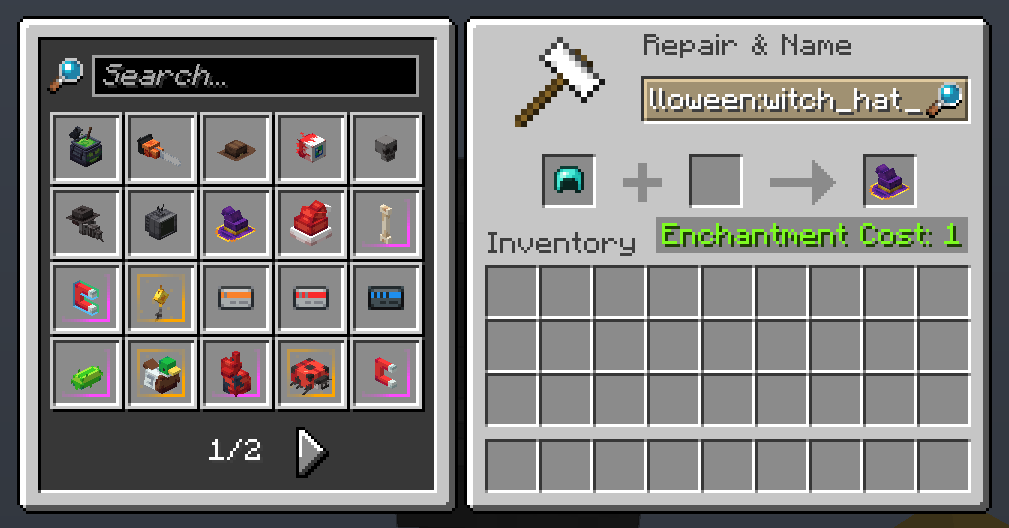
Get any resource pack-loaded item model in survival or creative with ease!
The mod adds a widget to the anvil GUI displaying every model currently loaded by any resource packs. If installed on the server-side, clicking an item automatically sets its item model and makes the item equippable on the player's head.
The mod also adds a tab in the Creative inventory for convenient access to every loaded model in Creative Mode.
Made with ❤️ by deborn

Project description from Modrinth.
Pick your setup
Choose the version and loader you play, then open the matching release.
Check the dependencies, then try the file in a copied instance before changing a world you care about.
Recent files
modelbrowser-1.5.1.jar
29 Sept 2026
modelbrowser-1.5.0.jar
30 Aug 2026
modelbrowser-1.4.1-beta.jar
18 Jun 2026
modelbrowser-1.4.0-beta.jar
20 Apr 2026
modelbrowser-1.3.2.jar
2 Mar 2026
modelbrowser-1.3.1.jar
8 Jan 2026
modelbrowser-1.3.0.jar
30 Nov 2025
model-browser-1.2.2.jar
26 Nov 2025
model-browser-1.2.1.jar
25 Nov 2025
model-browser-1.2.0.jar
23 Nov 2025
model-browser-1.0.1.jar
18 Nov 2025
model-browser-1.0.0.jar
17 Nov 2025
Looking for an older file? The official Modrinth project page is in Resources.
 mod
Discover Plants, Animals and Monsters with a Spyglass. Collect them all and take notes in your personal Field Guide!
 mod
A vanilla enhancing mod that aims to expand the food system with dynamic meals, while also adding stamina.
 mod
A fork of GriefPrevention that adds 3D subdivisions