Minecraft version
Back to mods 
Modrinth · Minecraft mod
Loot Bags
Discover rare loot bags from mob kills! Hunt for mobs and find epic rewards in these Loot Bags.
Choose a version Pick your version below, then grab the matching file.
Quick answer
Which Loot Bags release should I use?
Latest stable file 3.1+mod
Game version 1.21, 1.21.1, 1.21.2
Loader Fabric, Forge, NeoForge
Loot Bags 3.1+mod targets 1.21, 1.21.1, 1.21.2 with Fabric, Forge, NeoForge. Installation on the client is optional. Installation on the dedicated server is optional. No extra mods listed for this file.
Where it goes
Is Loot Bags required on the client, server, or both?
Installation on the client is optional. Installation on the dedicated server is optional.
Client Optional
Dedicated server Optional
Loader for this release Fabric, Forge, NeoForge
Required install it here Optional supported, not mandatory Not supported do not install here Source doesn’t say do not assume
The source marks this as usable on both the client and server.
What else does Loot Bags 3.1+mod need?
3.1+mod. Change the file and its required mods may change too.
This file does not list any required mods. Do not add a library just because a different file uses it.
This file does not list any required or optional mods.
Before you install it
Add Loot Bags without breaking your instance.
Built for Loot Bags 3.1+mod. Pick another file and the loader, install side or required mods may change.
- 01
Stick to this file
Use 3.1+mod. It targets 1.21, 1.21.1, 1.21.2 with Fabric, Forge, NeoForge; another release may have different loader, side or dependency requirements.
- 02
Bring the mods it needs
This file does not list any required mods. Do not add a library just because a different file uses it.
- 03
Put it on the correct side
Installation on the client is optional. Installation on the dedicated server is optional.
- 04
Pick the file you checked
Use the “Get this file” button beside 3.1+mod. It opens that exact file at the source.
About this project
What does Loot Bags add?

Loot Bags!
Discover six new types of loot bags—Common, Uncommon, Rare, Health, Epic and Mythic—when you defeat mobs! Each bag holds exciting and balanced rewards.
Varying Drop Rates
Not all mobs drop loot bags. Some are rarer than others, making every kill a thrilling chance for a special prize!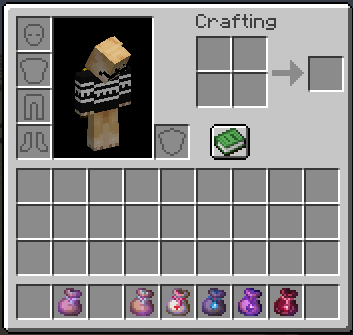
Hunt for Rewards
Keep your eyes peeled and your sword sharp. The rarer the loot bag, the greater the reward! Happy hunting!
Cheats
To get all available loot bags, type the following command:
/function loot_bags:cheat/give_all
Config
To modify the drop rates of the loot bags:
- Go to the datapack folder, then navigate to
Loot Bags [DP]/data/loot_bags/function/kill_entity.
You will find three files: Easy, Medium, and Hard.
...
execute store result score $x __variable__ run random value 1..<value to modify>
...
To increase the chances of getting a loot bag, decrease the value .
And do the opposite for each difficulty level.
Uninstalling
- Access the Chat Window.
- Enter the Uninstall Command and press Enter:
/function lbags:uninstall
Links


Project description from Modrinth.
Pick your setup
Loot Bags by Minecraft version and loader
Choose the version and loader you play, then open the matching release.
Minecraft version
1.21.1
5 loader buildsMinecraft version
1.21
5 loader buildsCheck the dependencies, then try the file in a copied instance before changing a world you care about.
Recent files
Loot Bags versions and loaders
3.1+mod
loot-bags-3.1.jar
3 Jan 2025
Client Optional Server Optional Dependencies No extras listed Listed on Release listing
Check the 1.21.2 · Fabric setup 1.211.21.11.21.2Fabric release
3.1
Loot Bags [DP].zip
3 Jan 2025
Client Optional Server Optional Dependencies No extras listed Listed on Release listing
Check the 1.21.2 · datapack setup 1.211.21.11.21.2datapack release
3+mod
loot-bags-3.jar
11 Dec 2024
Client Optional Server Optional Dependencies No extras listed Listed on Release listing
Check the 1.21.2 · Fabric setup 1.211.21.11.21.2Fabric release
3
Loot Bags [DP].zip
11 Dec 2024
Client Optional Server Optional Dependencies No extras listed Listed on Release listing
Check the 1.21.2 · datapack setup 1.211.21.11.21.2datapack release
2.2+mod
loot-bags-2.2.jar
8 Sept 2024
Client Optional Server Optional Dependencies No extras listed Listed on Release listing
Check the 1.21.1 · Fabric setup 1.211.21.1FabricForge release
2.2
Loot Bags DP.zip
8 Sept 2024
Client Optional Server Optional Dependencies No extras listed Listed on Release listing
Check the 1.21.1 · datapack setup 1.211.21.1datapack release
2.1+mod
loot-bags-2.1.jar
1 Sept 2024
Client Optional Server Optional Dependencies No extras listed Listed on Release listing
Check the 1.21.1 · Fabric setup 1.211.21.1FabricForge release
2.1
Loot Bags DP.zip
1 Sept 2024
Client Optional Server Optional Dependencies No extras listed Listed on Release listing
Check the 1.21.1 · datapack setup 1.211.21.1datapack release
Looking for an older file? The official Modrinth project page is in Resources.
 mod
mod CurseForge · Minecraft
Mythika: Creatures of Greek Myth
Creatures of Greek myth, brought to life.
 mod
mod CurseForge + Modrinth · Minecraft
LetMeEnchant
Removes many limits related with anvils and enchantments
 mod
mod CurseForge + Modrinth · Minecraft
Classic Peripherals
Addon for CC: Tweaked that adds a bunch of peripherals and tweaks.