Minecraft version
Back to mods 
Modrinth · Minecraft mod
Voice chat visualizer
Client-side Simple Voice Chat overlay that shows who is speaking near you. Face, name and a live voice waveform. Fully draggable and deeply configurable.
Choose a version Pick your version below, then grab the matching file.
Quick answer
Which Voice chat visualizer release should I use?
Latest stable file 1.0.0+26.3
Game version 26.3
Loader Fabric
Voice chat visualizer 1.0.0+26.3 targets 26.3 with Fabric. It must be installed on the client. Do not install it on the dedicated server. No extra mods listed for this file.
Where it goes
Is Voice chat visualizer required on the client, server, or both?
It must be installed on the client. Do not install it on the dedicated server.
Client Required
Dedicated server Not supported
Loader for this release Fabric
Required install it here Optional supported, not mandatory Not supported do not install here Source doesn’t say do not assume
This file is marked client-only.
What else does Voice chat visualizer 1.0.0+26.3 need?
1.0.0+26.3. Change the file and its required mods may change too.
This file does not list any required mods. Do not add a library just because a different file uses it.
This file does not list any required or optional mods.
Before you install it
Add Voice chat visualizer without breaking your instance.
Built for Voice chat visualizer 1.0.0+26.3. Pick another file and the loader, install side or required mods may change.
- 01
Stick to this file
Use 1.0.0+26.3. It targets 26.3 with Fabric; another release may have different loader, side or dependency requirements.
- 02
Bring the mods it needs
This file does not list any required mods. Do not add a library just because a different file uses it.
- 03
Put it on the correct side
It must be installed on the client. Do not install it on the dedicated server.
- 04
Pick the file you checked
Use the “Get this file” button beside 1.0.0+26.3. It opens that exact file at the source.
About this project
What does Voice chat visualizer add?
A client-side overlay for Simple Voice Chat. It lists the players you can hear right now, each with their face, their name and a waveform that follows how loud they talk. When a few people are standing around and someone starts speaking, you can see who it is.

Features
- Shows everyone you can currently hear: face, name and an animated indicator.
- The indicator follows the speaker's actual volume, so you can tell loud from quiet.
- Works with proximity, locational and group (static) audio.
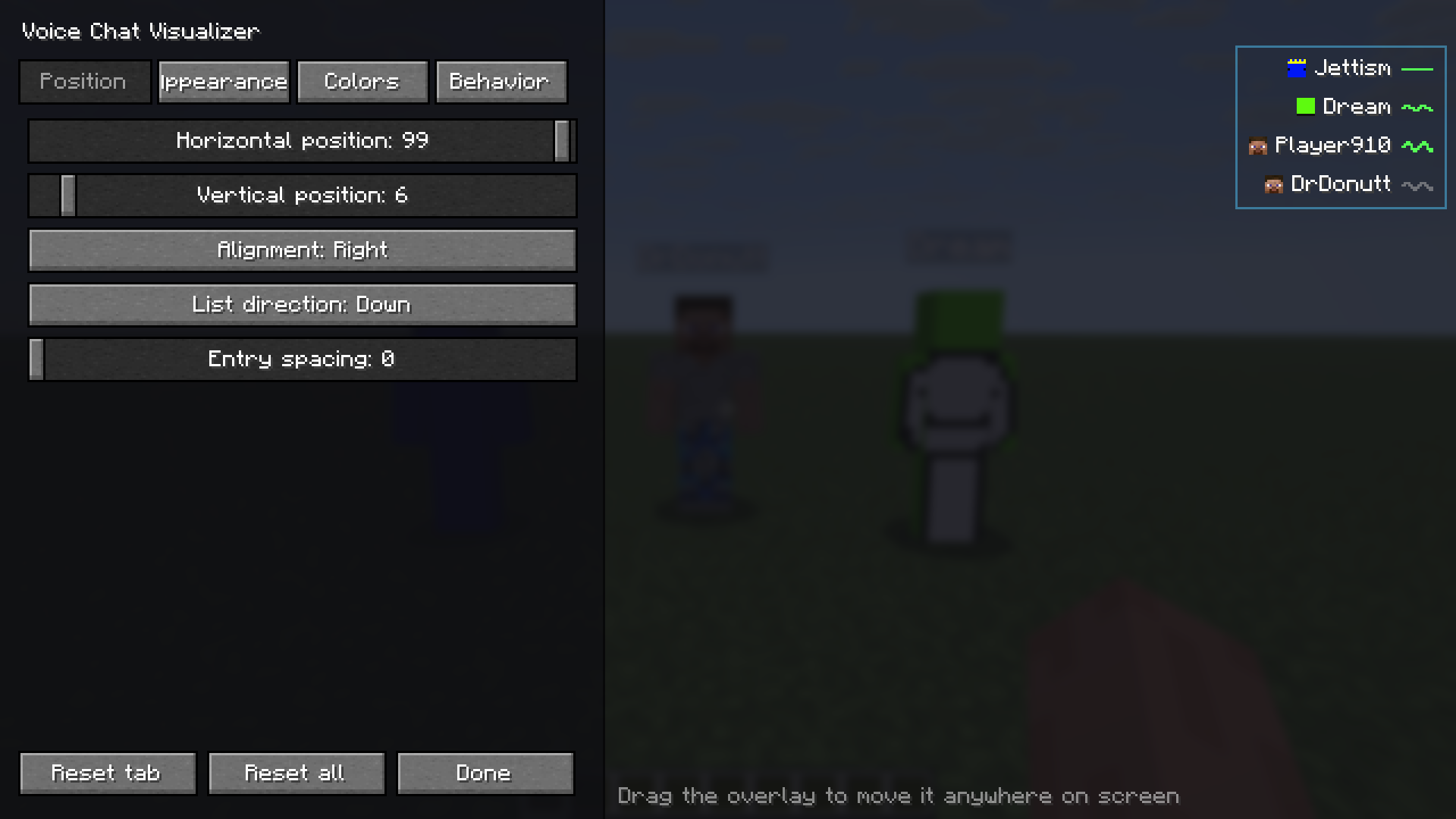
- You can drag the overlay anywhere on screen, align it left or right, and have the list grow up or down.
- The in-game configurator has four tabs (Position, Appearance, Colors, Behavior) and HSV and hex color pickers.
- The configurator shows a live preview with sample speakers, so you can set everything up alone, with no second player online.
- The settings panel moves to the opposite side of the screen from the overlay, so it never covers what you are positioning.
- The defaults are minimal: a small face and no background.
- Two keybinds: open the configurator (V by default) and toggle the overlay (not bound by default).
- Adds a Configure button to Mod Menu, if you have it installed.
- English and Polish translations.
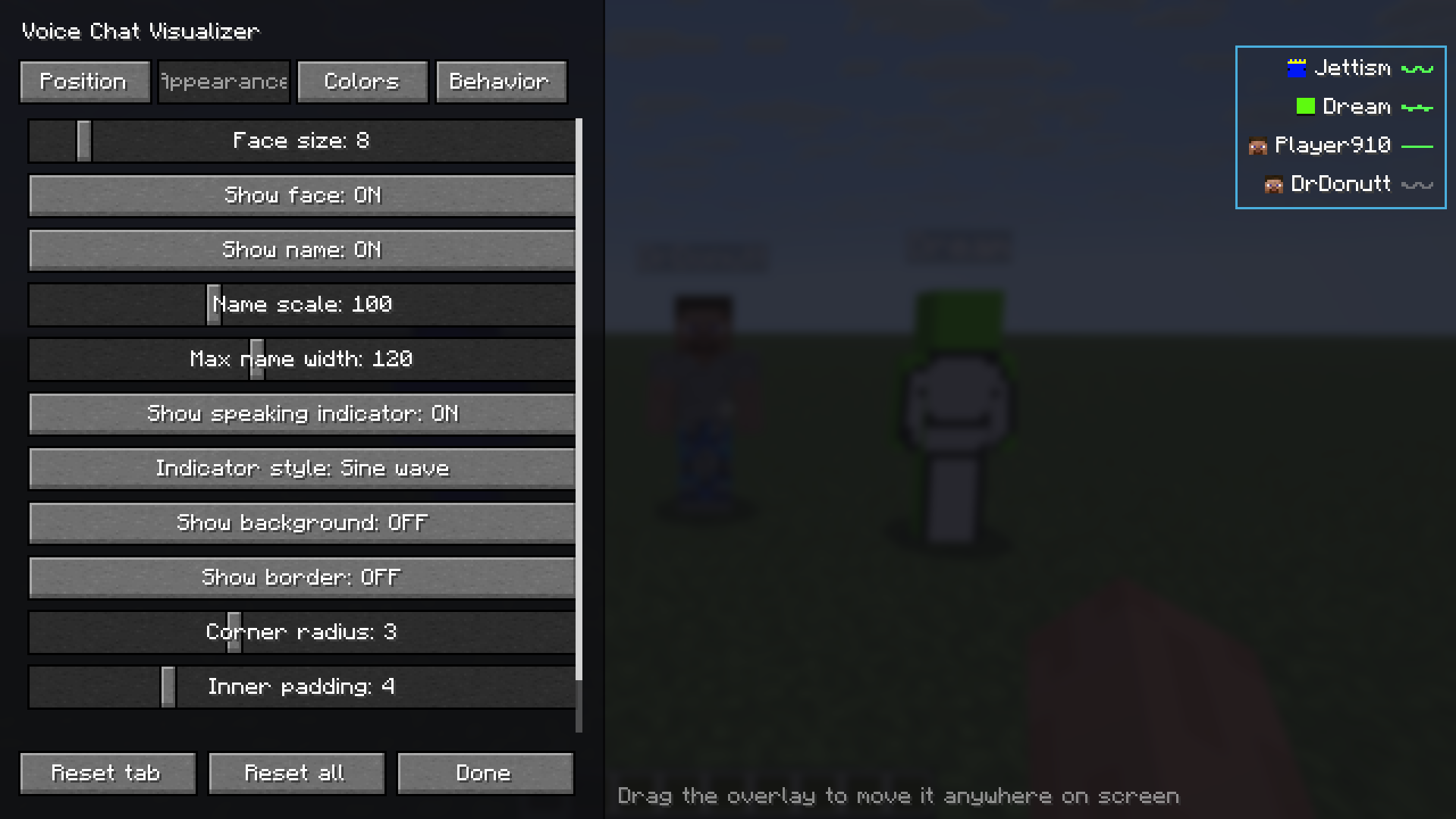
Things you can change: face size (down to 4 px), name scale and max width, background and border, corner radius, padding, distance display, max entries, fade in and out, hold time, slide-in animation, loudness sensitivity, sort order, whisper marking, "show myself" and the indicator style (wave, bars or dot).
How it works
The mod uses the Simple Voice Chat plugin API and only reads the audio you receive. Every voice packet you hear puts that player on the list, and they fade out shortly after they stop talking. Names and skins come from the tab list, so they are correct even for players behind a wall.
What you need
- Fabric API
- Simple Voice Chat. The server has to run it too, as usual.
- Mod Menu is optional. It adds a Configure button.
The mod is client-side only, so you don't need it on the server. It runs on Fabric and is released under the MIT license.
Every file in the Versions tab lists the Minecraft version it supports and the dependencies it needs. Pick the one that matches your game.
Installation
- Install Fabric Loader.
- Put Fabric API, Simple Voice Chat and Voice Chat Visualizer in your
modsfolder. - Join a server that uses Simple Voice Chat.
- Press V (the default key), or open Mod Menu → Voice Chat Visualizer → Configure, to open the configurator.
Configuration
Open the configurator with the keybind or through Mod Menu. Changes show in the preview as you make them and are saved to config/svc-visualizer.json. Reset tab and Reset all bring back the defaults.
On the Position tab you drag the preview to where you want the overlay.
The Appearance tab has face size, name scale and width, indicator style, background, border and padding.
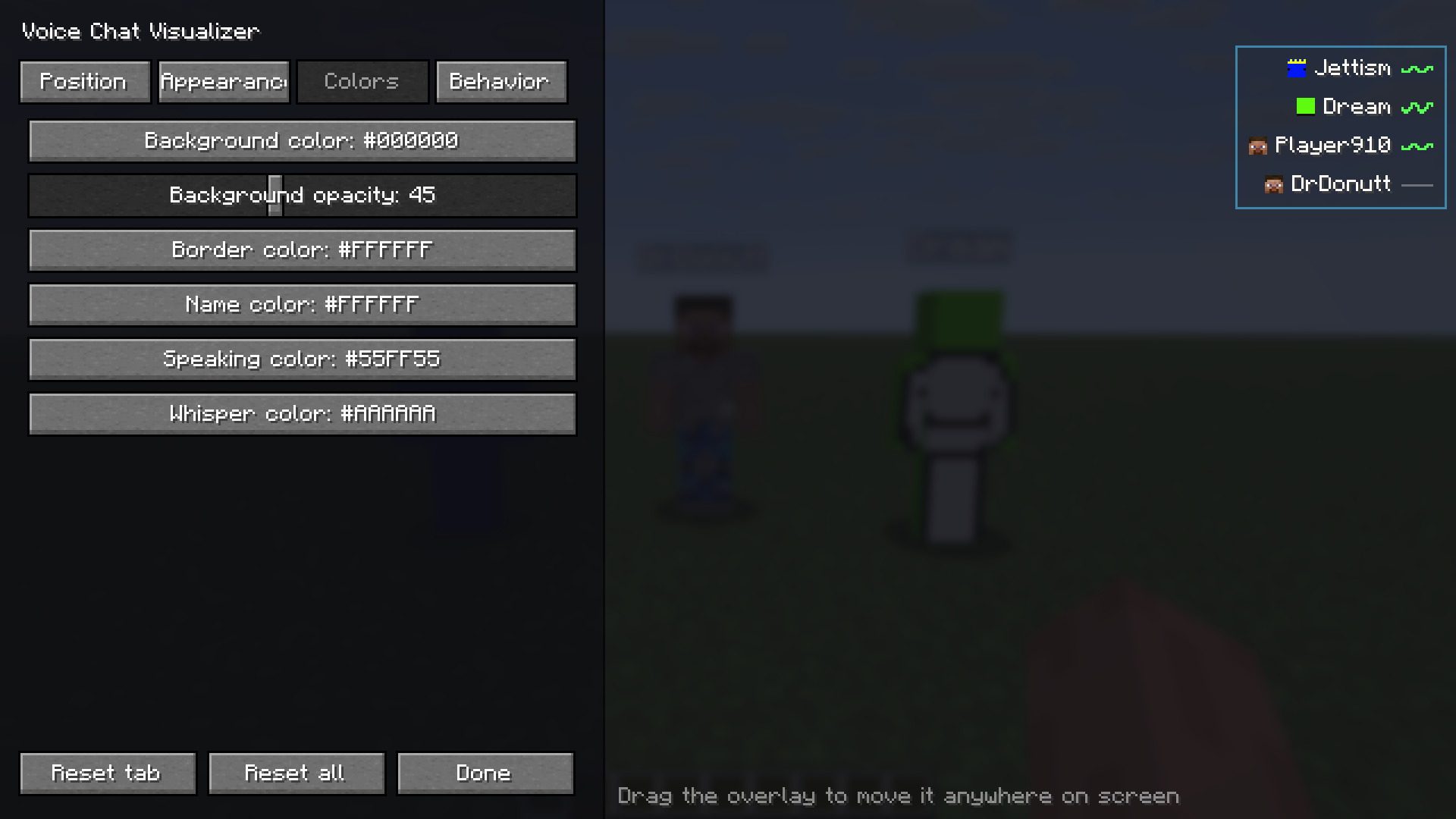
The Colors tab has HSV and hex pickers for the background, border, name, speaking and whisper colors.
Project description from Modrinth.
Pick your setup
Voice chat visualizer by Minecraft version and loader
Choose the version and loader you play, then open the matching release.
Minecraft version
26.2
1 loader buildMinecraft version
26.1.2
1 loader buildMinecraft version
26.1.1
1 loader buildMinecraft version
26.1
1 loader buildMinecraft version
1.21.11
1 loader buildMinecraft version
1.21.10
1 loader buildMinecraft version
1.21.9
1 loader buildMinecraft version
1.21.8
1 loader buildMinecraft version
1.21.7
1 loader buildMinecraft version
1.21.6
1 loader buildMinecraft version
1.21.5
1 loader buildShowing the newest 12 of 17 game versions. Older files are in the list below.
Check the dependencies, then try the file in a copied instance before changing a world you care about.
Recent files
Voice chat visualizer versions and loaders
1.0.0+26.3
voice-chat-visualizer-1.0.0+26.3.jar
12 Oct 2026
Client Required Server Not supported Dependencies No extras listed Listed on Release listing
Check the 26.3 · Fabric setup 26.3Fabric release
1.0.0+26.2
voice-chat-visualizer-1.0.0+26.2.jar
26 Jul 2026
Client Required Server Not supported Dependencies No extras listed Listed on Release listing
Check the 26.2 · Fabric setup 26.2Fabric release
1.0.0+26.1.x
voice-chat-visualizer-1.0.0+26.1.x.jar
26 Jul 2026
Client Required Server Not supported Dependencies No extras listed Listed on Release listing
Check the 26.1.2 · Fabric setup 26.126.1.126.1.2Fabric release
1.0.0+1.21.11
voice-chat-visualizer-1.0.0+1.21.11.jar
26 Jul 2026
Client Required Server Not supported Dependencies No extras listed Listed on Release listing
Check the 1.21.11 · Fabric setup 1.21.11Fabric release
1.0.0+1.21.9-1.21.10
voice-chat-visualizer-1.0.0+1.21.9-1.21.10.jar
26 Jul 2026
Client Required Server Not supported Dependencies No extras listed Listed on Release listing
Check the 1.21.10 · Fabric setup 1.21.101.21.9Fabric release
1.0.0+1.21.6-1.21.8
voice-chat-visualizer-1.0.0+1.21.6-1.21.8.jar
26 Jul 2026
Client Required Server Not supported Dependencies No extras listed Listed on Release listing
Check the 1.21.8 · Fabric setup 1.21.61.21.71.21.8Fabric release
1.0.0+1.21-1.21.5
voice-chat-visualizer-1.0.0+1.21-1.21.5.jar
26 Jul 2026
Client Required Server Not supported Dependencies No extras listed Listed on Release listing
Check the 1.21.5 · Fabric setup 1.211.21.11.21.21.21.3 release
Looking for an older file? The official Modrinth project page is in Resources.
 mod
Modrinth · Minecraft
Builder's Inventory
Inventory utilities for creative mode
 mod
Modrinth · Minecraft
Lunatrick
A miscellaneous add-on for Trickster. Currently focuses on aesthetics and customization.
 mod
CurseForge + Modrinth · Minecraft
ServerUtilities - GTNH
Various utilities for players and admins