Minecraft version
Back to mods 
Modrinth · Minecraft mod
Simple Voice Chat Scroll
Adjust player voice volume with RMB and the mouse wheel
Choose a version Pick your version below, then grab the matching file.
Quick answer
Which Simple Voice Chat Scroll release matches 26.2?
Best match for your filters 0.0.2+mc26.2
Game version 26.2
Loader Fabric, Forge, NeoForge
Simple Voice Chat Scroll 0.0.2+mc26.2 targets 26.2 with Fabric, Forge, NeoForge. It must be installed on the client. Do not install it on the dedicated server. No extra mods listed for this file.
Where it goes
Is Simple Voice Chat Scroll required on the client, server, or both?
It must be installed on the client. Do not install it on the dedicated server.
Client Required
Dedicated server Not supported
Loader for this release Fabric, Forge, NeoForge
Required install it here Optional supported, not mandatory Not supported do not install here Source doesn’t say do not assume
This file is marked client-only.
What else does Simple Voice Chat Scroll 0.0.2+mc26.2 need?
0.0.2+mc26.2 on 26.2. Every mod below is checked against that same setup.
This file does not list any required mods. Do not add a library just because a different file uses it.
This file does not list any required or optional mods.
Before you install it
Add Simple Voice Chat Scroll without breaking your instance.
Built for Simple Voice Chat Scroll 0.0.2+mc26.2 on 26.2. Pick another file and the loader, install side or required mods may change.
- 01
Stick to this file
Use 0.0.2+mc26.2. It targets 26.2 with Fabric, Forge, NeoForge; another release may have different loader, side or dependency requirements.
- 02
Bring the mods it needs
This file does not list any required mods. Do not add a library just because a different file uses it.
- 03
Put it on the correct side
It must be installed on the client. Do not install it on the dedicated server.
- 04
Pick the file you checked
Use the “Get this file” button beside 0.0.2+mc26.2. It opens that exact file at the source.
About this project
What does Simple Voice Chat Scroll add?
Simple Voice Chat Scroll — Quick Voice Volume Control
Simple Voice Chat Scroll is a lightweight client-side Minecraft mod for Fabric, Forge, and NeoForge. It integrates with Simple Voice Chat and lets you adjust individual player volume without opening the voice chat menu.
Look at a player, hold the right mouse button, and scroll the mouse wheel to change their volume. The selected value is saved automatically through Simple Voice Chat.
The volume indicator remains visible even when player name tags are disabled or hidden.
Features
- Quickly adjust individual player volume
- Volume range from 0% to 200%
- Simple RMB + mouse wheel controls
- Works with hidden or disabled player name tags
- Player volume is saved through Simple Voice Chat
- Client-side only — no server installation required
Controls
- Point the crosshair at a player connected to Simple Voice Chat.
- Hold the right mouse button.
- Scroll up to increase their volume.
- Scroll down to decrease their volume.
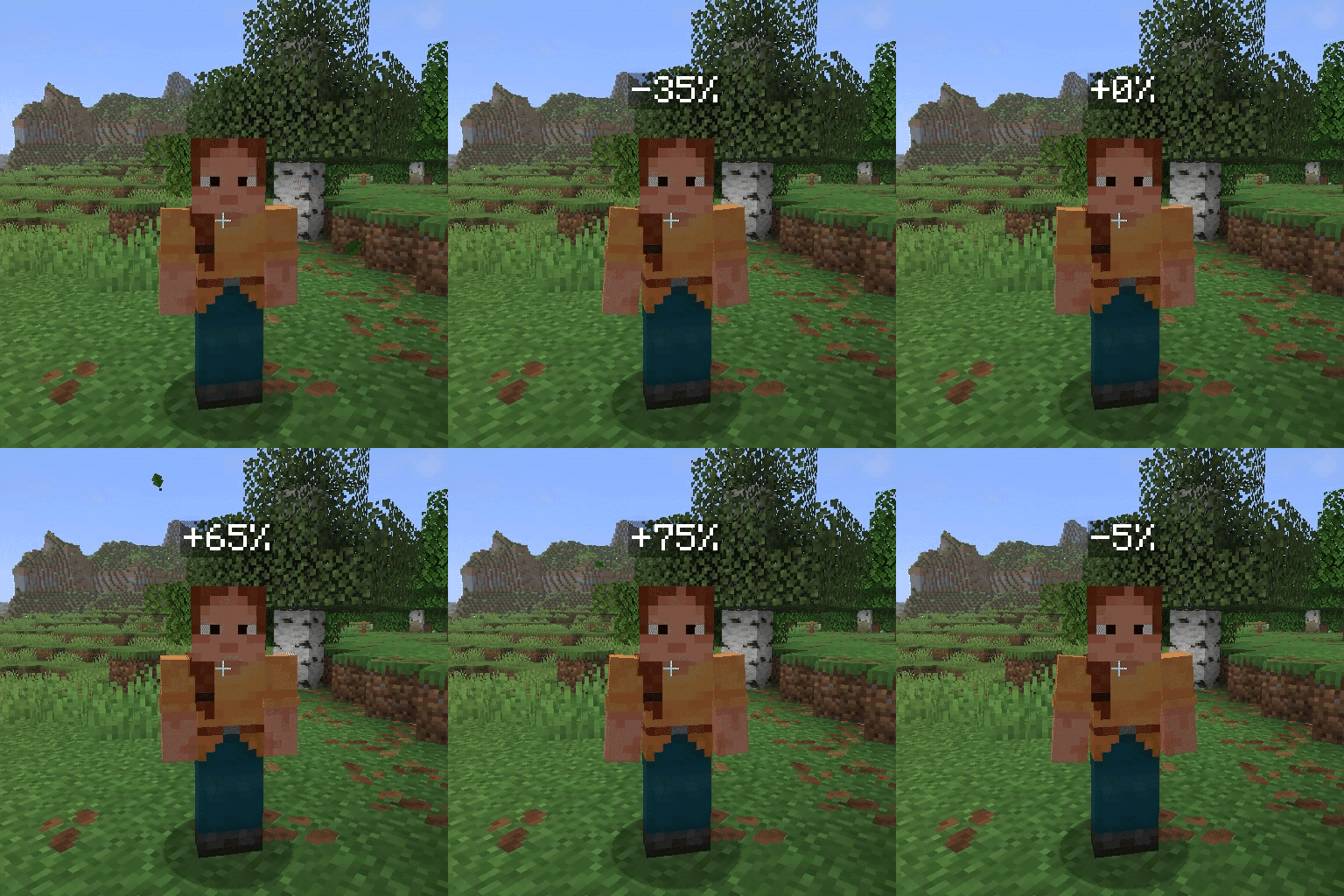
Below the default 100% volume, each scroll step changes the volume by 5 percentage points. At or above 100%, each step changes it by 10 percentage points.
The displayed value shows the difference from the default volume:
0%— default 100% volume+100%— 200% volume-100%— muted
Support and Issues
If you discover a bug or have a suggestion, create an issue in the Simple Voice Chat Scroll GitHub repository.
Project description from Modrinth.
Pick your setup
Simple Voice Chat Scroll by Minecraft version and loader
Choose the version and loader you play, then open the matching release.
Minecraft version
26.1.2
3 loader buildsMinecraft version
26.1.1
3 loader buildsMinecraft version
26.1
3 loader buildsMinecraft version
1.21.11
3 loader buildsMinecraft version
1.21.10
1 loader buildMinecraft version
1.21.9
3 loader buildsMinecraft version
1.21.8
3 loader buildsMinecraft version
1.21.7
3 loader buildsMinecraft version
1.21.6
3 loader buildsMinecraft version
1.21.5
3 loader buildsMinecraft version
1.21.4
3 loader buildsShowing the newest 12 of 15 game versions. Older files are in the list below.
Check the dependencies, then try the file in a copied instance before changing a world you care about.
Recent files
Simple Voice Chat Scroll versions and loaders
0.0.2+mc26.2
SimpleVoiceChatScroll-0.0.2+mc26.2-universal.jar
31 Jul 2026
Client Required Server Not supported Dependencies No extras listed Listed on Release listing
Check the 26.2 · Fabric setup 26.2FabricForgeNeoForge release
0.0.1+mc26.2-fabric
SimpleVoiceChatScroll-0.0.1+mc26.2-fabric.jar
29 Jul 2026
Client Required Server Not supported Dependencies No extras listed Listed on Release listing
Check the 26.2 · Fabric setup 26.2Fabric release
0.0.1+mc26.2-forge
SimpleVoiceChatScroll-0.0.1+mc26.2-forge.jar
29 Jul 2026
Client Required Server Not supported Dependencies No extras listed Listed on Release listing
Check the 26.2 · Forge setup 26.2Forge release
0.0.1+mc26.2-neoforge
SimpleVoiceChatScroll-0.0.1+mc26.2-neoforge.jar
29 Jul 2026
Client Required Server Not supported Dependencies No extras listed Listed on Release listing
Check the 26.2 · NeoForge setup 26.2NeoForge release
Looking for an older file? The official Modrinth project page is in Resources.
 mod
mod CurseForge + Modrinth · Minecraft
Redstone overpower
Give your redstone contraptions a whole new level
 mod
mod CurseForge + Modrinth · Minecraft
COI Client
Client mod adding support for the Circle Of Imagination plugin, plugin implementing complete power system from Lord of The Mysteries web novel in Minecraft
 mod
mod CurseForge + Modrinth · Minecraft
Material Beacons
Changes how beacons work depending on the material used. Instead of beacons being built out of any valid material and then selecting an effect, the material used to build the beacon determines the effect.