Minecraft version
Back to mods 
Modrinth · Minecraft mod
Command Blocks to Sign
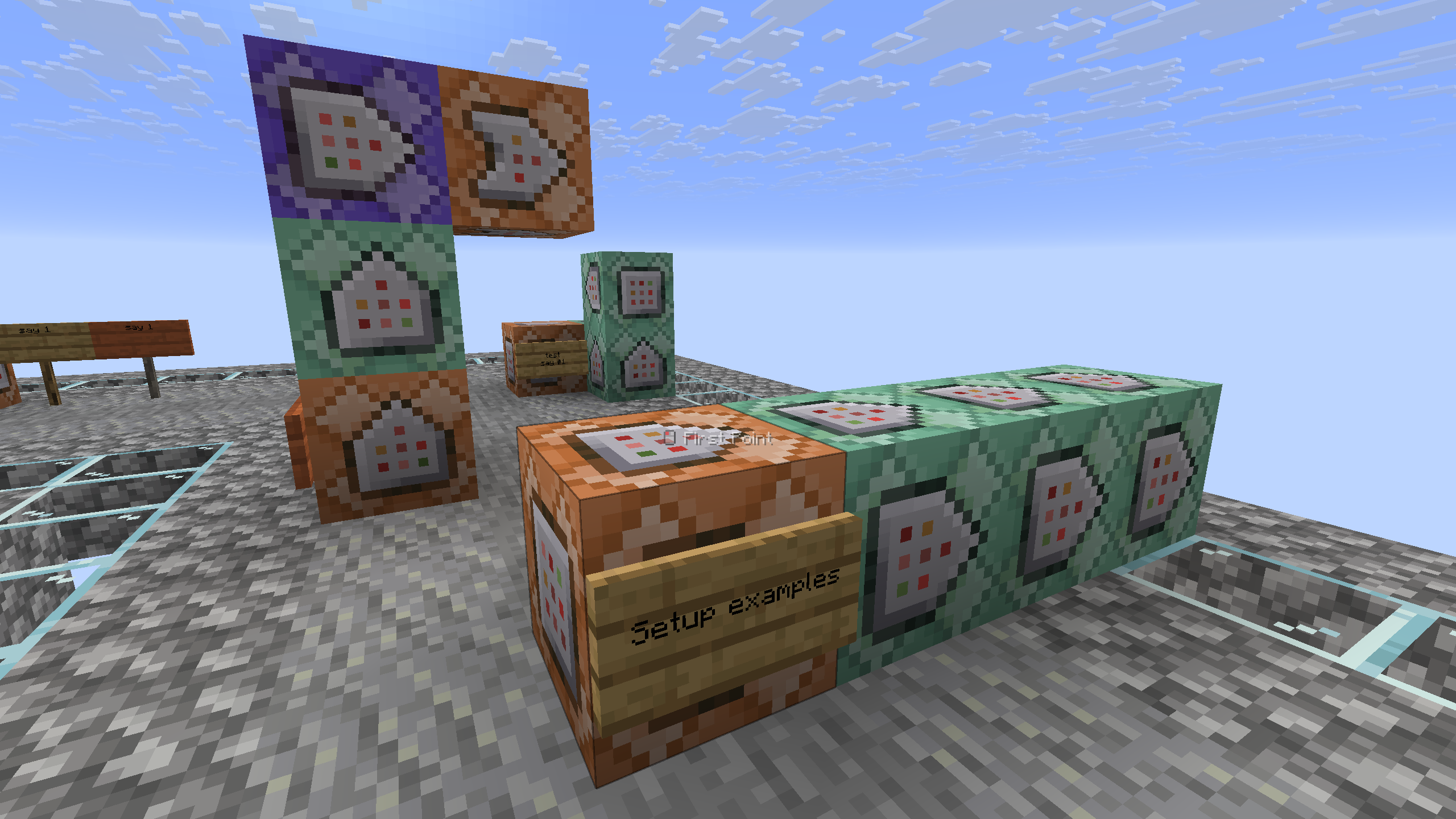
Convert command blocks to clickable signs by waxing a sign that has command blocks (max 4) behind it.
Choose a version Pick your version below, then grab the matching file.
Quick answer
Which Command Blocks to Sign release should I use?
Latest stable file 1.1.3
Game version 1.21.5, 1.21.6, 1.21.7
Loader Fabric, Forge, NeoForge
Command Blocks to Sign 1.1.3 targets 1.21.5, 1.21.6, 1.21.7 with Fabric, Forge, NeoForge. Installation on the client is optional. Installation on the dedicated server is optional. No extra mods listed for this file.
Where it goes
Is Command Blocks to Sign required on the client, server, or both?
Installation on the client is optional. Installation on the dedicated server is optional.
Client Optional
Dedicated server Optional
Loader for this release Fabric, Forge, NeoForge
Required install it here Optional supported, not mandatory Not supported do not install here Source doesn’t say do not assume
The source marks this as usable on both the client and server.
What else does Command Blocks to Sign 1.1.3 need?
1.1.3. Change the file and its required mods may change too.
This file does not list any required mods. Do not add a library just because a different file uses it.
This file does not list any required or optional mods.
Before you install it
Add Command Blocks to Sign without breaking your instance.
Built for Command Blocks to Sign 1.1.3. Pick another file and the loader, install side or required mods may change.
- 01
Stick to this file
Use 1.1.3. It targets 1.21.5, 1.21.6, 1.21.7 with Fabric, Forge, NeoForge; another release may have different loader, side or dependency requirements.
- 02
Bring the mods it needs
This file does not list any required mods. Do not add a library just because a different file uses it.
- 03
Put it on the correct side
Installation on the client is optional. Installation on the dedicated server is optional.
- 04
Pick the file you checked
Use the “Get this file” button beside 1.1.3. It opens that exact file at the source.
About this project
What does Command Blocks to Sign add?
Command Blocks to Sign
Transform your command blocks into clickable signs!
⚙️ Server side!
If you only install this datapack/mod on your server/LAN, it will work for everyone else without them needing to install it!
📖 Instructions:
- Place a sign on the side of the command block that you want to convert, with a maximum of 4 command blocks. (They must be facing one to another).
- Take a honeycomb and right click the sign to wax it. (The wax will be removed)
- That's it! Your sign is ready.
The system only reacts if the sign is on a command block, otherwise it will do nothing and the waxing of the sign will act as usual.
⤵️ Installation:
Datapack:
Download the latest release and put the datapack .zip file into the datapacks folder of your Minecraft world.
Mod:
Download the latest release and put the mod .jar file into the mods folder of your Minecraft game.
✍️ Feedback, Questions & Suggestions
I'm always listening! If you happen to have questions, suggestions or just encountered a bug, then feel free to join my discord server to ask for help in the "mods and datapacks" section. Click to join the server
Project description from Modrinth.
Pick your setup
Command Blocks to Sign by Minecraft version and loader
Choose the version and loader you play, then open the matching release.
Minecraft version
26.2
5 loader buildsMinecraft version
26.1.2
5 loader buildsMinecraft version
26.1.1
5 loader buildsMinecraft version
26.1
5 loader buildsMinecraft version
25w35a
5 loader buildsMinecraft version
25w34b
5 loader buildsMinecraft version
25w32a
5 loader buildsMinecraft version
25w31a
5 loader buildsMinecraft version
1.21.11
5 loader buildsMinecraft version
1.21.10
5 loader buildsMinecraft version
1.21.9
5 loader buildsShowing the newest 12 of 16 game versions. Older files are in the list below.
Check the dependencies, then try the file in a copied instance before changing a world you care about.
Recent files
Command Blocks to Sign versions and loaders
1.1.3
command-blocks-to-sign-1.1.3.jar
14 Sept 2026
Client Optional Server Optional Dependencies No extras listed Listed on Release listing
Check the 26.3-rc-3 · Fabric setup 1.21.51.21.61.21.71.21.8 release
1.1.3
command-blocks-to-sign-1.1.3.zip
14 Sept 2026
Client Optional Server Optional Dependencies No extras listed Listed on Release listing
Check the 26.3-rc-3 · datapack setup 1.21.51.21.61.21.71.21.8 release
1.1.2
command-blocks-to-sign-1.1.2.jar
14 Sept 2026
Client Optional Server Optional Dependencies No extras listed Listed on Release listing
Check the 26.3-rc-3 · Fabric setup 1.21.51.21.61.21.71.21.8 release
1.1.2
command-blocks-to-sign-1.1.2.zip
14 Sept 2026
Client Optional Server Optional Dependencies No extras listed Listed on Release listing
Check the 26.3-rc-3 · datapack setup 1.21.51.21.61.21.71.21.8 release
1.1.1+mod
command-blocks-to-sign-1.1.1.jar
4 Sept 2025
Client Optional Server Optional Dependencies No extras listed Listed on Release listing
Check the 26.2 · Fabric setup 1.21.51.21.61.21.71.21.8 release
1.1.1
command-blocks-to-sign-v1.1.1.zip
4 Sept 2025
Client Optional Server Optional Dependencies No extras listed Listed on Release listing
Check the 26.2 · datapack setup 1.21.51.21.61.21.71.21.8 release
1.1.0+mod
command-blocks-to-sign-1.1.0.jar
27 Aug 2025
Client Optional Server Optional Dependencies No extras listed Listed on Release listing
Check the 25w35a · Fabric setup 1.21.51.21.61.21.71.21.8 release
1.1.0
command-blocks-to-sign-v1.1.0.zip
27 Aug 2025
Client Optional Server Optional Dependencies No extras listed Listed on Release listing
Check the 25w35a · datapack setup 1.21.51.21.61.21.71.21.8 release
1.0.1+mod
command-blocks-to-sign-1.0.1.jar
17 Aug 2025
Client Optional Server Optional Dependencies No extras listed Listed on Release listing
Check the 25w34b · Fabric setup 1.21.51.21.61.21.71.21.8 release
1.0.1
command-blocks-to-sign-v1.0.1-datapack-1.21.5+.zip
17 Aug 2025
Client Optional Server Optional Dependencies No extras listed Listed on Release listing
Check the 25w34b · datapack setup 1.21.51.21.61.21.71.21.8 release
1.0.0+mod
command-blocks-to-sign-1.0.0.jar
14 Aug 2025
Client Optional Server Optional Dependencies No extras listed Listed on Release listing
Check the 25w32a · Fabric setup 1.21.51.21.61.21.71.21.8 release
1.0.0
command-blocks-to-sign-v1.0.0.zip
14 Aug 2025
Client Optional Server Optional Dependencies No extras listed Listed on Release listing
Check the 25w32a · datapack setup 1.21.51.21.61.21.71.21.8 release
Looking for an older file? The official Modrinth project page is in Resources.
 mod
mod CurseForge + Modrinth · Minecraft
Ascendant Armory
Level up your weapons & armor, roll powerful traits, build the perfect loadout.
 mod
mod CurseForge + Modrinth · Minecraft
Dreambound
A balanced KeepInventory alternative that saves your gear when you sleep.
 mod
mod CurseForge + Modrinth · Minecraft
Chunks fade in
A simple mod that adds different animations for chunks!