Minecraft version
Back to mods 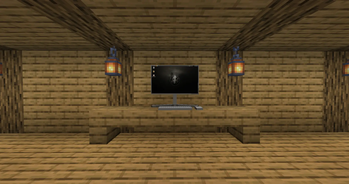
Modrinth · Minecraft mod
craftcompute
what if webdisplays werent web but operating system, well here you have it!
Choose a version Pick your version below, then grab the matching file.
Quick answer
Which craftcompute release should I use?
Latest stable file 1.2.0-hotfix1
Game version 1.21.1, 1.21.10, 1.21.11
Loader NeoForge
craftcompute 1.2.0-hotfix1 targets 1.21.1, 1.21.10, 1.21.11 with NeoForge. Installation on the client is optional. Installation on the dedicated server is optional. No extra mods listed for this file.
Where it goes
Is craftcompute required on the client, server, or both?
Installation on the client is optional. Installation on the dedicated server is optional.
Client Optional
Dedicated server Optional
Loader for this release NeoForge
Required install it here Optional supported, not mandatory Not supported do not install here Source doesn’t say do not assume
The source marks this as usable on both the client and server.
What else does craftcompute 1.2.0-hotfix1 need?
1.2.0-hotfix1. Change the file and its required mods may change too.
This file does not list any required mods. Do not add a library just because a different file uses it.
This file does not list any required or optional mods.
Before you install it
Add craftcompute without breaking your instance.
Built for craftcompute 1.2.0-hotfix1. Pick another file and the loader, install side or required mods may change.
- 01
Stick to this file
Use 1.2.0-hotfix1. It targets 1.21.1, 1.21.10, 1.21.11 with NeoForge; another release may have different loader, side or dependency requirements.
- 02
Bring the mods it needs
This file does not list any required mods. Do not add a library just because a different file uses it.
- 03
Put it on the correct side
Installation on the client is optional. Installation on the dedicated server is optional.
- 04
Pick the file you checked
Use the “Get this file” button beside 1.2.0-hotfix1. It opens that exact file at the source.
About this project
What does craftcompute add?
craftcompute
features:
- realistic computers using actual VMs
- an actual linux distro (meaning you can do almost anything)
- nativly accelerated VMs
- persistent instance storage
blocks and items:
- block - computer (the actual computer)
- block - monitor (linkable to computer, currently just display clone works)
- block - flatscreen (like monitor, but flat on wall)
- item - thumbdrive (to store data)
- item - linker (to link stuff to computer)
- item - screwdriver (to configure and move around monitors and flatscreens)
why would i want to download craftcompute?
- if you want realistic, VM based, fast, native computers inside of minecraft
warnings:
- it is recommended to be used on a debian bases system and has not yet been tested on any other
- there will be prompts asking for admin authentication, this is normal and just needed for installing and setting up the VM environment (qemu, libvirt)
- the contained operating system is not monitored, controlled or censored, you are able to visit sensitive content
Project description from Modrinth.
Pick your setup
craftcompute by Minecraft version and loader
Choose the version and loader you play, then open the matching release.
Minecraft version
26.1.1
1 loader buildMinecraft version
26.1
1 loader buildMinecraft version
1.21.11
1 loader buildMinecraft version
1.21.10
1 loader buildMinecraft version
1.21.9
1 loader buildMinecraft version
1.21.8
1 loader buildMinecraft version
1.21.7
1 loader buildMinecraft version
1.21.6
1 loader buildMinecraft version
1.21.5
1 loader buildMinecraft version
1.21.4
1 loader buildMinecraft version
1.21.3
1 loader buildShowing the newest 12 of 15 game versions. Older files are in the list below.
Check the dependencies, then try the file in a copied instance before changing a world you care about.
Recent files
craftcompute versions and loaders
1.2.0-hotfix1
craftcompute-1.2.0-hotfix1.jar
17 May 2026
Client Optional Server Optional Dependencies No extras listed Listed on Release listing
Check the 1.21.11 · NeoForge setup 1.21.11.21.101.21.111.21.2 release
1.2.0
craftcompute-1.2.0.jar
17 May 2026
Client Optional Server Optional Dependencies No extras listed Listed on Release listing
Check the 1.21.11 · NeoForge setup 1.21.11.21.101.21.111.21.2 release
1.0-SNAPSHOT
craftcompute-1.0-SNAPSHOT.jar
26 Apr 2026
Client Optional Server Optional Dependencies No extras listed Listed on Release listing
Check the 26.1.2 · NeoForge setup 1.211.21.11.21.101.21.11 release
Looking for an older file? The official Modrinth project page is in Resources.
 mod
CurseForge · Minecraft
Infinity Nexus Machines
A simple mod for upgaidable machines
 mod
CurseForge · Minecraft
Industrial Facilities
A Minecraft mod adding various blocks and items useful for industrial-style building.
 mod
CurseForge + Modrinth · Minecraft
Block Blocker
Event Prevention for Blocks