Fabric API Needed by DynamicSkins 1.3.1
requiredMatching file found Matched file: 0.92.9+1.20.1

Modrinth · Minecraft mod
Server-synchronized custom player skins with high-resolution 64-4096px + open/close mouth.
Quick answer
DynamicSkins 1.3.1 targets 1.20.1 with Fabric. Installation on the client is optional. Installation on the dedicated server is optional. 1 required mod needs a matching file.
Where it goes
Installation on the client is optional. Installation on the dedicated server is optional.
The source marks this as usable on both the client and server.
1.3.1. Change the file and its required mods may change too.
Install Fabric API, Plasmo Voice first, but 1 required mod has no matching file for this setup. Do not mix loader builds to force a match.
We only count dependency files that match this setup. A file for another loader does not fill the gap.
Before you install it
Built for DynamicSkins 1.3.1. Pick another file and the loader, install side or required mods may change.
Use 1.3.1. It targets 1.20.1 with Fabric; another release may have different loader, side or dependency requirements.
Install Fabric API, Plasmo Voice first, but 1 required mod has no matching file for this setup. Do not mix loader builds to force a match.
Installation on the client is optional. Installation on the dedicated server is optional.
Use the “Get this file” button beside 1.3.1. It opens that exact file at the source.
About this project
DynamicSkins is a Fabric mod that lets players use server-synchronized custom avatars instead of relying solely on Minecraft's default skin system.
Players can upload two avatar textures through an in-game editor:
Uploaded avatars are synchronized through the server, stored locally on the server, and automatically sent to other players. This allows multiplayer servers to provide consistent custom avatars without requiring resource packs or external skin services.
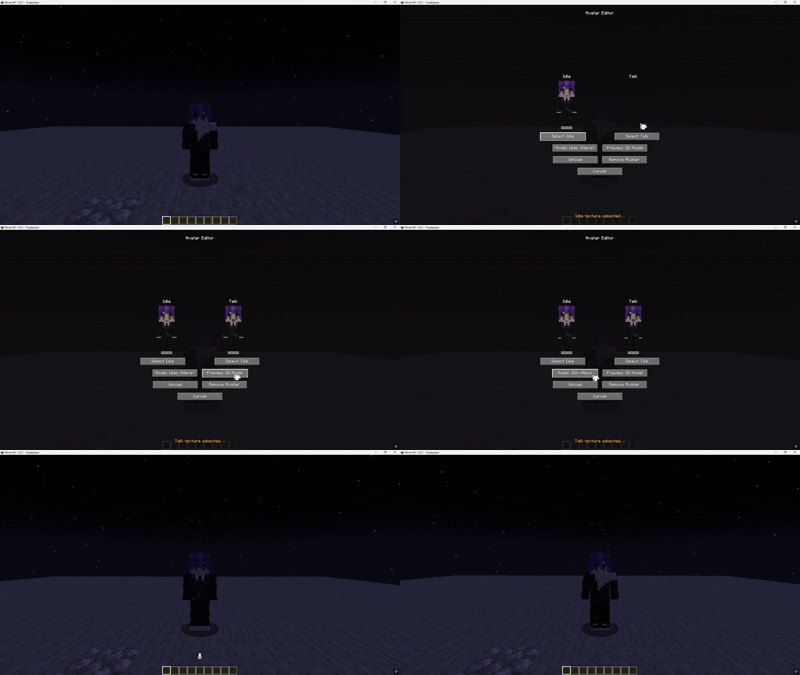
DynamicSkins supports square PNG textures including:
Requirements:
Players can also remove their uploaded avatar directly from the Avatar Editor.
DynamicSkins can automatically switch to a talking avatar while the player is speaking.
This feature requires Plasmo Voice.
If Plasmo Voice is not installed, DynamicSkins continues to function normally as a synchronized custom avatar system, but talking-state textures will not be used.
Uploaded avatar textures are stored locally by the Minecraft server inside the DynamicSkins storage directory.
Clients automatically cache synchronized avatars for faster loading.
| Component | Version |
|---|---|
| Minecraft | 1.20.1 |
| Mod Loader | Fabric |
| Fabric Loader | 0.19.3+ |
| Fabric API | 0.92.9+1.20.1 |
| Java | 17 or 21 |
| Plasmo Voice | (1.20.1-2.1.13) |
| Property | Value |
|---|---|
| Version | 1.0.6 |
| Minecraft | 1.20.1 |
| Loader | Fabric |
| Release Type | Required |
Project description from Modrinth.
Pick your setup
Choose the version and loader you play, then open the matching release.
Check the dependencies, then try the file in a copied instance before changing a world you care about.
Recent files
DynamicSkins+mc1.20.1-1.3.1.jar
11 Sept 2026
DynamicSkins+mc1.20.1-1.3.0.jar
11 Sept 2026
DynamicSkins+mc1.20.1-1.1.7.jar
6 Sept 2026
DynamicSkins+mc1.20.1-1.1.7.jar
5 Sept 2026
DynamicSkins+mc1.20.1-1.1.6.jar
3 Sept 2026
DynamicSkins+mc1.20.1-1.1.5.jar
29 Jul 2026
DynamicSkins+mc1.20.1-1.0.7.jar
3 Jul 2026
DynamicSkins+mc1.20.1-1.0.6.jar
2 Jul 2026
Looking for an older file? The official Modrinth project page is in Resources.
 mod
modOuter Wilds-inspired respawn animation for Minecraft.
 mod
modEuphoria Patches is an add-on for Complementary Shaders, extending it with more optional features and settings.
 mod
modFind unique and powerful artifacts in the ancient structures of the world!