Back to mods
NotEnoughGlints project artwork

Modrinth · Minecraft mod

NotEnoughGlints

A Minecraft Addition Enabling Colored Enchantment Glints. For Vanilla And Modded Clients.

Choose a version Pick your version below, then grab the matching file.

Quick answer

Which NotEnoughGlints release should I use?

Updated today
Latest stable file 1.4.5+ServerPlugin
Game version 26.1, 26.1.1, 26.1.2
Loader folia, paper, purpur

NotEnoughGlints 1.4.5+ServerPlugin targets 26.1, 26.1.1, 26.1.2 with folia, paper, purpur. Installation on the client is optional. Installation on the dedicated server is optional. No extra mods listed for this file.

Where it goes

Is NotEnoughGlints required on the client, server, or both?

Installation on the client is optional. Installation on the dedicated server is optional.

Client Optional
Dedicated server Optional
Loader for this release folia, paper, purpur
Required install it here Optional supported, not mandatory Not supported do not install here Source doesn’t say do not assume

The source marks this as usable on both the client and server.

What else does NotEnoughGlints 1.4.5+ServerPlugin need?

1.4.5+ServerPlugin. Change the file and its required mods may change too.

No extra mods listed for this file

This file does not list any required mods. Do not add a library just because a different file uses it.

This file does not list any required or optional mods.

Before you install it

Add NotEnoughGlints without breaking your instance.

Built for NotEnoughGlints 1.4.5+ServerPlugin. Pick another file and the loader, install side or required mods may change.

  1. 01

    Stick to this file

    Use 1.4.5+ServerPlugin. It targets 26.1, 26.1.1, 26.1.2 with folia, paper, purpur; another release may have different loader, side or dependency requirements.

  2. 02

    Bring the mods it needs

    This file does not list any required mods. Do not add a library just because a different file uses it.

  3. 03

    Put it on the correct side

    Installation on the client is optional. Installation on the dedicated server is optional.

  4. 04

    Pick the file you checked

    Use the “Get this file” button beside 1.4.5+ServerPlugin. It opens that exact file at the source.

About this project

What does NotEnoughGlints add?

This resource + data pack enables custom enchantment glint options, with support for all vanilla dyes, you gain the ability to personalize your tools and armor to your liking!
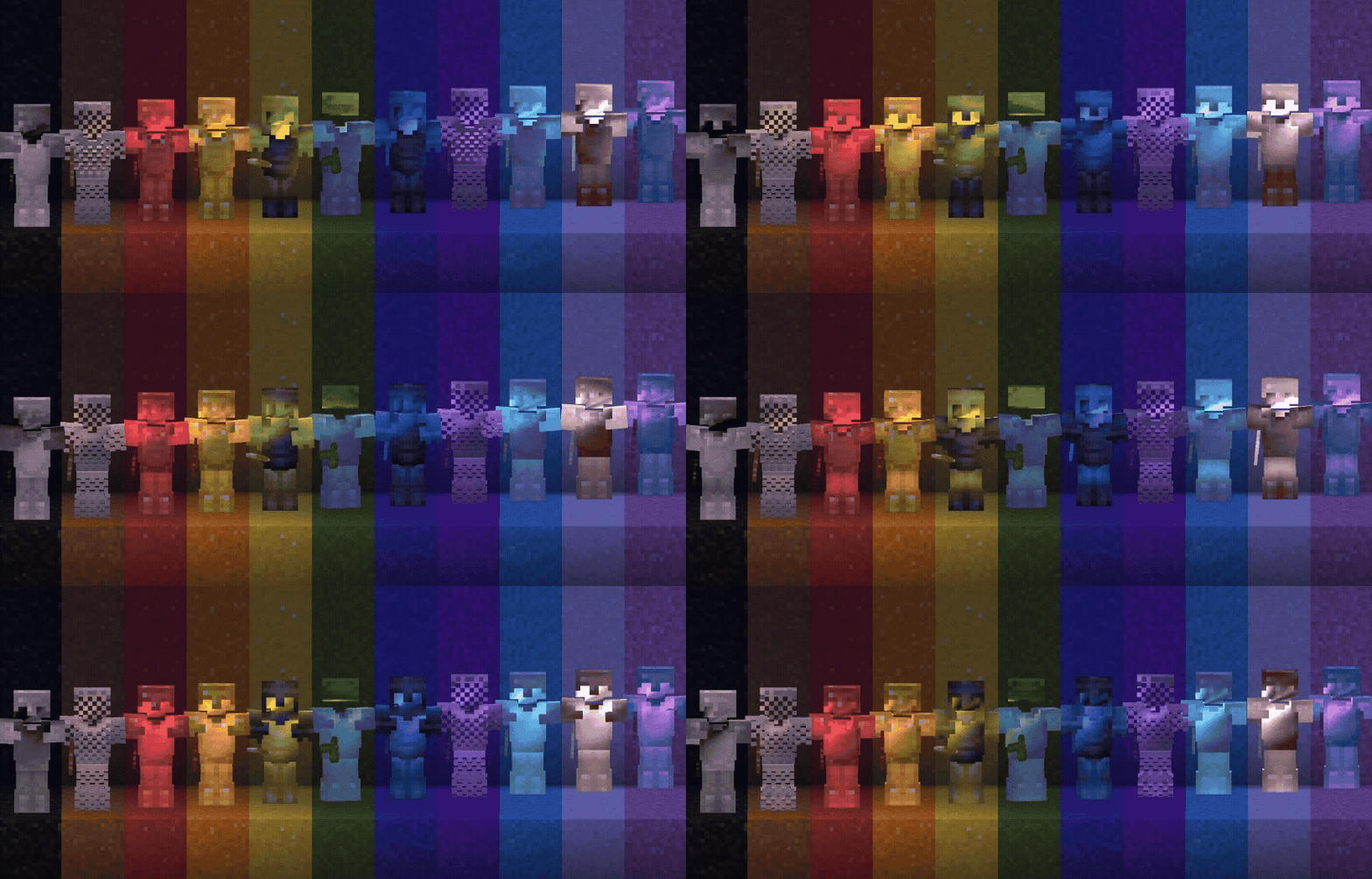
Display of custom glinted armor & tools

This pack modifies the item and entity shaders, and won't work in cojunction with others who do the same.

The Resourcepack can be used without the datapack, but you'll lack the recipes, so be aware you'll only be able to summon custom glinted items via commands, resources on that are coming soon.

Supports Minecraft 26.1+, Compatible with both The Vulkan and OpenGL renderers.

to custom-glint a piece of gear, place it + a dye + a honeycomb together in a smithing table.
removing glints doesnt work yet, however you can change between them freely.
use a nether star for the rainbow glint effect.
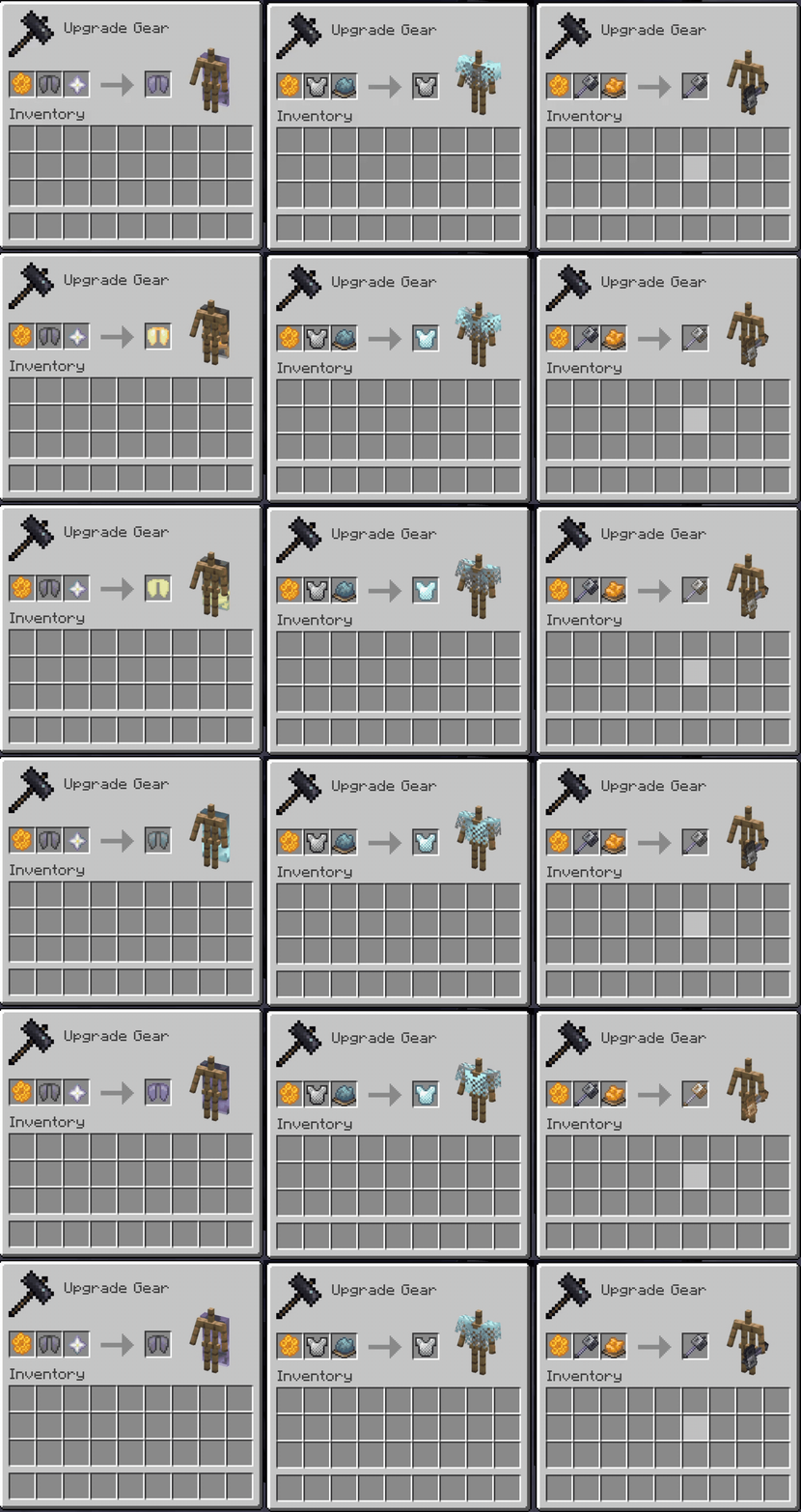
Showcasing the Recipe for a custom enchantment glint, a honeycomb + the piece of gear to be Glinted + dye of a certain color or nether star
PRO TIP: use a glass pane instead of a dye to remove the custom glint.

due to a technical limitation with the current shader implementation, its not available on leather armor. ):

Upcoming features:

  • fallback textures to vanilla textures, so when removing the Resourcepack items with colored glint wont appear as missing texture.
  • implementing needed things to allow Colored Glints shields
  • making a version for people who use the "Glint Speed" accessibility option

youre welcome to join the discord for Sneak peeks into the development progress regarding future features, or just to ask questions regarding the pack

What version should you install?

Playing by yourself - Vanilla Minecraft

You should use the client version, meaning download the datapack of the client version and put in in the datapacks folder of your world, and the same for the resourcepack.

Playing by yourself - Modded Minecraft

Its best to use the MOD version, easiest installation.

Multiplayer Server Owner - Paper / Purpur / Folia

Its best to use the plugin version.

Multiplayer Server Owner - Modded

Best to use the Mod version of the pack.

Project description from Modrinth.
Pick your setup

NotEnoughGlints by Minecraft version and loader

Choose the version and loader you play, then open the matching release.

25 available setups

Check the dependencies, then try the file in a copied instance before changing a world you care about.

Recent files

NotEnoughGlints versions and loaders

13 of 13 releases match

Looking for an older file? The official Modrinth project page is in Resources.