Cloth Config API (Fabric/Forge/NeoForge) Optional for Simple Datapacks 2.7.1-neoforge+26.1
optionalNo matching file

Modrinth · Minecraft mod
Simplifying the use of datapacks
Quick answer
Simple Datapacks 2.7.1-neoforge+26.1 targets 26.1, 26.1.1-rc-1, 26.1.1 with NeoForge. It must be installed on the client. Do not install it on the dedicated server. No extra mods listed for this file.
Where it goes
It must be installed on the client. Do not install it on the dedicated server.
This file is marked client-only.
2.7.1-neoforge+26.1 on 26.2-pre-2 NeoForge. Every mod below is checked against that same setup.
This file does not list any required mods. Do not add a library just because a different file uses it.
We only count dependency files that match this setup. A file for another loader does not fill the gap.
Before you install it
Built for Simple Datapacks 2.7.1-neoforge+26.1 on 26.2-pre-2 NeoForge. Pick another file and the loader, install side or required mods may change.
Use 2.7.1-neoforge+26.1. It targets 26.1, 26.1.1-rc-1, 26.1.1 with NeoForge; another release may have different loader, side or dependency requirements.
This file does not list any required mods. Do not add a library just because a different file uses it.
It must be installed on the client. Do not install it on the dedicated server.
Use the “Get this file” button beside 2.7.1-neoforge+26.1. It opens that exact file at the source.
About this project
The purpose of this mod is to simplify the ways of adding datapacks to the game. To do this, the mod creates a folder in the root directory of Minecraft called datapacks. In my opinion, the capabilities of datapacks are underestimated by players, mostly because not everyone understands how to install datapacks into the game. This is more difficult to do than to install a mod or resource pack, although many datapacks bring a lot of content to the game.
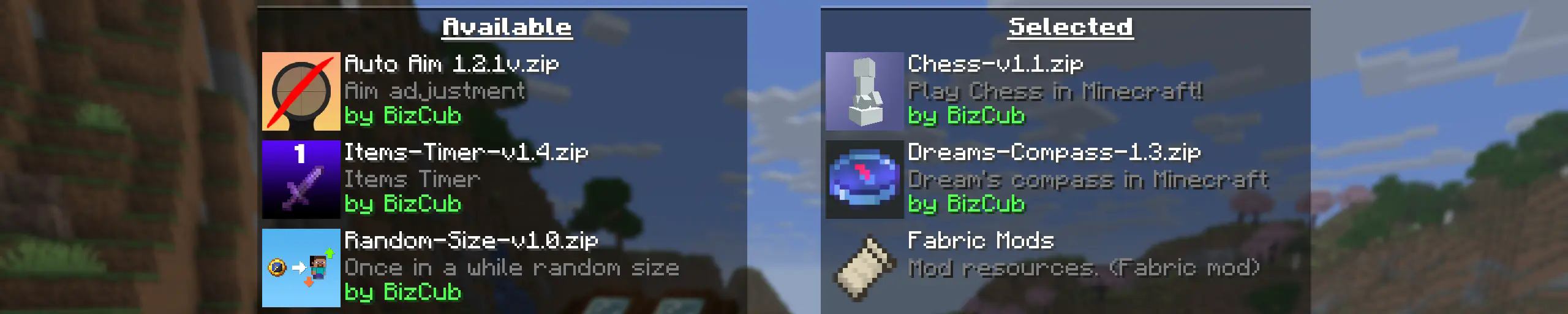
My goal is to make a mod that will help players with installing datapacks into the game so that they can get a new portion of unforgettable impressions.

In order to launch a world with datapacks, you need to download any datapack that is compatible with the selected version of Minecraft, open and place the datapack in the datapacks folder, start creating a world and select the desired datapack from the list. However, when using Cloth Config, the mod settings specify the path to the downloads folder, so to use datapacks, you only need to download them, then simply open the datapack selection menu and enable the desired one.
Whenever possible, I added the most basic features for the mod that I could imagine.
Since the main thing for me is that as many players as possible start using datapacks, I made the mod available on 4 different loaders so that it can be launched from almost any modpack.
The mod has a configuration. The values used by the mod can be changed in the mod menu (Fabric requires ModMenu), and can also be changed in the configuration file, which is available using the Cloth Config API.
The mod allows players to add and load datapacks from different folders. To change the sources of these packs, you need to configure them in the mod settings. If you want to specify a folder in the game's root directory, for example, my_datapacks instead of the full path C:\Users\{USERNAME}\AppData\Roaming\.minecraft\my_datapacks, simply enter the folder name in the field in the mod settings menu.
By default, datapacks are loaded from the datapacks folder in the root directory and the downloads folder, allowing them to appear in the game immediately after installation (provided Cloth Config API is loaded; otherwise, only the datapacks folder will be used).
The mod settings have two lists: one for required and one for optional datapacks. The first list specifies the paths to datapacks that are automatically applied when entering a world. The second list contains datapacks that remain inactive but can be enabled at any time using the /datapack enable command.
The Simple Datapacks mod runs on the server. Since the mod settings are not accessible on the server, it automatically uses all datapacks from the datapacks folder.
It's possible to disable feature packs (experimental datapacks). If you don't use feature packs, you can disable them to save space on the datapack selection screen. In the mod settings, function packages can be set to required, and then they will be applied when the world starts.
Unlike similar mods, datapacks will continue to work in the world, even if you disable the mod. In the mod settings, you can enable copying datapacks to the world folder. In this case, the datapack will work without the mod, because the game will read it from the world.

Project description from Modrinth.
Pick your setup
Choose the version and loader you play, then open the matching release.
Showing the newest 12 of 273 game versions. Older files are in the list below.
Check the dependencies, then try the file in a copied instance before changing a world you care about.
Recent files
simple-datapacks-2.7.1-neoforge+26.1.jar
22 Jun 2026
Looking for an older file? The official Modrinth project page is in Resources.
 mod
modBetter Crafts: Dirt Path is a data pack that allows you to craft dirt path [1.16.x - 26.2]
 mod
modBetter Crafts: Nautilus Shell is a data pack that allows you to craft nautilus shell [1.16.x - 26.2]
 mod
modBetter Crafts: Hopper is a data pack that allows you to craft hopper (with barrel) [1.16.x - 26.2]