ctLibMod Needed by mcsudo 0.0.4
requiredMatching file found Matched file: 0.1.13

Modrinth · Minecraft mod
Add Linux commands to Minecraft.
Quick answer
mcsudo 0.0.4 targets 1.21.2, 1.21.3 with Fabric, Quilt. Do not install it on the client. It must be installed on the dedicated server. All 1 required mods have matching files.
Where it goes
Do not install it on the client. It must be installed on the dedicated server.
This file is marked server-only.
0.0.4 on 1.21.2. Every mod below is checked against that same setup.
Install ctLibMod first. We found matching files for this game-version and loader setup.
We only count dependency files that match this setup. A file for another loader does not fill the gap.
Before you install it
Built for mcsudo 0.0.4 on 1.21.2. Pick another file and the loader, install side or required mods may change.
Use 0.0.4. It targets 1.21.2, 1.21.3 with Fabric, Quilt; another release may have different loader, side or dependency requirements.
Install ctLibMod first. We found matching files for this game-version and loader setup.
Do not install it on the client. It must be installed on the dedicated server.
Use the “Get this file” button beside 0.0.4. It opens that exact file at the source.
About this project
This module adds some commonly used Linux commands to the game, including sudo, echo, cat, and export.
Some Linux mechanisms have also been added, such as the home folder and the .bashrc file.
Some commands support parameters, you can use _ plus parameters.
Some commands also support the use of variables. You can use variables in the form of ${variable name}. For how to set variables, please see export.
Dynamic variables are recalculated on every execution, here are all dynamic variables:
home: the current user’s home folderuuid: uuid of the current userplayer: the username of the current userexp: the current user’s experience valuelevel: the level of the current userhealth: current user’s healthmax_health: the current user’s maximum healthworld: current world namelocation: current location (format is x.y.z)server: current server namemotd: motd of the current servertime: current time (Unix timestamp)usage:
/echo <content> # Output content
usage:
/cat <file path> # Output file content
usage:
/write <file path> <content> #Write file content, which will overwrite the original content.
usage:
/export <variable name> <variable value> #Set variables
/export public_<variable name> <variable value> # Set public variables, sudo permissions are required
Install mods from Modrinth.
usage:
/apt install <slug> <version> # Install module
/apt search <slug> # Search module
image of apt command: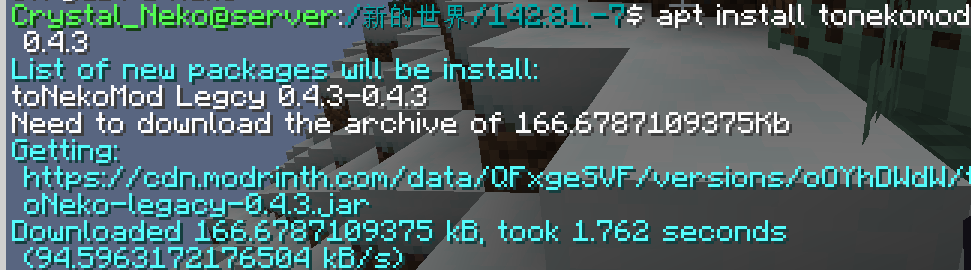
Call the system to execute bash commands (only supports Linux).
usage:
/bash <command>
WARNNING:THIS COMMAND IS DANGEROUS. IT MAYBE DAMAGE YOUR SYSTEM.
You know the command.
This file executes the commands inside when the player logs in. The commands are separated by ; and there is no / before the command.
The file is located in home/<player name>/.bashrc. Players can modify this file without sudo permissions.
Project description from Modrinth.
Pick your setup
Choose the version and loader you play, then open the matching release.
Check the dependencies, then try the file in a copied instance before changing a world you care about.
Recent files
sudo-0.0.4.jar
6 Nov 2024
Looking for an older file? The official Modrinth project page is in Resources.
 mod
Improved and rebalanced smithing, item repair and enchantment sources. Fully-featured and vanilla friendly.
 mod
A customizable Hypixel SkyBlock chat mod featuring 200+ message filters, chat tabs, search and compact messages.
 mod
A Fabric and NeoForge Minecraft mod that customizes the player list (tab list) header, footer, and message of the day.