Minecraft version
Back to mods 
Modrinth · Minecraft mod
DarkZoom
A simple and basic zoom mod. Works server-side too.
Choose a version Pick your version below, then grab the matching file.
Quick answer
Which DarkZoom release matches 26.2?
Best match for your filters 1.1.2
Game version 26.1, 26.1.1, 26.1.2
Loader NeoForge
DarkZoom 1.1.2 targets 26.1, 26.1.1, 26.1.2 with NeoForge. Do not install it on the client. It must be installed on the dedicated server. No extra mods listed for this file.
Where it goes
Is DarkZoom required on the client, server, or both?
Do not install it on the client. It must be installed on the dedicated server.
Client Not supported
Dedicated server Required
Loader for this release NeoForge
Required install it here Optional supported, not mandatory Not supported do not install here Source doesn’t say do not assume
This file is marked server-only.
What else does DarkZoom 1.1.2 need?
1.1.2 on 26.2. Every mod below is checked against that same setup.
This file does not list any required mods. Do not add a library just because a different file uses it.
This file does not list any required or optional mods.
Before you install it
Add DarkZoom without breaking your instance.
Built for DarkZoom 1.1.2 on 26.2. Pick another file and the loader, install side or required mods may change.
- 01
Stick to this file
Use 1.1.2. It targets 26.1, 26.1.1, 26.1.2 with NeoForge; another release may have different loader, side or dependency requirements.
- 02
Bring the mods it needs
This file does not list any required mods. Do not add a library just because a different file uses it.
- 03
Put it on the correct side
Do not install it on the client. It must be installed on the dedicated server.
- 04
Pick the file you checked
Use the “Get this file” button beside 1.1.2. It opens that exact file at the source.
About this project
What does DarkZoom add?
Get a server today and play with your friends! Click HERE or below banner & Use Code GAMERPOTION to get 25 off!



DarkZoom
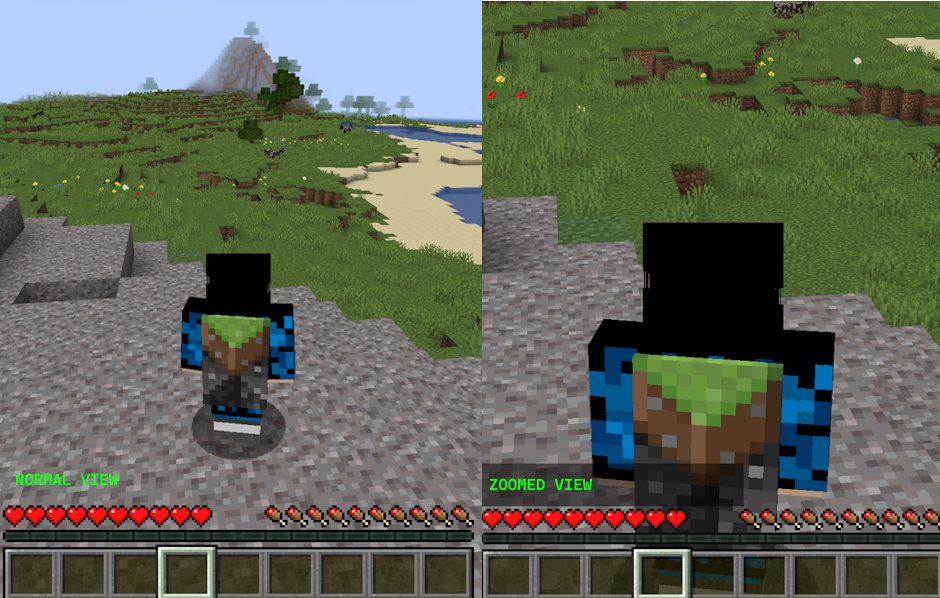
Activate zoom mode and zoom in on the area you are viewing | View Changelog
Server side is supported. You can install this on the server and not need to have it installed on the client.
Created by the same authors who made DarkRPG (for a full RPG experience, get the DarkRPG modpack and enjoy quests and rpg gameplay)
Features
(Your vanilla experience will be further enhanced thanks to these features)
This simple and basic mod allows you to zoom in on an area using a command. This works server-side as well so you don't need this installed on the client. Simply use the trigger command /trigger darkzoom and you will enter a zoomed mode which will show you a zoomed view of what you are seeing. This effect lasts for 2 seconds and can be reactivated again.
Note: This makes use of the in-game FOV function. Make sure your FOV slider is at 100% for this to work correctly.

Permission - Feel free to use in your modpack.
Click the banner below to get your server today! or go to BisectHosting.com and make sure to use the code 'gamerpotion' to get your 25% off.
Project description from Modrinth.
Pick your setup
DarkZoom by Minecraft version and loader
Choose the version and loader you play, then open the matching release.
Minecraft version
26.1.2
3 loader buildsMinecraft version
26.1.1
3 loader buildsMinecraft version
26.1
3 loader buildsMinecraft version
1.20.4
3 loader buildsMinecraft version
1.20.3
2 loader buildsMinecraft version
1.20.2
2 loader buildsMinecraft version
1.20.1
3 loader buildsCheck the dependencies, then try the file in a copied instance before changing a world you care about.
Recent files
DarkZoom versions and loaders
1.1.2
darkzoom-neoforge-26.1-1.1.2.jar
3 May 2026
Client Not supported Server Required Dependencies No extras listed Listed on Release listing
Check the 26.2 · NeoForge setup 26.126.1.126.1.226.2 release
1.1.2
darkzoom-forge-26.1-1.1.2.jar
3 May 2026
Client Not supported Server Required Dependencies No extras listed Listed on Release listing
Check the 26.2 · Forge setup 26.126.1.126.1.226.2 release
1.1.2
darkzoom-fabric-26.1-1.1.2.jar
3 May 2026
Client Not supported Server Required Dependencies No extras listed Listed on Release listing
Check the 26.2 · Fabric setup 26.126.1.126.1.226.2 release
Looking for an older file? The official Modrinth project page is in Resources.
 mod
CurseForge + Modrinth · Minecraft
BuffMobs
BuffMobs enhances mob attributes like health, attack speed, and armor, with full customization via in-game gui. Includes optional day-based scaling that increases mob strength over time.
 mod
Modrinth · Minecraft
DeathLogPlus
Records your deaths with cause, location, date/time, and inventory snapshot.
 mod
Modrinth · Minecraft
Retouch Brush
A Minecraft mod that lets you cycle through paintings using the brush!