Minecraft version
Back to mods 
Modrinth · Minecraft mod
Rebalantment
Aims to rebalance and shift the enchantment level system, and remove durability, while fully customizable
Choose a version Pick your version below, then grab the matching file.
Quick answer
Which Rebalantment release should I use?
Latest stable file 1.2.2
Game version 1.21.1
Loader NeoForge
Rebalantment 1.2.2 targets 1.21.1 with NeoForge. Installation on the client is optional. Installation on the dedicated server is optional. No extra mods listed for this file.
Where it goes
Is Rebalantment required on the client, server, or both?
Installation on the client is optional. Installation on the dedicated server is optional.
Client Optional
Dedicated server Optional
Loader for this release NeoForge
Required install it here Optional supported, not mandatory Not supported do not install here Source doesn’t say do not assume
The source marks this as usable on both the client and server.
What else does Rebalantment 1.2.2 need?
1.2.2. Change the file and its required mods may change too.
This file does not list any required mods. Do not add a library just because a different file uses it.
This file does not list any required or optional mods.
Before you install it
Add Rebalantment without breaking your instance.
Built for Rebalantment 1.2.2. Pick another file and the loader, install side or required mods may change.
- 01
Stick to this file
Use 1.2.2. It targets 1.21.1 with NeoForge; another release may have different loader, side or dependency requirements.
- 02
Bring the mods it needs
This file does not list any required mods. Do not add a library just because a different file uses it.
- 03
Put it on the correct side
Installation on the client is optional. Installation on the dedicated server is optional.
- 04
Pick the file you checked
Use the “Get this file” button beside 1.2.2. It opens that exact file at the source.
About this project
What does Rebalantment add?
This mod aims to allow anyone to customize the balancing of durability and enchanting easily. All features apply to both vanilla and all modded items, unless specified otherwise.
Features:
-Max level can be configured anywhere from 1 to 255, or to half the default value
-Enchantment levels can be singular or not
-Durability can be turned on or off
-Durability can be multiplied by any positive value
-Configurations can be changed without leaving the world
-By default, all enchantments' max levels are set to half their normal value, all enchantments have only one level, and durability is removed. So for example, Sharpness will have only the first level, and be as effective as Sharpness II
-This mod adds a new enchantment, and replaces Mending and Unbreaking with two new enchantments: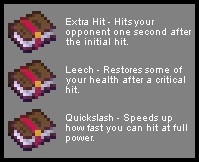 (Compatible with Enchantment Descriptions)
-Divides damage and protection enchantments into primary and secondary categories, allowing the combination of any primary with any secondary, but not two of the same tag (Since it uses tags, only works with Vanilla enchantments and specified modded ones)
-Primary Damage: Sharpness, Extra-Hit, Leech; Secondary Damage: Quickslash, Bane of Arthropods, Impaling, Smite
-Primary Protection: Protection; Secondary Protection: Blast Protection, Fire Protection, Projectile Protection, Feather Falling
-Maces, Tridents and Axes can now be enchanted with both damage tags
Planned Features:
-Rebuild enchantment table system from scratch
-Rebalance progression
Project description from Modrinth.
Pick your setup
Rebalantment by Minecraft version and loader
Choose the version and loader you play, then open the matching release.
Check the dependencies, then try the file in a copied instance before changing a world you care about.
Recent files
Rebalantment versions and loaders
1.2.2
rebal-1.2.2.jar
17 Oct 2026
Client Optional Server Optional Dependencies No extras listed Listed on Release listing
Check the 1.21.1 · NeoForge setup 1.21.1NeoForge release
1.2.1
rebal-1.2.1.jar
16 Oct 2026
Client Optional Server Optional Dependencies No extras listed Listed on Release listing
Check the 1.21.1 · NeoForge setup 1.21.1NeoForge release
1.2.0
rebal-1.2.0.jar
15 Oct 2026
Client Optional Server Optional Dependencies No extras listed Listed on Release listing
Check the 1.21.1 · NeoForge setup 1.21.1NeoForge release
1.1.0
zrebalantment-1.1.0-neoforge-1.21.1.jar
19 Sept 2026
Client Optional Server Optional Dependencies No extras listed Listed on Release listing
Check the 1.21.1 · NeoForge setup 1.21.1NeoForge release
1.0.0
rebalantment-1.0.0-neoforge-1.21.1.jar
10 Jun 2026
Client Optional Server Optional Dependencies No extras listed Listed on Release listing
Check the 1.21.1 · NeoForge setup 1.21.1NeoForge release
Looking for an older file? The official Modrinth project page is in Resources.