Fabric API Needed by Drinking Flask 4.0.5+mc26.2
requiredMatching file found Matched file: 0.157.0+26.2

Modrinth · Minecraft mod
Potions & stews don't stack? Put them all in a flask!
Quick answer
Drinking Flask 4.0.5+mc26.2 targets 26.2-rc-1, 26.2-rc-2, 26.2 with Fabric. Installation on the client is optional. Installation on the dedicated server is optional. All 1 required mods have matching files.
Where it goes
Installation on the client is optional. Installation on the dedicated server is optional.
The source marks this as usable on both the client and server.
4.0.5+mc26.2. Change the file and its required mods may change too.
Install Fabric API first. We found matching files for this game-version and loader setup.
We only count dependency files that match this setup. A file for another loader does not fill the gap.
Before you install it
Built for Drinking Flask 4.0.5+mc26.2. Pick another file and the loader, install side or required mods may change.
Use 4.0.5+mc26.2. It targets 26.2-rc-1, 26.2-rc-2, 26.2 with Fabric; another release may have different loader, side or dependency requirements.
Install Fabric API first. We found matching files for this game-version and loader setup.
Installation on the client is optional. Installation on the dedicated server is optional.
Use the “Get this file” button beside 4.0.5+mc26.2. It opens that exact file at the source.
About this project
The Drinking Flask is an item that can store up to 16 drinks. When you drink from the flask, the effects of a random drink from inside will be applied.
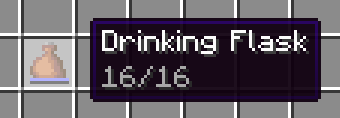
Useful for carrying many potions or stews, or playing Russian roulette!
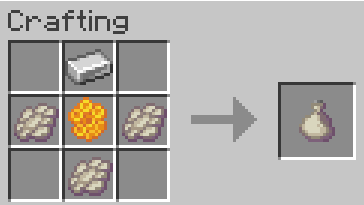
The Phantom Drinking Flask is more expensive, but you can view its contents. Drinking from it still applies a random drink though.
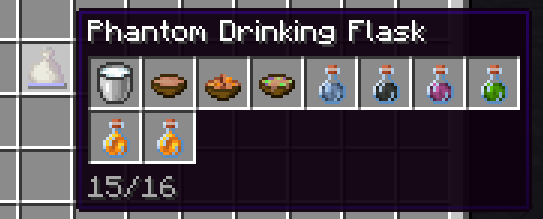
To add a drink to the flask, you can either:
The behavior is similar to a bundle.
For balancing, potions take up 2 of the 16 slots each (configurable through datapack).
Drinks include:
When you pour the drink into a bundle, you get the container back immediately even though it displays in the phantom tooltip.
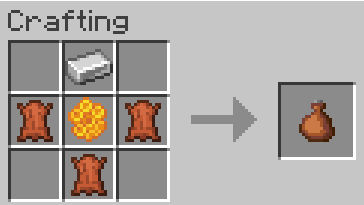
You can use leather or rabbit hide interchangeably.
Compatability has been reworked in 2.0.0. Support for other mods must be done explicitly in either this mod or the other mod, through tags and optionally an API. If you're a developer or datapacker, see the wiki page for more information.
Compatability needs to be added manually by adding the mod item to one of the following tags, or defining a new remainder tag and recipe. See the mod data for examples.
#drinkingflask:can_pour_into_flask (no remainder set)#drinkingflask:remainder/bottle (glass bottle)#drinkingflask:remainder/bowl (bowl)#drinkingflask:remainder/bucket (bucket)If there's a mod you'd like support for, feel free to open a github isue or PR
Most mods should work out-of-the-box, as long as the drink has a minecraft:consumable component with the drink animation. Items can also be flask-enabled by adding them to the #drinkingflask:can_pour_into_flask tag. Remainders are determined by looking at the minecraft:use_remainder component or the recipe remainder if absent.
Project description from Modrinth.
Pick your setup
Choose the version and loader you play, then open the matching release.
Showing the newest 12 of 18 game versions. Older files are in the list below.
Check the dependencies, then try the file in a copied instance before changing a world you care about.
Recent files
drinkingflask-4.0.5+mc26.2.jar
12 Jun 2026
drinkingflask-4.0.5+mc26.1.jar
12 Jun 2026
drinkingflask-4.0.4+mc26.1.jar
25 Mar 2026
drinkingflask-4.0.3+mc26.1.jar
24 Mar 2026
drinkingflask-3.0.2+mc1.21.1.jar
29 Dec 2025
drinkingflask-4.0.2+mc1.21.9.jar
30 Sept 2025
drinkingflask-4.0.2+mc1.21.8.jar
25 Sept 2025
drinkingflask-4.0.1+mc1.21.8.jar
13 Sept 2025
drinkingflask-3.0.1+mc1.21.1.jar
13 Sept 2025
drinkingflask-4.0.0+mc1.21.8.jar
13 Sept 2025
drinkingflask-3.0.0+mc1.21.1.jar
13 Sept 2025
drinkingflask-2.0.1.jar
9 Dec 2024
Looking for an older file? The official Modrinth project page is in Resources.
 mod
modThis is an unofficial Fabric port of the Functional Storage(https://github.com/Buuz135/FunctionalStorage) mod.
 mod
modThis is a craftable, infinitely edible items. Satiety and hidden satiety levels have been omitted.
 mod
modAn all-new gameplay experience featuring a new crafting system, brand-new dimensions, and a redesigned progression path.