Minecraft version
Back to mods 
Modrinth · Minecraft mod
View Model Customizer (Animations)
A minimalist Open Source Fabric mod for Minecraft 1.21.4+ that gives you complete control over your first-person viewmodel.
Choose a version Pick your version below, then grab the matching file.
Quick answer
Which View Model Customizer (Animations) release should I use?
Latest stable file 3.3
Game version 26.1, 26.1.1, 26.1.2
Loader Fabric
View Model Customizer (Animations) 3.3 targets 26.1, 26.1.1, 26.1.2 with Fabric. It must be installed on the client. Do not install it on the dedicated server. No extra mods listed for this file.
Where it goes
Is View Model Customizer (Animations) required on the client, server, or both?
It must be installed on the client. Do not install it on the dedicated server.
Client Required
Dedicated server Not supported
Loader for this release Fabric
Required install it here Optional supported, not mandatory Not supported do not install here Source doesn’t say do not assume
This file is marked client-only.
What else does View Model Customizer (Animations) 3.3 need?
3.3. Change the file and its required mods may change too.
This file does not list any required mods. Do not add a library just because a different file uses it.
This file does not list any required or optional mods.
Before you install it
Add View Model Customizer (Animations) without breaking your instance.
Built for View Model Customizer (Animations) 3.3. Pick another file and the loader, install side or required mods may change.
- 01
Stick to this file
Use 3.3. It targets 26.1, 26.1.1, 26.1.2 with Fabric; another release may have different loader, side or dependency requirements.
- 02
Bring the mods it needs
This file does not list any required mods. Do not add a library just because a different file uses it.
- 03
Put it on the correct side
It must be installed on the client. Do not install it on the dedicated server.
- 04
Pick the file you checked
Use the “Get this file” button beside 3.3. It opens that exact file at the source.
About this project
What does View Model Customizer (Animations) add?
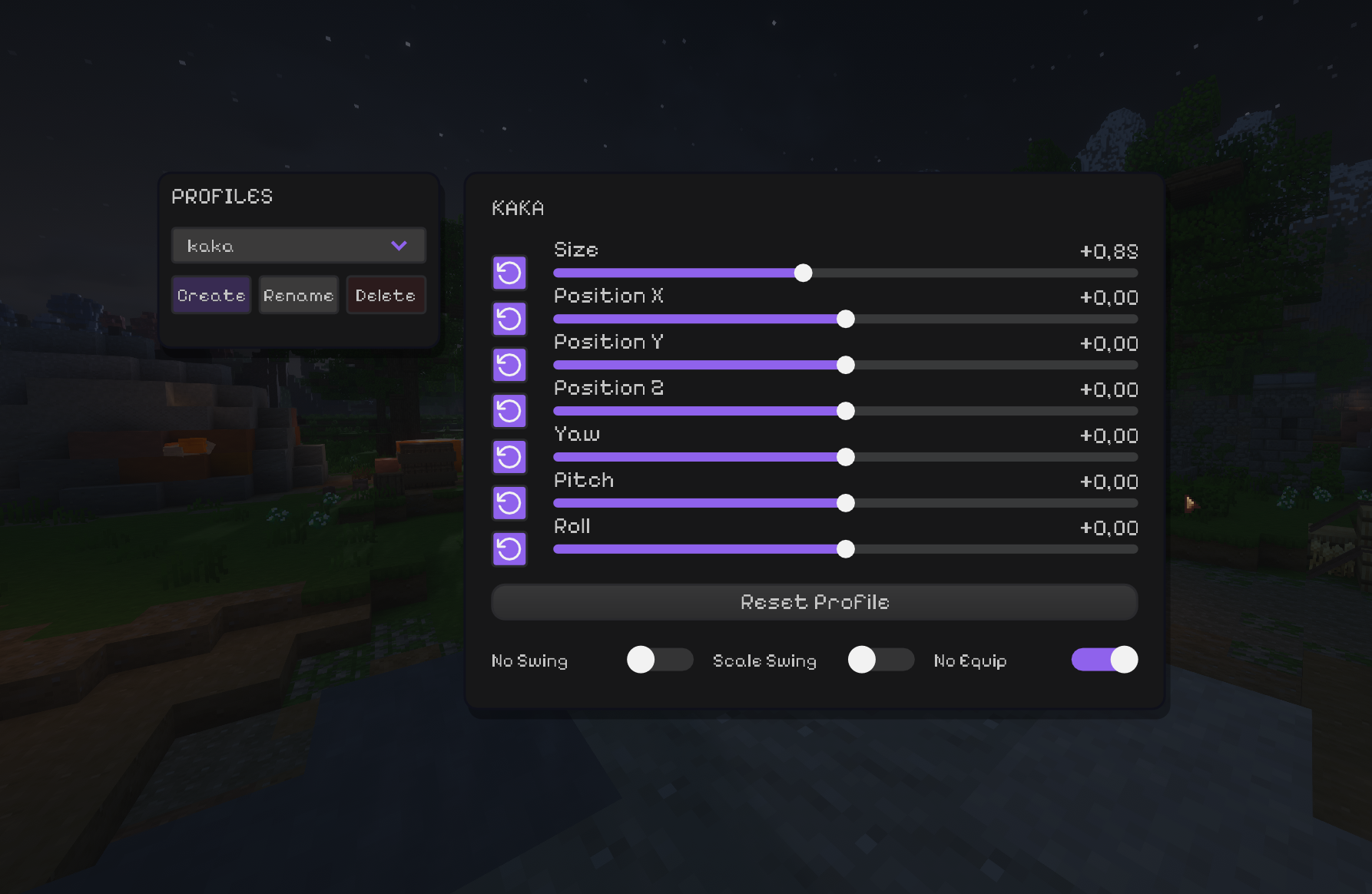
View Model Customizer


Fine-tune the way your held items look in first person.
Move, rotate and scale the viewmodel, save profiles, and control swing/equip animations - all client-side.
🖥️ Client-side only. Install it for yourself; the server does not need the mod.
✨ What you can tweak
| Control | What it does |
|---|---|
| 📏 Size | Changes the held-item scale. |
| ↔️ Position X / Y / Z | Moves the item with a range from -100 to 100. |
| 🔄 Yaw / Pitch / Roll | Rotates the item around its own axis — no flying across the screen. |
| ↩️ Reset controls | Reset one setting or restore the active profile's defaults. |
| 📁 Profiles | Create, rename, delete and instantly switch setups. Everything saves automatically. |
| ⚔️ No Swing | Removes swing side movement while keeping item rotation. |
| 📐 Scale Swing | Makes the swing animation respect your item scale. |
| 🚫 No Equip | Disables the draw/equip animation when switching items. |
🚀 Installation
- Install Fabric Loader and Fabric API for your Minecraft version.
- Download the matching jar:
View Model Customizer-mc1.21.11-3.3.jarfor Minecraft 1.21.11;View Model Customizer-mc26.1.2-3.3.jarfor Minecraft 26.1.2.
🎮 Usage
Press V to open the editor. The keybind can be changed in Minecraft's controls.
Create a profile for each setup, tune its position/rotation, and the changes are saved automatically. Empty hands keep their normal vanilla animation instead of inheriting an item offset.
📄 License
Project description from Modrinth.
Pick your setup
View Model Customizer (Animations) by Minecraft version and loader
Choose the version and loader you play, then open the matching release.
Minecraft version
26.1.1
1 loader buildMinecraft version
26.1
1 loader buildMinecraft version
1.21.11
1 loader buildMinecraft version
1.21.4
1 loader buildCheck the dependencies, then try the file in a copied instance before changing a world you care about.
Recent files
View Model Customizer (Animations) versions and loaders
3.3
View Model Customizer-mc26.1.2-3.3.jar
13 Jul 2026
Client Required Server Not supported Dependencies No extras listed Listed on Release listing
Check the 26.1.2 · Fabric setup 26.126.1.126.1.2Fabric release
3.3
View Model Customizer-mc1.21.11-3.3.jar
13 Jul 2026
Client Required Server Not supported Dependencies No extras listed Listed on Release listing
Check the 1.21.11 · Fabric setup 1.21.11Fabric release
3.2.2
viewmodel-mod-3.2.2.jar
19 Dec 2025
Client Required Server Not supported Dependencies No extras listed Listed on Release listing
Check the 1.21.4 · Fabric setup 1.21.4Fabric release
2.1.0
viewmodel-customizer-2.1.0.jar
19 Nov 2025
Client Required Server Not supported Dependencies No extras listed Listed on Release listing
Check the 1.21.4 · Fabric setup 1.21.4Fabric release
1.0.0
viewmodel-customizer.jar
13 Nov 2025
Client Required Server Not supported Dependencies No extras listed Listed on Release listing
Check the 1.21.4 · Fabric setup 1.21.4Fabric release
Looking for an older file? The official Modrinth project page is in Resources.
 mod
Modrinth · Minecraft
FastLoginPlus
Actively maintained fork of FastLogin with continuous updates and feature enhancements.
 mod
Modrinth · Minecraft
Celeritas/Nothirium Extra
Unofficial client-side addon for Celeritas/Actinium/Nothirium
 mod
CurseForge + Modrinth · Minecraft
Tinkers' Gadgets
A lightweight Tinkers' Construct addon featuring tools, new materials, and exclusive projectile traits.