Minecraft version
Back to mods 
Modrinth · Minecraft mod
Big Sign Writer
Easily write large multi-line characters on signs!
Choose a version Pick your version below, then grab the matching file.
Quick answer
Which Big Sign Writer release should I use?
Latest stable file 2.2.1+1.21.6-fabric
Game version 1.21.6, 1.21.7, 1.21.8
Loader Fabric
Big Sign Writer 2.2.1+1.21.6-fabric targets 1.21.6, 1.21.7, 1.21.8 with Fabric. It must be installed on the client. Do not install it on the dedicated server. No extra mods listed for this file.
Where it goes
Is Big Sign Writer required on the client, server, or both?
It must be installed on the client. Do not install it on the dedicated server.
Client Required
Dedicated server Not supported
Loader for this release Fabric
Required install it here Optional supported, not mandatory Not supported do not install here Source doesn’t say do not assume
This file is marked client-only.
What else does Big Sign Writer 2.2.1+1.21.6-fabric need?
2.2.1+1.21.6-fabric. Change the file and its required mods may change too.
This file does not list any required mods. Do not add a library just because a different file uses it.
This file does not list any required or optional mods.
Before you install it
Add Big Sign Writer without breaking your instance.
Built for Big Sign Writer 2.2.1+1.21.6-fabric. Pick another file and the loader, install side or required mods may change.
- 01
Stick to this file
Use 2.2.1+1.21.6-fabric. It targets 1.21.6, 1.21.7, 1.21.8 with Fabric; another release may have different loader, side or dependency requirements.
- 02
Bring the mods it needs
This file does not list any required mods. Do not add a library just because a different file uses it.
- 03
Put it on the correct side
It must be installed on the client. Do not install it on the dedicated server.
- 04
Pick the file you checked
Use the “Get this file” button beside 2.2.1+1.21.6-fabric. It opens that exact file at the source.
About this project
What does Big Sign Writer add?
Due to MC-308809, all existing signs written with Big Sign Writer will appear broken in 26.2. This has been fixed in the 26.3 snapshots.
If you are playing on 26.2, a resource pack fixing the mod's fonts can be found here.
A client-side utility mod that eases inputting text onto signs that forms larger letters! Just turn the toggle on in the sign editing UI, and type as normal! Each large character is made up of smaller, normal Unicode characters from the vanilla Minecraft font, allowing this mod to work on most servers.
Certain resource packs may cause issues.
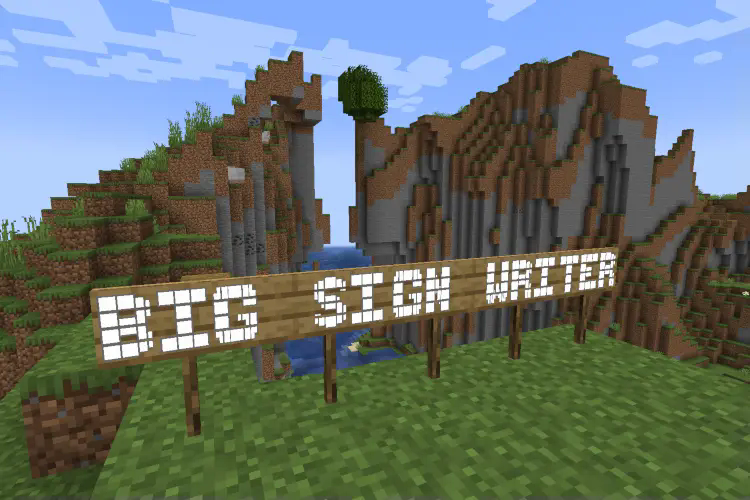
A button is added to the sign editing GUI to switch between large letter typing and normal. This button's position can be changed in the config file. (config/bigsignwriter/config.json)
Most default fonts have large characters for all uppercase letters, all numbers, and a few additional symbols. Custom fonts can be added in the 'fonts' folder. (config/bigsignwriter/fonts/)
Configuration
The config and font files are loaded once at runtime, and can be reloaded through the in-game config screen.
config/bigsignwriter/config.json
Contains the general mod configuration. Can be edited through the in-game config screen, accessible by default through the sign edit screen, or Mod Menu on Fabric and NeoForge's mod list.
config/bigsignwriter/fonts/
Folder where you can put custom fonts! You can create copies of the default fonts from the in-game config screen, which will go here.
Custom fonts are .json files, which contain a "name":"" field, an optional "characterSeparator":"" field, which can override which character(s) to use in between letters, and a "characters":{} field containing every large character and the normal character they represent. You may add additional characters, as long as what you want replaced is a single, type-able character. There's also an optional "credits":"" field for adding credits, and an optional "parentFont":"" field for explicitly defining which font to inherit characters from (based on filename without ".json", or built-in id).
When editing/creating large characters, it is important that each line is the exact same width to maintain alignment. Different fonts will have different widths for different characters, so it is a good idea to make these directly inside Minecraft, and then copy each line into the config file.
The default 'T' is a good example, the top line is 3 blocks, which are 9 pixels wide each, making for a total of 27 pixels. Each subsequent line has one block, then on both sides of the block there is 1 space (4 pixels wide), and 1 "no-break space" (5 pixels wide), bringing the total in line at 27.
To check that your alignment is good, I like to copy three blocks ███ onto both sides of each line, then modify each line until all the blocks are in line with each other.
A massively helpful tool to aid in this process is Symbol Chat, which adds a menu where you can filter every available Unicode character by their width, among other things.
Project description from Modrinth.
Pick your setup
Big Sign Writer by Minecraft version and loader
Choose the version and loader you play, then open the matching release.
Minecraft version
26.1.1
2 loader buildsMinecraft version
26.1-rc-3
1 loader buildMinecraft version
26.1-rc-2
1 loader buildMinecraft version
26.1
2 loader buildsMinecraft version
1.21.11
2 loader buildsMinecraft version
1.21.10
2 loader buildsMinecraft version
1.21.9
2 loader buildsMinecraft version
1.21.8
2 loader buildsMinecraft version
1.21.7
2 loader buildsMinecraft version
1.21.6
2 loader buildsMinecraft version
1.21.5
2 loader buildsShowing the newest 12 of 17 game versions. Older files are in the list below.
Check the dependencies, then try the file in a copied instance before changing a world you care about.
Recent files
Big Sign Writer versions and loaders
2.2.1+1.21.6-fabric
bigsignwriter-2.2.1+1.21.6-fabric.jar
1 Sept 2026
Client Required Server Not supported Dependencies No extras listed Listed on Release listing
Check the 1.21.8 · Fabric setup 1.21.61.21.71.21.8Fabric release
2.2.1+1.21.6-neoforge
bigsignwriter-2.2.1+1.21.6-neoforge.jar
1 Sept 2026
Client Required Server Not supported Dependencies No extras listed Listed on Release listing
Check the 1.21.8 · NeoForge setup 1.21.61.21.71.21.8NeoForge release
2.2.1+1.21.4-fabric
bigsignwriter-2.2.1+1.21.4-fabric.jar
1 Sept 2026
Client Required Server Not supported Dependencies No extras listed Listed on Release listing
Check the 1.21.5 · Fabric setup 1.21.41.21.5Fabric release
2.2.1+1.21.4-neoforge
bigsignwriter-2.2.1+1.21.4-neoforge.jar
1 Sept 2026
Client Required Server Not supported Dependencies No extras listed Listed on Release listing
Check the 1.21.5 · NeoForge setup 1.21.41.21.5NeoForge release
2.2.1+1.21.3-fabric
bigsignwriter-2.2.1+1.21.3-fabric.jar
1 Sept 2026
Client Required Server Not supported Dependencies No extras listed Listed on Release listing
Check the 1.21.3 · Fabric setup 1.21.21.21.3Fabric release
2.2.1+1.21.3-neoforge
bigsignwriter-2.2.1+1.21.3-neoforge.jar
1 Sept 2026
Client Required Server Not supported Dependencies No extras listed Listed on Release listing
Check the 1.21.3 · NeoForge setup 1.21.21.21.3NeoForge release
2.2.1+1.21.1-fabric
bigsignwriter-2.2.1+1.21.1-fabric.jar
1 Sept 2026
Client Required Server Not supported Dependencies No extras listed Listed on Release listing
Check the 1.21.1 · Fabric setup 1.211.21.1Fabric release
2.2.1+1.21.1-neoforge
bigsignwriter-2.2.1+1.21.1-neoforge.jar
1 Sept 2026
Client Required Server Not supported Dependencies No extras listed Listed on Release listing
Check the 1.21.1 · NeoForge setup 1.211.21.1NeoForge release
2.2.0+26.1-fabric
bigsignwriter-2.2.0+26.1-fabric.jar
23 Jun 2026
Client Required Server Not supported Dependencies No extras listed Listed on Release listing
Check the 26.1.2 · Fabric setup 26.126.1.126.1.2Fabric release
2.2.0+26.1-neoforge
bigsignwriter-2.2.0+26.1-neoforge.jar
23 Jun 2026
Client Required Server Not supported Dependencies No extras listed Listed on Release listing
Check the 26.1.2 · NeoForge setup 26.126.1.126.1.2NeoForge release
2.2.0+1.21.11-fabric
bigsignwriter-2.2.0+1.21.11-fabric.jar
23 Jun 2026
Client Required Server Not supported Dependencies No extras listed Listed on Release listing
Check the 1.21.11 · Fabric setup 1.21.11Fabric release
2.2.0+1.21.11-neoforge
bigsignwriter-2.2.0+1.21.11-neoforge.jar
23 Jun 2026
Client Required Server Not supported Dependencies No extras listed Listed on Release listing
Check the 1.21.11 · NeoForge setup 1.21.11NeoForge release
Looking for an older file? The official Modrinth project page is in Resources.
 mod
mod CurseForge + Modrinth · Minecraft
Create: Cyber Goggles
A client-side mod for Create that provides modular assistance features.
 mod
mod CurseForge + Modrinth · Minecraft
Create Aeronautics Discovery
An extension for the Minecraft Create Aeronautics to add generated structures to the world.
 mod
mod CurseForge + Modrinth · Minecraft
NuclearCraft: Neoteric
This is a re-creation of old but gold NuclearCraft on a modern MC version