Mod Menu Optional for Borderless Fullscreen 2.5.1-26.3
optionalMatching file found Matched file: 21.0.1

CurseForge · Minecraft mod
Makes Minecraft's fullscreen mode more configurable
Quick answer
Borderless Fullscreen 2.5.1-26.3 targets 26.3 with Fabric. It must be installed on the client. Do not install it on the dedicated server. All 1 required mods have matching files.
Where it goes
It must be installed on the client. Do not install it on the dedicated server.
This file is marked client-only.
2.5.1-26.3 on Fabric. Every mod below is checked against that same setup.
Install Fabric API first. We found matching files for this game-version and loader setup. 1 comes through another mod in the chain.
1 extra mod was pulled in by another dependency. Indented rows show who needs each one. We only count dependency files that match this setup. A file for another loader does not fill the gap.
Before you install it
Built for Borderless Fullscreen 2.5.1-26.3 on Fabric. Pick another file and the loader, install side or required mods may change.
Use 2.5.1-26.3. It targets 26.3 with Fabric; another release may have different loader, side or dependency requirements.
Install Fabric API first. We found matching files for this game-version and loader setup. 1 comes through another mod in the chain.
It must be installed on the client. Do not install it on the dedicated server.
Use the “Get this file” button beside 2.5.1-26.3. It opens that exact file at the source.
About this project
This mod changes Minecraft's fullscreen mode and makes it more customizable. By default, it makes the game not minimize on lost focus, and allows other windows on top of the game.
On Windows 10 and 11, Fullscreen Optimizations are enabled by default. Fullscreen Optimizations make the game run better, but they prevent anything from being on top of the game while the game is focused. If you want to, for example, have a picture-in-picture video on top of the game, or use the discord overlay, you have to disable Fullscreen Optimizations.
If you are on Linux, and the taskbar is above the game, disable the Borderless Fullscreen option.
On some Linux distributions you cannot have anything in front of the game, because some window systems don't support regular always-on-top windows. In that case, you have to create a custom window rule to put something in front of the game. Here is an example for firefox picture-in-picture videos
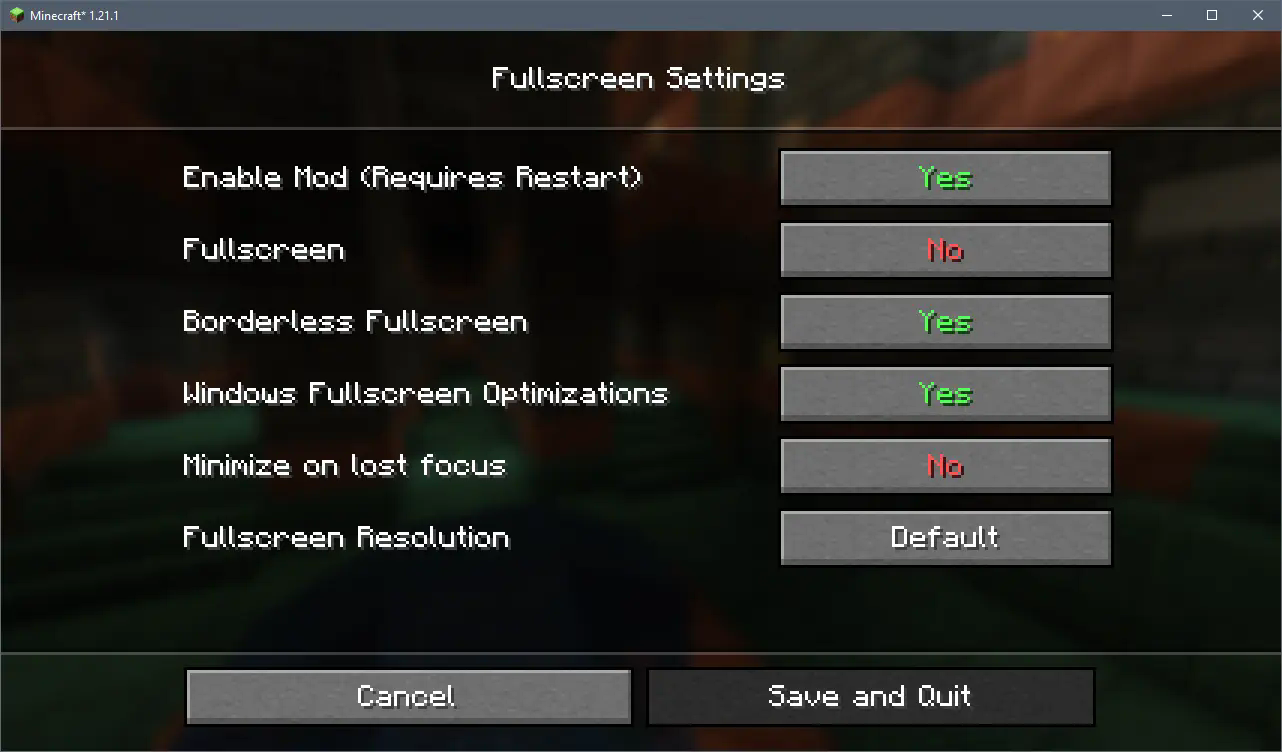 The config menu as of version 2.0.0
To open the config menu you need Mod Menu
Project description from CurseForge.
Pick your setup
Choose the version and loader you play, then open the matching release.
Showing the newest 12 of 18 game versions. Older files are in the list below.
Check the dependencies, then try the file in a copied instance before changing a world you care about.
Recent files
BorderlessFullscreen-v2.5.1-mc26.3.jar
1 Oct 2026
BorderlessFullscreen-v2.5.0-mc26.3.jar
17 Sept 2026
BorderlessFullscreen-v2.4.1_01-mc26.1.2.jar
13 Jul 2026
BorderlessFullscreen-v2.4.1-mc26.2.jar
17 Jun 2026
BorderlessFullscreen-v2.4.1-mc26.1.2.jar
27 Apr 2026
BorderlessFullscreen-v2.4.1-mc1.21.1.jar
27 Apr 2026
BorderlessFullscreen-v2.4.0-mc26.1.1.jar
3 Apr 2026
BorderlessFullscreen-v2.4.0-mc26.1.jar
30 Mar 2026
BetterFullscreen-v2.3.0_01-mc1.20.1.jar
13 Mar 2026
BetterFullscreen-v2.3.0-mc1.20.1.jar
11 Mar 2026
BetterFullscreen-v2.3.0-mc1.21.1.jar
11 Mar 2026
BorderlessFullscreen-v2.2.1-mc1.21.9.jar
10 Oct 2025
Looking for an older file? The official CurseForge project page is in Resources.
 mod
Scheduled item and entity cleanup with configurable filters, a multi-page dustbin, chunk-overload storage and countdown notices.
 mod
More FPS and fewer stutters with shaders on Vulkan (Vitrail), especially with lots of mobs. The image stays the same.
 mod
Provide the sortInventory feature for Item Scroller or Item Scroller-Forge versions 1.21-.