oωo (owo-lib) Needed by gadget 0.2.3+1.20.3
requiredMatching file found Matched file: 0.12.6+1.20.3
Modrinth · Minecraft mod
Debugger's Delight
Quick answer
gadget 0.2.3+1.20.3 targets 1.20.3, 1.20.4 with Fabric, Quilt. Installation on the client is optional. Installation on the dedicated server is optional. All 2 required mods have matching files.
Where it goes
Installation on the client is optional. Installation on the dedicated server is optional.
The source marks this as usable on both the client and server.
0.2.3+1.20.3. Change the file and its required mods may change too.
Install oωo (owo-lib), Fabric API first. We found matching files for this game-version and loader setup.
We only count dependency files that match this setup. A file for another loader does not fill the gap.
Before you install it
Built for gadget 0.2.3+1.20.3. Pick another file and the loader, install side or required mods may change.
Use 0.2.3+1.20.3. It targets 1.20.3, 1.20.4 with Fabric, Quilt; another release may have different loader, side or dependency requirements.
Install oωo (owo-lib), Fabric API first. We found matching files for this game-version and loader setup.
Installation on the client is optional. Installation on the dedicated server is optional.
Use the “Get this file” button beside 0.2.3+1.20.3. It opens that exact file at the source.
About this project
Debugger's Delight
Gadget is a collection of tools to debug and inspect certain game elements from in-game - think Chrome's developer tools, or Firefoxes' Firebug.
Gadget's inspection tools work both in single player and on a remote server - if it also has Gadget installed.
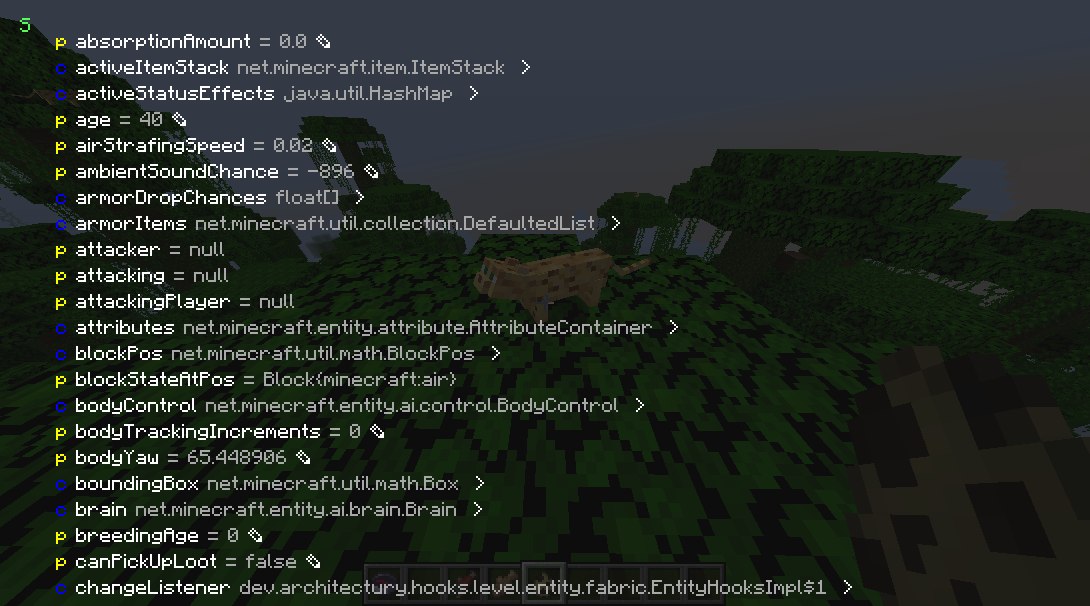
Press the Inspect (default: I) key when targeting a entity or block entity to view and edit its internal Java fields. You can inspect both the client and server Java object.
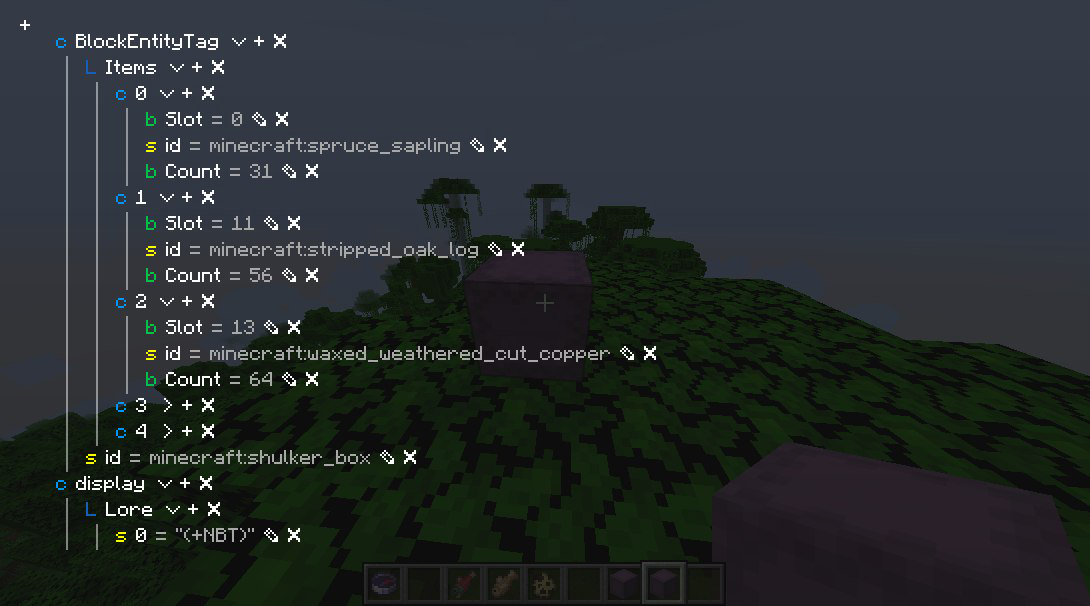
Press the Inspect (default: I) key when hovering over an item stack with NBT to view and edit its NBT.
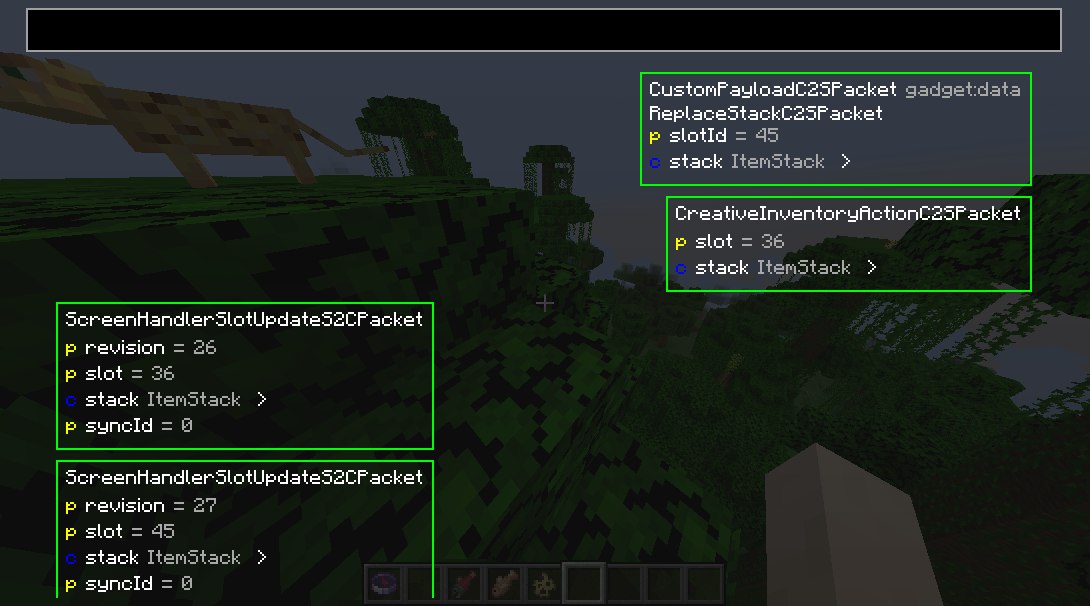
Press the Dump Packets (default: K) key to toggle dumping network traffic on. You can also join with the packet dumper engaged by right-clicking the server or world and selecting Join and start dumping packets.
Press Dump Packets again to stop recording and save the dump.
You can review it from the Gadget's menu.
Gadget supports the Fabric Permissions API.
If not present, it defaults to requiring OP status.
Gadget uses the following permissions:
gadget.inspect - entity inspector usage permissiongadget.replaceStack - NBT viewer write permission
(the class inspector is broken in the latest version :P)
Look through all classes touched by mixin (or all classes, if you hold shift) by looking in the class inspector.
N.B.: This will automatically download Quiltflower from the QuiltMC maven the first time you press Inspect Exported Classes.
Project description from Modrinth.
Pick your setup
Choose the version and loader you play, then open the matching release.
Check the dependencies, then try the file in a copied instance before changing a world you care about.
Recent files
gadget-0.2.6+1.21.11.jar
5 Mar 2026
gadget-0.2.5+1.21.9.jar
6 Oct 2025
gadget-0.2.4+1.21.jar
27 Jul 2024
gadget-0.2.3+1.20.3.jar
22 Jan 2024
gadget-0.2.3+1.20.2.jar
1 Jan 2024
gadget-0.2.2+1.20.2.jar
11 Oct 2023
gadget-0.2.2+1.20.jar
4 Oct 2023
gadget-0.2.1+1.20.jar
8 Jul 2023
gadget-0.2.0+1.19.4.jar
9 Jun 2023
gadget-0.1.8-hotfix+1.19.4.jar
29 Apr 2023
gadget-0.1.8-hotfix+1.19.2.jar
28 Apr 2023
gadget-0.1.8+1.19.4.jar
29 Mar 2023
Looking for an older file? The official Modrinth project page is in Resources.
 mod
A sleek social chat mod for Minecraft that replaces vanilla chat with channels, private messaging, and a modern GUI.
 mod
A working voice chat in Minecraft!
 mod
In-game irc client built into the chat (actually simpler then simpleirc)