Fabric API Needed by InvSort 3.4.0+mc26.3-snapshot-1
requiredMatching file found Matched file: 0.153.1+26.3

Modrinth · Minecraft mod
Quickly sort Minecraft inventories and containers into a clean, predictable order.
Quick answer
InvSort 3.4.0+mc26.3-snapshot-1 targets 26.3-snapshot-1 with Fabric. It must be installed on the client. Do not install it on the dedicated server. All 1 required mods have matching files.
Where it goes
It must be installed on the client. Do not install it on the dedicated server.
This file is marked client-only.
3.4.0+mc26.3-snapshot-1. Change the file and its required mods may change too.
Install Fabric API first. We found matching files for this game-version and loader setup.
We only count dependency files that match this setup. A file for another loader does not fill the gap.
Before you install it
Built for InvSort 3.4.0+mc26.3-snapshot-1. Pick another file and the loader, install side or required mods may change.
Use 3.4.0+mc26.3-snapshot-1. It targets 26.3-snapshot-1 with Fabric; another release may have different loader, side or dependency requirements.
Install Fabric API first. We found matching files for this game-version and loader setup.
It must be installed on the client. Do not install it on the dedicated server.
Use the “Get this file” button beside 3.4.0+mc26.3-snapshot-1. It opens that exact file at the source.
About this project
InvSort is a lightweight Fabric client mod that adds fast, practical inventory
sorting to Minecraft. It cleans up messy inventories and containers without
making you manually drag every stack around.
It focuses on predictable survival-friendly sorting: restacking partial piles,
compacting empty gaps, and ordering items in a way that keeps common storage
readable. Use it on its own, or alongside InvSearch and InvCatalogue as part of
the wider inventory management suite.
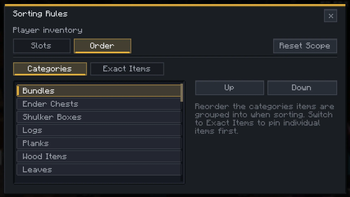
Open supported inventories and containers to use the Sort button. Right-click
that button to open the rules screen, where you can protect slots, assign exact
items to specific slots, and control the order that categories or exact items
should follow.
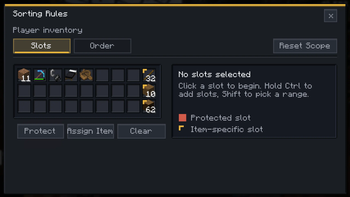
The rules screen has separate Slots and Order views. Use Slots when you want
parts of an inventory or chest to stay untouched, or when one slot should only
receive a particular item. Use Order when you want logs, planks, tools, stone,
food, or exact items to appear in your preferred sequence.
InvSort does not require a server install. Install Fabric Loader, Fabric API,
and the InvSort jar for your Minecraft version.
It does not add blocks, items, or server mechanics. Server rules still apply,
so only use it where client-side utility mods are allowed.
Project description from Modrinth.
Pick your setup
Choose the version and loader you play, then open the matching release.
Showing the newest 12 of 25 game versions. Older files are in the list below.
Check the dependencies, then try the file in a copied instance before changing a world you care about.
Recent files
inventory-sort-3.4.0.jar
24 Jun 2026
inventory-sort-3.4.0.jar
24 Jun 2026
inventory-sort-3.4.0.jar
24 Jun 2026
inventory-sort-3.4.0.jar
24 Jun 2026
inventory-sort-3.4.0.jar
24 Jun 2026
inventory-sort-3.4.0.jar
24 Jun 2026
inventory-sort-3.4.0.jar
24 Jun 2026
inventory-sort-3.4.0.jar
24 Jun 2026
inventory-sort-3.3.0.jar
21 Jun 2026
inventory-sort-3.3.0.jar
21 Jun 2026
inventory-sort-3.3.0.jar
21 Jun 2026
inventory-sort-3.3.0.jar
21 Jun 2026
Looking for an older file? The official Modrinth project page is in Resources.
 mod
Provides Vanilla-style "fly by instrument" support for elytra flight
 mod
A modern port of the classic fabric Origins mod. Backwards compatible with most of your favorite origins expansions.
 mod
Deployer is a Create library addon that extends logistics, gauges, and fluid systems while prioritizing stability over compatibility.