Minecraft version
Back to mods 
Modrinth · Minecraft mod
Chat Colours
Overhauls the game's 14 year old text formatting syntax.
Choose a version Pick your version below, then grab the matching file.
Quick answer
Which Chat Colours release matches 1.20 Forge?
Best match for your filters chatcolours-1.19-1.0
Game version 1.19.2, 1.19.3, 1.19.4
Loader Forge
Chat Colours chatcolours-1.19-1.0 targets 1.19.2, 1.19.3, 1.19.4 with Forge. Installation on the client is optional. Installation on the dedicated server is optional. No extra mods listed for this file.
Where it goes
Is Chat Colours required on the client, server, or both?
Installation on the client is optional. Installation on the dedicated server is optional.
Client Optional
Dedicated server Optional
Loader for this release Forge
Required install it here Optional supported, not mandatory Not supported do not install here Source doesn’t say do not assume
The source marks this as usable on both the client and server.
What else does Chat Colours chatcolours-1.19-1.0 need?
chatcolours-1.19-1.0 on 1.20 Forge. Every mod below is checked against that same setup.
This file does not list any required mods. Do not add a library just because a different file uses it.
This file does not list any required or optional mods.
Before you install it
Add Chat Colours without breaking your instance.
Built for Chat Colours chatcolours-1.19-1.0 on 1.20 Forge. Pick another file and the loader, install side or required mods may change.
- 01
Stick to this file
Use chatcolours-1.19-1.0. It targets 1.19.2, 1.19.3, 1.19.4 with Forge; another release may have different loader, side or dependency requirements.
- 02
Bring the mods it needs
This file does not list any required mods. Do not add a library just because a different file uses it.
- 03
Put it on the correct side
Installation on the client is optional. Installation on the dedicated server is optional.
- 04
Pick the file you checked
Use the “Get this file” button beside chatcolours-1.19-1.0. It opens that exact file at the source.
About this project
What does Chat Colours add?
Chat Colours
Overhauls the game's 14 year old text formatting syntax.
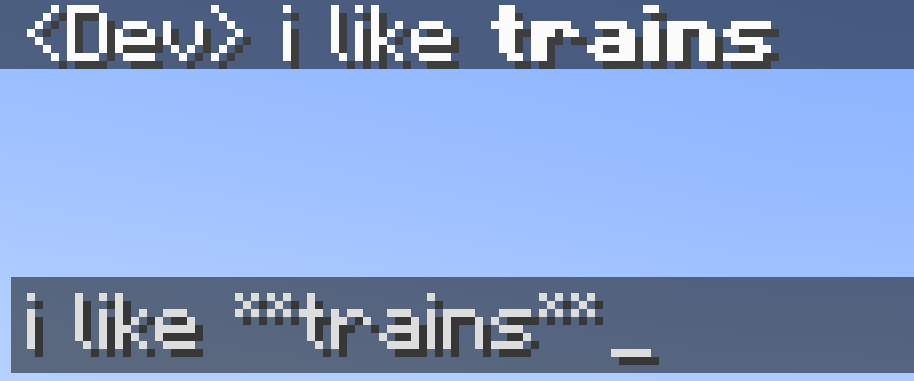
Markdown-like syntax
This mod allows you to use markdown-like syntax to format your text in
minecraft:
*italic text* -> italic text**bold text** -> bold text***bold + italic*** -> bold + italic__underline__ -> underline~~strikethrough~~ -> strikethroughthis **is** bold -> this is boldthis __*is* multiple things__ -> this is multiple things
The terminating set of symbols is optional, e.g. **hello will still be
bold.
If you put a star at the start of the name of an item in an anvil, it
will cancel out the italic
Hex codes/custom colours
This mod allows you to colour your text with custom colours:
[#ff0000]red text -> red text
 [#ff00FF]pink text -> pink text
**[#00ff00]bold green text** or [#00ff00]**bold green text**-> bold green text
The codes are case-insensitive.
Extended format syntax
This feature has been replaced by new syntax, but still works.
The mod allows you to use named colours instead of the normal single
letters.
The names are white, black, blue, green, aqua (or cyan), red, purple,
gray and yellow.
The names are case-insensitive.
To use the dark version of the colour (except white and black), put "d",
"dark" or "deep" before or after the name. You can optionaly use a space
or underscore between the name and the prefix/suffix. For example,§[dark_blue], §[deepblue], §[blue d], §[dblue] all make dark
blue text
§[gold], the name MCWiki gives the colour, can also be used for dark
yellow.
Bold, underline, italics, etc
You can also use:
§[s]for strikeout text,§[b]for bold text,§[o]for obfuscated text,§[u]for underlined text,- and
§[r]for §r (reset)
Multiple style options
Format options can be chained without needing multiple §s. For
example, §[red][u][i]text will show red, bold, underlined text. You
need to put the colour before the bold and underline. This is because
the colour code resets the style to be coloured, but not italic, bold,
etc. This is a minecraft thing, and also applies to vanilla formatting
codes.
Use on servers
If you want to use this mod on a server, this mod will have to be
installed on it, or the server must otherwise allow you to send '§' in
chat, or the server will automatically kick you when you use formatting.
Project description from Modrinth.
Pick your setup
Chat Colours by Minecraft version and loader
Choose the version and loader you play, then open the matching release.
Minecraft version
1.20
1 loader buildMinecraft version
1.19.4
1 loader buildMinecraft version
1.19.3
1 loader buildMinecraft version
1.19.2
1 loader buildMinecraft version
1.18.2
1 loader buildMinecraft version
1.16.5
1 loader buildCheck the dependencies, then try the file in a copied instance before changing a world you care about.
Recent files
Chat Colours versions and loaders
chatcolours-1.19-1.0
chatcolours-1.19-1.0.jar
18 Jun 2023
Client Optional Server Optional Dependencies No extras listed Listed on Release listing
Check the 1.20 · Forge setup 1.19.21.19.31.19.41.20 release
Looking for an older file? The official Modrinth project page is in Resources.
 mod
CurseForge · Minecraft
Noted
A clean, fully customizable client-side task manager and hud overlay to track your build,farms and gools diractly in-game
 mod
CurseForge · Minecraft
RP Tubes
The RedPower 2 pneumatic tube system, revived for 1.19.2 — authentic Tubes, Filters, Sorting Machines, Alloy Furnace, and Automatic Crafting Tables.
 mod
CurseForge · Minecraft
NeroEconomy
Buy, sell, haul and bid — a player-driven economy that turns a Neroland server from sixteen solo grinds into one living market.