SekCore Lib Needed by Re:Skin 3.0.2
requiredMatching file found Matched file: 1.0.2

Modrinth · Minecraft mod
Skin changer with support for HD skins, works with Mo' Bends & most other model changing mods
Quick answer
Re:Skin 3.0.2 targets 1.20, 1.20.1 with Forge, NeoForge. Installation on the client is optional. Installation on the dedicated server is optional. All 1 required mods have matching files.
Where it goes
Installation on the client is optional. Installation on the dedicated server is optional.
The source marks this as usable on both the client and server.
3.0.2. Change the file and its required mods may change too.
Install SekCore Lib first. We found matching files for this game-version and loader setup.
We only count dependency files that match this setup. A file for another loader does not fill the gap.
Before you install it
Built for Re:Skin 3.0.2. Pick another file and the loader, install side or required mods may change.
Use 3.0.2. It targets 1.20, 1.20.1 with Forge, NeoForge; another release may have different loader, side or dependency requirements.
Install SekCore Lib first. We found matching files for this game-version and loader setup.
Installation on the client is optional. Installation on the dedicated server is optional.
Use the “Get this file” button beside 3.0.2. It opens that exact file at the source.
About this project
Set skins using /setskin (url) or /setskin (url) (player)
Note: Url's must directly link the image, they can't just be on the page. Example skin used in gif https://i.imgur.com/mORJxcm.png
Reset skin back to vanilla with /clearskin
Reload skins/clear the cache using /clearskincache
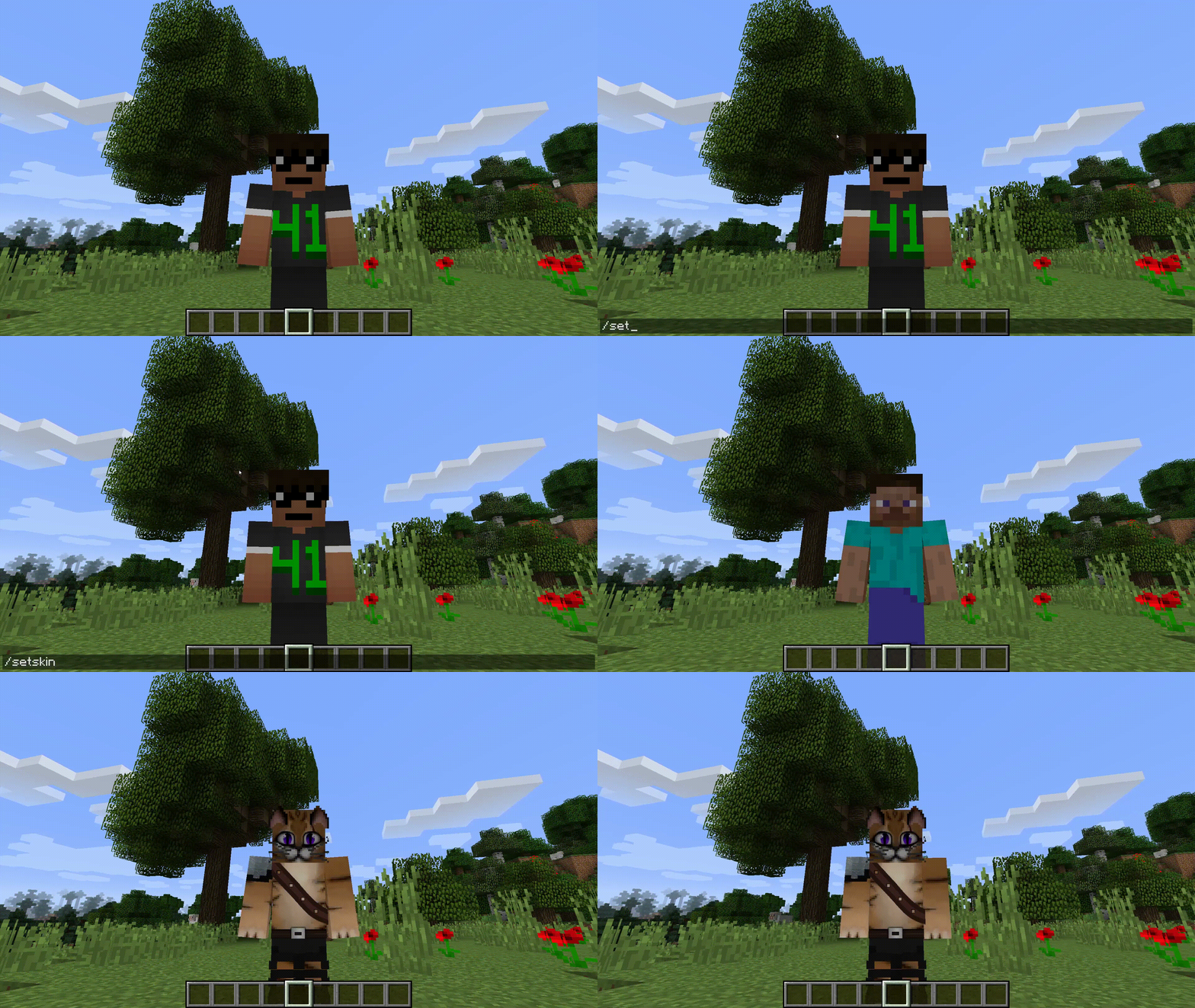
To get the image source from imgur.com (Copy the image address not the main https://imgur.com/ link)
Compatible Skin Sizes
As long as they follow the same ratio as the default skins e.g. 64x64 or the old 32x64 then they will be supported. Though the way that minecraft handles textures the numbers will need to be powers of 2. Basically multiply the base size by 2 over and over until you get the size you want.
I have not tried going lower but theoretically that should also work.
New Skins: 64x64,128x128,256x256,512x512,1024x1024,2048x2048,4096x4096,8192x8192
Old Skins: 64x32,128x64,256x128,512x256,1024x512,2048x1024,4096x2048,8192x4096

Project description from Modrinth.
Pick your setup
Choose the version and loader you play, then open the matching release.
Check the dependencies, then try the file in a copied instance before changing a world you care about.
Recent files
ReSkin-1.20-3.0.2-universal.jar
7 Jul 2024
ReSkin-1.20-3.0.1-universal.jar
27 Feb 2024
ReSkin-1.20-3.0.0-universal.jar
22 Jun 2023
ReSkin-2.6.1-universal.jar
20 Jan 2023
ReSkin-2.6.0-universal.jar
19 Jan 2023
Looking for an older file? The official Modrinth project page is in Resources.
 mod
modOverhaul survival with many changes to existing mechanics. Weapon rebalance, enchanting rework, and much more
 mod
modThis mod allows you to plant a bigger tree with more saplings.
 mod
modCarry a client-only vanilla lantern on your hip or in hand with dynamic light and physics!