Minecraft version
Back to mods 
Modrinth · Minecraft mod
XPGui
Store your experience
Choose a version Pick your version below, then grab the matching file.
Quick answer
Which XPGui release matches Fabric?
Best match for your filters 1.0.2
Game version 26.2, 26.3
Loader Fabric
XPGui 1.0.2 targets 26.2, 26.3 with Fabric. Installation on the client is optional. Installation on the dedicated server is optional. No extra mods listed for this file.
Where it goes
Is XPGui required on the client, server, or both?
Installation on the client is optional. Installation on the dedicated server is optional.
Client Optional
Dedicated server Optional
Loader for this release Fabric
Required install it here Optional supported, not mandatory Not supported do not install here Source doesn’t say do not assume
The source marks this as usable on both the client and server.
What else does XPGui 1.0.2 need?
1.0.2 on Fabric. Every mod below is checked against that same setup.
This file does not list any required mods. Do not add a library just because a different file uses it.
This file does not list any required or optional mods.
Before you install it
Add XPGui without breaking your instance.
Built for XPGui 1.0.2 on Fabric. Pick another file and the loader, install side or required mods may change.
- 01
Stick to this file
Use 1.0.2. It targets 26.2, 26.3 with Fabric; another release may have different loader, side or dependency requirements.
- 02
Bring the mods it needs
This file does not list any required mods. Do not add a library just because a different file uses it.
- 03
Put it on the correct side
Installation on the client is optional. Installation on the dedicated server is optional.
- 04
Pick the file you checked
Use the “Get this file” button beside 1.0.2. It opens that exact file at the source.
About this project
What does XPGui add?
A simple fabric mod: can store player experience
zh_cn:
打开背包,点击角色旁边的“体验瓶”按钮,打开储存体验的屏幕。
点击“+”或“-”存储玩家的经验。
即使玩家死亡,仓库中的经验也可以保存。
en_us:
Open the Player Inventory and click the "Experience Bottle" button next to the character to open the screen for storing experiences.
Click "+" or "-" to store the player's experience.
Experience in the warehouse can be saved even if the player dies.
The Modpack DangerousWorld.
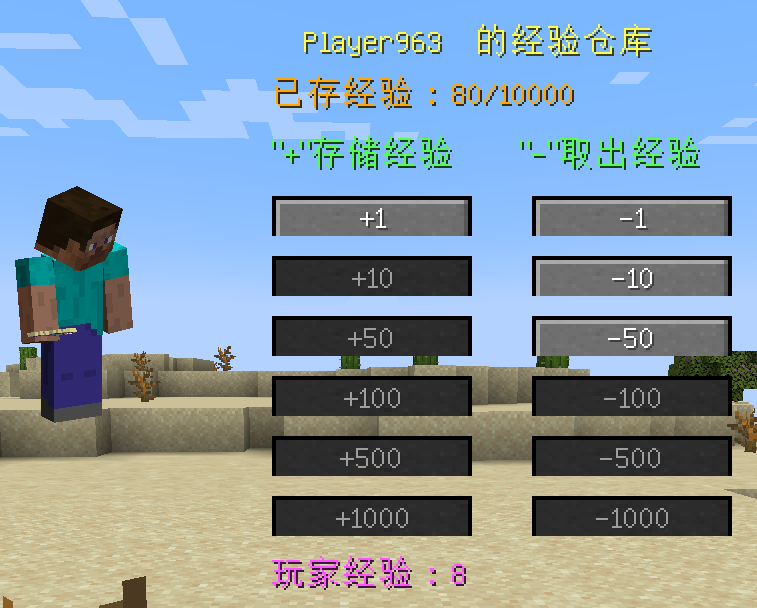
Project description from Modrinth.
Pick your setup
XPGui by Minecraft version and loader
Choose the version and loader you play, then open the matching release.
Minecraft version
26.2
1 loader buildMinecraft version
26.1.1
1 loader buildMinecraft version
26.1
1 loader buildMinecraft version
1.21.11
1 loader buildMinecraft version
1.21.1
1 loader buildMinecraft version
1.21
1 loader buildMinecraft version
1.20.6
1 loader buildMinecraft version
1.20.5
1 loader buildMinecraft version
1.20.1
1 loader buildMinecraft version
1.19.2
1 loader buildCheck the dependencies, then try the file in a copied instance before changing a world you care about.
Recent files
XPGui versions and loaders
1.0.2
xpgui-fabric-mc26.3-1.0.2.jar
16 Sept 2026
Client Optional Server Optional Dependencies No extras listed Listed on Release listing
Check the 26.3 · Fabric setup 26.226.3Fabric release
1.0.1
xpgui-fabric-mc26.2-1.0.1.jar
23 Jun 2026
Client Optional Server Optional Dependencies No extras listed Listed on Release listing
Check the 26.3 · Fabric setup 26.226.3Fabric release
1.0.1
xpgui-fabric-26.1-1.0.1.jar
27 Mar 2026
Client Optional Server Optional Dependencies No extras listed Listed on Release listing
Check the 26.1.1 · Fabric setup 26.126.1.1Fabric release
1.0.1
xpgui-fabric-1.21.11-1.0.1.jar
21 Feb 2026
Client Optional Server Optional Dependencies No extras listed Listed on Release listing
Check the 1.21.11 · Fabric setup 1.21.11Fabric release
1.0.1
XPGui-mc1.21-fabric-1.0.1.jar
14 Jun 2024
Client Optional Server Optional Dependencies No extras listed Listed on Release listing
Check the 1.21.1 · Fabric setup 1.211.21.1Fabric release
1.0.1
XPGui-mc1.19.2-fabric-1.0.1.jar
6 May 2024
Client Optional Server Optional Dependencies No extras listed Listed on Release listing
Check the 1.19.2 · Fabric setup 1.19.2Fabric release
1.0.1
XPGui-mc1.20.1-fabric-1.0.1.jar
6 May 2024
Client Optional Server Optional Dependencies No extras listed Listed on Release listing
Check the 1.20.1 · Fabric setup 1.20.1Fabric release
1.0.1
XPGui-mc1.20.5-fabric-1.0.1.jar
3 May 2024
Client Optional Server Optional Dependencies No extras listed Listed on Release listing
Check the 1.20.6 · Fabric setup 1.20.51.20.6Fabric release
Looking for an older file? The official Modrinth project page is in Resources.
 mod
mod CurseForge + Modrinth · Minecraft
Frostbyte's Maximum Mobility
Adds QoL features to the movement system: Step up, Boat step up, Coyote time (jump forgiveness), Bedrock bridging, & Bedrock elytra canceling.
 mod
mod CurseForge · Minecraft
HubExtended
An extension mod for the hub server
 mod
mod Modrinth · Minecraft
Seasonal Integration
Adding compatibility between Serene Seasons and other mods or datapacks for a smoother experience.