Blackwolf Library Needed by More Carpets 2.10.0
requiredMatching file found Matched file: 1.4.1-Forge

Modrinth · Minecraft mod
This mod adds around 240 new Carpets and extracts textures from their respective vanilla Minecraft block
Quick answer
More Carpets 2.10.0 targets 26.3 with Forge. Installation on the client is optional. Installation on the dedicated server is optional. All 1 required mods have matching files.
Where it goes
Installation on the client is optional. Installation on the dedicated server is optional.
The source marks this as usable on both the client and server.
2.10.0 on 26.3 Forge. Every mod below is checked against that same setup.
Install Blackwolf Library first. We found matching files for this game-version and loader setup.
We only count dependency files that match this setup. A file for another loader does not fill the gap.
Before you install it
Built for More Carpets 2.10.0 on 26.3 Forge. Pick another file and the loader, install side or required mods may change.
Use 2.10.0. It targets 26.3 with Forge; another release may have different loader, side or dependency requirements.
Install Blackwolf Library first. We found matching files for this game-version and loader setup.
Installation on the client is optional. Installation on the dedicated server is optional.
Use the “Get this file” button beside 2.10.0. It opens that exact file at the source.
About this project
This mod adds around 240 new Carpets.
IMPORTANT ! The mod require Blackwolf Library to work !
The mod extracts textures from their respective vanilla Minecraft block. So they can be overriden with resource packs as usual.
Compatible with all resource packs.
It's compatible with: Just Enough Items (JEI)
To create these new carpets you must first create the Carpet Frame. Below examples of the recipe.
You can use any carpet from the vanilla game for the recipe.
You can now use the Carpet Frame with a block whose texture you want. Below are some examples.
Some Carpets emit light like their respective blocks.
The color of the beam of the beacon can be changed by glass carpets.
From a crafting you can obtained four carpets.
The glazed terracotta carpets are directional, so you could make the usual 2x2 patterns.
Thanks to MisterEcho for the review: https://youtu.be/ISqDfYnSpv4?t=162


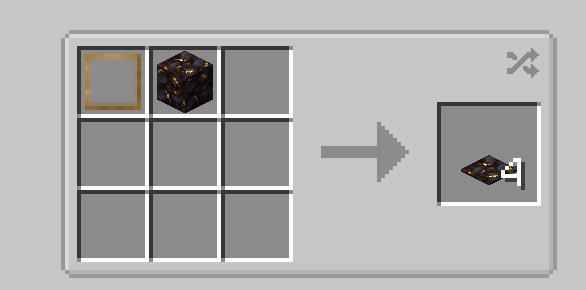
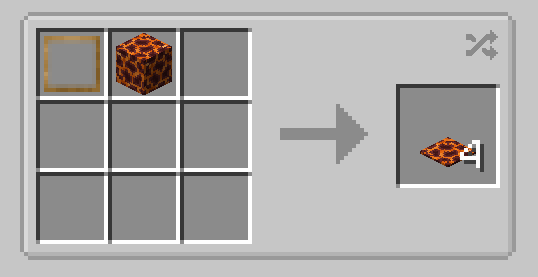

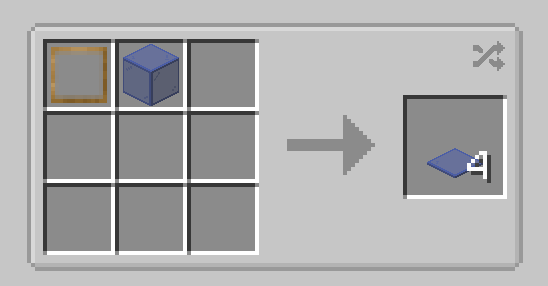
For some carpets you need particular crafting, you can use Just Enough Items (JEI) to see them.
They are: Fire Carpet, Fire Soul Carpet, Lava Carpet (2 version), Nether Carpet and Strange Carpet (no texture).

BisectHosting offers quick, simple and high quality server hosting with over a dozen locations available across the world, ensuring low latency. After your purchase, the server is already configured and ready to use. With their 24/7 support and fast-response time, no issues shall stand in your way!
Use the promo code BLACKWOLF to get a 25% discount off your first month when buying any of their gaming servers.
Feel free to use this mod on your modpack
Project description from Modrinth.
Pick your setup
Choose the version and loader you play, then open the matching release.
Check the dependencies, then try the file in a copied instance before changing a world you care about.
Recent files
MoreCarpets-forge-26.3-2.10.0.jar
8 Oct 2026
Looking for an older file? The official Modrinth project page is in Resources.
 mod
Build with timber beams, palisades, braces, patterned frames and log piles in the wood types available in your game. Light them with braziers, chandeliers, sconces and candelabras.
 mod
Adds functioning record players that can play 7" singles and 12" LPs containing music within the game.
 mod
Adds outlines to all enchanted items!