Fabric API Needed by Screenshot+ 1.1.1-mc1.21.11
requiredMatching file found Matched file: 0.141.6+1.21.11

Modrinth · Minecraft mod
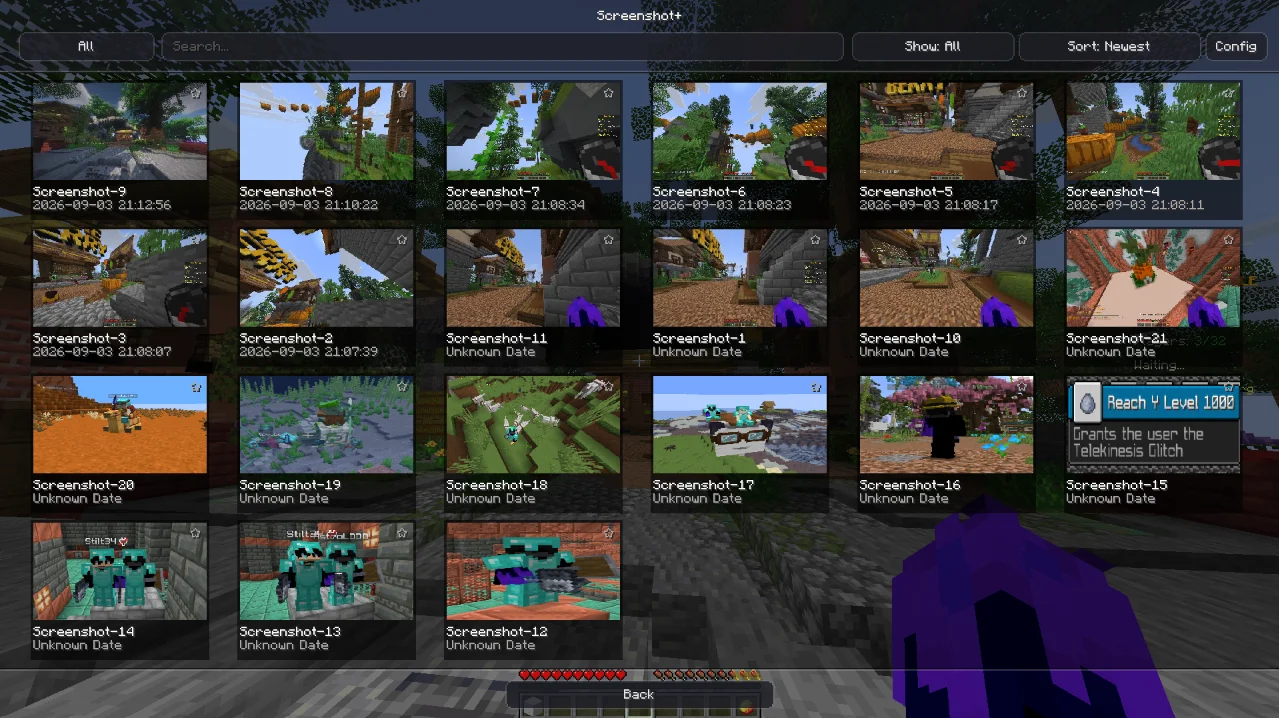
Screenshot+ is a lightweight client-side Fabric mod that transforms Minecraft's basic screenshot folder into a polished, in-game screenshot manager.
Quick answer
Screenshot+ 1.1.1-mc1.21.11 targets 1.21.11 with Fabric. It must be installed on the client. Do not install it on the dedicated server. All 1 required mods have matching files.
Where it goes
It must be installed on the client. Do not install it on the dedicated server.
This file is marked client-only.
1.1.1-mc1.21.11. Change the file and its required mods may change too.
Install Fabric API first. We found matching files for this game-version and loader setup. 1 comes through another mod in the chain.
1 extra mod was pulled in by another dependency. Indented rows show who needs each one. We only count dependency files that match this setup. A file for another loader does not fill the gap.
Before you install it
Built for Screenshot+ 1.1.1-mc1.21.11. Pick another file and the loader, install side or required mods may change.
Use 1.1.1-mc1.21.11. It targets 1.21.11 with Fabric; another release may have different loader, side or dependency requirements.
Install Fabric API first. We found matching files for this game-version and loader setup. 1 comes through another mod in the chain.
It must be installed on the client. Do not install it on the dedicated server.
Use the “Get this file” button beside 1.1.1-mc1.21.11. It opens that exact file at the source.
About this project
Screenshot+ is a client-side Fabric mod that adds an in-game gallery for the purpose of storing your screenshots. You can use the gallery/mod to view, edit and manage your screenshots and take very high resolution screenshots in the same mod.
If there is any problem with the mod or any problem you are facing related to the mod please get back to me through discord.❤️
Project description from Modrinth.
Pick your setup
Choose the version and loader you play, then open the matching release.
Showing the newest 12 of 19 game versions. Older files are in the list below.
Check the dependencies, then try the file in a copied instance before changing a world you care about.
Recent files
screenshotplus-1.1.1-mc1.21.11.jar
24 Oct 2026
screenshotplus-1.1.2-mc26.3.jar
24 Oct 2026
screenshotplus-1.1.1-mc26.2.jar
24 Oct 2026
screenshotplus-1.1.1-mc26.1.jar
24 Oct 2026
screenshotplus-1.1.0-mc26.3-snapshot-sources.jar
3 Sept 2026
screenshotplus-1.1.0-mc26.1.jar
3 Sept 2026
screenshotplus-1.1.0-mc1.21.4.jar
22 Aug 2026
screenshotplus-1.1.0-mc1.21.11.jar
22 Aug 2026
screenshotplus-1.1.0-mc26.1.jar
22 Aug 2026
screenshotplus-1.1.0-mc26.2.jar
22 Aug 2026
screenshotplus-1.1.0-mc26.3-snapshot5.jar
22 Aug 2026
screenshotplus-1.0.0.jar
21 Jul 2026
Looking for an older file? The official Modrinth project page is in Resources.
 mod
Saves despawned items so players can fish them up or brush them out of suspicious sand/gravel. With admin tools and optional filters and limits.
 mod
Adding more birds to your Minecraft world!
 mod
WynnToolZ is a client-side Fabric mod that adds practical Wynncraft utilities for mounts and some other optional quality of life additions.