Bookshelf Needed by Nyctography 26.3.0.1
requiredMatching file found Matched file: 26.3.0.4

Modrinth · Minecraft mod
Adds the Nyctography substitution cipher as a usable Minecraft font.
Quick answer
Nyctography 26.3.0.1 targets 26.3 with NeoForge. Installation on the client is optional. Installation on the dedicated server is optional. All 1 required mods have matching files.
Where it goes
Installation on the client is optional. Installation on the dedicated server is optional.
The source marks this as usable on both the client and server.
26.3.0.1. Change the file and its required mods may change too.
Install Bookshelf first. We found matching files for this game-version and loader setup.
We only count dependency files that match this setup. A file for another loader does not fill the gap.
Before you install it
Built for Nyctography 26.3.0.1. Pick another file and the loader, install side or required mods may change.
Use 26.3.0.1. It targets 26.3 with NeoForge; another release may have different loader, side or dependency requirements.
Install Bookshelf first. We found matching files for this game-version and loader setup.
Installation on the client is optional. Installation on the dedicated server is optional.
Use the “Get this file” button beside 26.3.0.1. It opens that exact file at the source.
About this project

This mod adds the Nyctography substitution cipher as a Minecraft font! This font can be used for books, signs, chat messages, tooltips, and most forms of ingame text.
The nyctography writing system was invented in 1891 by Lewis Carrol. The goal of this system was to make writing in the dark easier, which is where the system gets its name. Text was written using a nyctograph, a stencil with squre holes that were used to align and write the characters. In modern times this writing system has been used for puzzles in games, DnD campaigns, and geocaches.
This writing system uses a series of dots and lines aranged around the edges of a square. For example the letter E has a dot in the top left corner and a line on the top. Each symbol loosely resembles its latin alphabet counterpart. For example the letter O has a dot in the top left corner and then a line on all sides of the box, creating a closed loop.
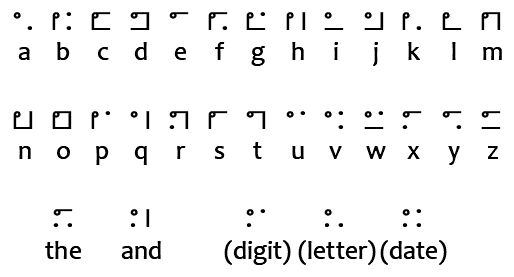
Similarly to braille, numbers are written using a letter. This mod will automatically handle this when writing text with the font but you will still need to know how to read them. Only consonants are used to avoid confusion with actual words.
There are five special characters in addition to the letters and numbers.
This font can be applied to any text using Mojang's text component system, including all commands and datapack features that accept raw JSON text. This is done by setting the font property of the text to nyctography:nyctography.
Vanilla commands will often allow you to define text using the raw JSON format. The font property controls which font will be used when rendering that text. This can be done for all fonts and is not unique to fonts added by this mod.
/give @a stone[custom_name='["",{"text":"Stone","font":"nyctography:nyctography",italic:false}]']/title @a title {"text":"Hello","font":"nyctography:nyctography"}/give @a written_book[written_book_content={pages:['[["",{"text":"Test book","font":"nyctography:nyctography"}]]'],title:"aaa",author:"bbb"}]This mod depends on the Bookshelf library which offers several commands to help work with fonts. A few examples of these commands are given below.
If you have access to code or scripting tools you can apply the font to any mutable text component. This is done by setting the font ID on the style of the text component. You can find an example of how I do this in my code here.
This project is sponsored by Nodecraft. Use code DARKHAX for 30% off your first month of service!
Project description from Modrinth.
Pick your setup
Choose the version and loader you play, then open the matching release.
Check the dependencies, then try the file in a copied instance before changing a world you care about.
Recent files
Nyctography-neoforge-MC26.3-26.3.0.1.jar
25 Sept 2026
Nyctography-fabric-MC26.3-26.3.0.1.jar
25 Sept 2026
Nyctography-fabric-MC26.2-26.2.0.1.jar
18 Jun 2026
Nyctography-neoforge-MC26.2-26.2.0.1.jar
18 Jun 2026
Nyctography-fabric-MC26.1.2-26.1.2.3.jar
18 Jun 2026
Nyctography-neoforge-MC26.1.2-26.1.2.3.jar
18 Jun 2026
Nyctography-fabric-MC26.1.2-26.1.2.2.jar
17 Jun 2026
Nyctography-neoforge-MC26.1.2-26.1.2.2.jar
17 Jun 2026
Nyctography-fabric-MC26.1.2-26.1.2.1.jar
16 Apr 2026
Nyctography-neoforge-MC26.1.2-26.1.2.1.jar
16 Apr 2026
nyctography-fabric-1.21.1-21.1.8.jar
2 Apr 2026
nyctography-neoforge-1.21.1-21.1.8.jar
2 Apr 2026
Looking for an older file? The official Modrinth project page is in Resources.
 mod
🔮 Turn your spellbook into a spectacle! Discover 178 core spells, nine schools, nine 3D grimoires and devastating God-tier rituals. Add Alex’s Caves and Bosses’Rise to expand your magical arsenal to 227 spells!
 mod
A Fabric Minecraft mod for viewing container slot index's at the click of a button! Useful for development/configuration!
 mod
Transforms vanilla villages into fortified cities.