Fabric API Needed by Servarium v1.0
requiredMatching file found Matched file: 0.165.0+26.3

Modrinth · Minecraft mod
Adds a customisable server list to Minecraft and enables you to configure every aspect of your servers.
Quick answer
Servarium v1.0 targets 26.3 with Fabric. It must be installed on the client. Do not install it on the dedicated server. All 2 required mods have matching files.
Where it goes
It must be installed on the client. Do not install it on the dedicated server.
This file is marked client-only.
v1.0 on 26.3. Every mod below is checked against that same setup.
Install Fabric API, Fabric Language Kotlin first. We found matching files for this game-version and loader setup.
We only count dependency files that match this setup. A file for another loader does not fill the gap.
Before you install it
Built for Servarium v1.0 on 26.3. Pick another file and the loader, install side or required mods may change.
Use v1.0. It targets 26.3 with Fabric; another release may have different loader, side or dependency requirements.
Install Fabric API, Fabric Language Kotlin first. We found matching files for this game-version and loader setup.
It must be installed on the client. Do not install it on the dedicated server.
Use the “Get this file” button beside v1.0. It opens that exact file at the source.
About this project
Adds a customisable server list to Minecraft and enables you to configure every aspect of your servers.
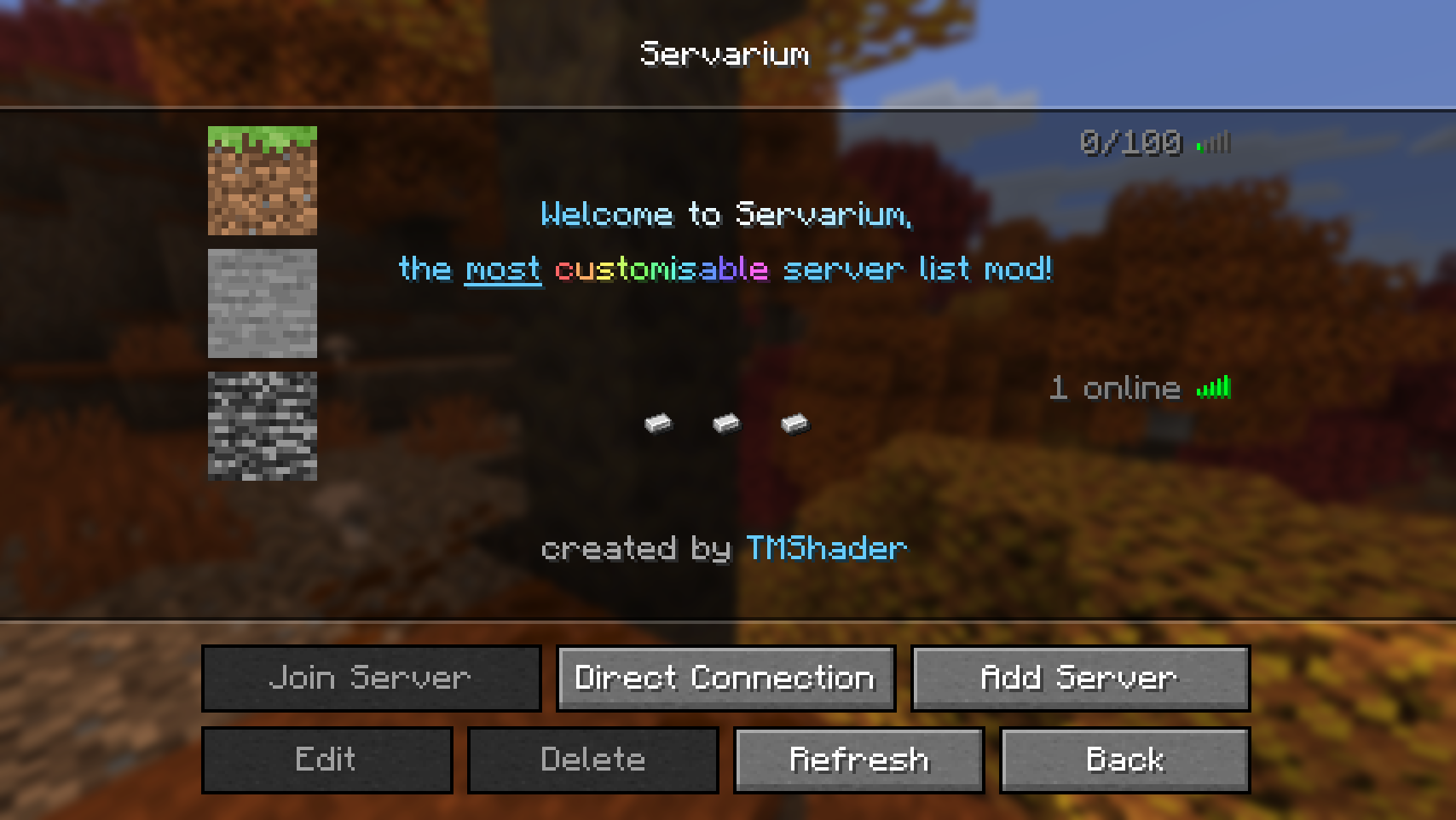
Note: Unchecked features are not yet available but are planned for a later release.
Servarium is a client-side mod and requires the following dependencies:
>=26.3>=0.20.1>=0.165.0+26.3>=1.14.2+kotlin.2.4.21Placeholder API is bundled directly into the mod and does not need to be installed separately.
The configuration file is written in YAML and is located at config/servarium/config.yml in your Minecraft directory. It has two top-level sections:
| Key | Type | Default | Description |
|---|---|---|---|
settings |
Settings | see below | General mod settings. |
servers |
list of Server entries | [] |
The servers shown in the custom server list. |
Note: Some values are listed in the configuration but are not yet implemented. They are marked with "⚠️ Not yet implemented." below and should not be used for now.

---
settings:
  list_header: "Servarium"
  button_label: "Servarium"
  button_placement: NEXT_TO_MULTIPLAYER

servers:
  - name: "Minecraft Server"
    address: "play.example.com"
    icon:
      type: DEFAULT
    motd: |-
      Example MOTD
      for the example server
    player_count:
      type: FORCED
      value: "12/100"
    ping_icon: LEVEL_5
    text_alignment: CENTER
    text_spacing: BALANCED
All options are optional. Any option you leave out falls back to its default value.
General options that control how the mod appears in the main menu.
| Key | Type | Default | Description |
|---|---|---|---|
list_header |
string | "Servarium" |
The text displayed at the top of the server list. |
button_label |
string | "Servarium" |
The text displayed on the button that opens the server list. |
button_placement |
enum | NEXT_TO_MULTIPLAYER |
Where the button is placed on the title screen. |
button_placement| Value | Behavior |
|---|---|
NEXT_TO_MULTIPLAYER |
Adds the button next to the Multiplayer button. (default) |
REPLACE_MULTIPLAYER |
Replaces the Multiplayer button with the Servarium button. |
NEXT_TO_REALMS |
Adds the button next to the Realms button. |
REPLACE_REALMS |
Replaces the Realms button with the Servarium button. |
Each item in the servers list describes one server.
| Key | Type | Default | Description |
|---|---|---|---|
name |
string | "Minecraft Server" |
The name displayed for the server. |
address |
string | "" |
The address of the server (for example play.example.com or play.example.com:25566). |
icon |
Icon | see below | The icon shown for the server. See icon. |
motd |
string | "" |
The message of the day, up to 2 lines. See motd. |
player_count |
Player count | see below | Controls how the player count is displayed. |
ping_icon |
enum | LEVEL_5 |
Controls the connection/ping icon. |
text_alignment |
enum | LEFT |
Alignment of the server text. |
text_spacing |
enum | VANILLA |
Line spacing of the server text. |
An object controlling how the server icon is rendered:
| Key | Type | Default | Description |
|---|---|---|---|
type |
enum | DEFAULT |
The icon source type. |
value |
string | omitted | The file name, atlas and sprite, username, or base64 string. |
type| Value | Behavior | value |
|---|---|---|
NONE |
Draws no icon in the GUI. | Ignored |
DEFAULT |
Displays the default server icon. (default) | Ignored |
FILE |
Loads an image from the icons/ directory. |
Required |
ATLAS |
Renders a texture from a game atlas. | Required |
PLAYER |
Shows a player's face from their skin. | Required |
BASE64 |
Renders a Base64-encoded image. | Required |
Place the file in config/servarium/icons/:
config/servarium/
├── config.yml
└── icons/
    └── my_server.png
Set value to the file's name:
icon:
  type: FILE
  value: "my_server.png"
Subfolders and other paths are not supported. The file must be placed directly in the icons folder.
Specify the atlas and the sprite from it, separated by a space:
icon:
  type: ATLAS
  value: "blocks block/bedrock"
Here blocks is the atlas and block/bedrock is the sprite from that atlas.
icon:
  type: PLAYER
  value: "TMShader"
icon:
  type: BASE64
  value: "iVBORw0KGgoAAAANSUhEUg..."
icon:
  type: DEFAULT
icon:
  type: NONE
A 64x64 image is recommended. Images of any other size are resized automatically.
motdThe message of the day can have a maximum of 2 lines. To configure both lines, write the text as a multi-line string using YAML's literal block style (|):
motd: |
  First line
  Second line
For a single line, a regular string is enough:
motd: "Welcome!"
An object with two properties:
| Key | Type | Default | Description |
|---|---|---|---|
type |
enum | FORCED |
How the player count is determined. |
value |
string | "" |
The text used by the FORCED type. |
type| Value | Behavior | value |
|---|---|---|
NONE |
Hides the player count. | Ignored |
FORCED |
Always displays the text in value exactly as written. (default) |
Required |
VANILLA |
⚠️ Not yet implemented. | Ignored |
TEMPLATED |
⚠️ Not yet implemented. | Required |
# Hide the player count
player_count:
  type: NONE
# Always show a fixed text
player_count:
  type: FORCED
  value: "12/100"
ping_iconControls the icon shown on the right side of the server entry.
| Value | Behavior |
|---|---|
NONE |
No ping icon is shown. |
VANILLA |
⚠️ Not yet implemented. |
LEVEL_1 |
Always shows the ping level 1 icon |
LEVEL_2 |
Always shows the ping level 2 icon |
LEVEL_3 |
Always shows the ping level 3 icon |
LEVEL_4 |
Always shows the ping level 4 icon |
LEVEL_5 |
Always shows the ping level 5 icon (default) |
UNREACHABLE |
Always shows the "unreachable" icon |
text_alignment| Value | Behavior |
|---|---|
LEFT |
Aligns the motd and server name to the left. (default) |
CENTER |
Centers the motd and server name. |
text_spacingControls the vertical spacing between the server name and the MOTD lines. In vanilla, the gap between the server name and the first line of the MOTD is larger than the gap between the two MOTD lines. All other options apply equal spacing across all three lines.
| Value | Behavior |
|---|---|
VANILLA |
Uses the vanilla spacing. (default) |
RELAXED |
Slightly larger spacing than BALANCED. |
BALANCED |
Equal spacing between all lines, closest to vanilla. |
COMPACT |
Tighter spacing. |
TIGHT |
The tightest spacing available. |
When text_spacing is not VANILLA, the server text can be thought of as having three lines: name is line 1, and motd provides lines 2 and 3.
This lets you place the server name on line 2 (the first line of the motd), which centers it vertically. To do this, set name to an empty string and write the actual name as the first line of the motd:
servers:
  - name: ""
    motd: "My Server"
    text_spacing: BALANCED
Servarium parses text using Placeholder API's built-in QuickText and Markdown formatters. Formatting tags and styles can be used in:
settings.list_headersettings.button_labelservers[].nameservers[].motdservers[].player_count.value (when type is FORCED or TEMPLATED)For the full list of tags, colours, gradients, and syntax rules, see the QuickText Documentation.
| Key | Allowed values | Default |
|---|---|---|
settings.list_header |
Any string | "Servarium" |
settings.button_label |
Any string | "Servarium" |
settings.button_placement |
NEXT_TO_MULTIPLAYER, REPLACE_MULTIPLAYER, NEXT_TO_REALMS, REPLACE_REALMS |
NEXT_TO_MULTIPLAYER |
servers[].name |
Any string | "Minecraft Server" |
servers[].address |
Any string | "" |
servers[].icon.type |
NONE, DEFAULT, FILE, ATLAS, PLAYER, BASE64 |
DEFAULT |
servers[].icon.value |
File name, atlas and sprite, username, or base64 string | omitted |
servers[].motd |
Any string, up to 2 lines | "" |
servers[].player_count.type |
NONE, FORCED (VANILLA and TEMPLATED are not yet implemented) |
FORCED |
servers[].player_count.value |
Any string (required only for FORCED and TEMPLATED) |
"" |
servers[].ping_icon |
NONE, LEVEL_1, LEVEL_2, LEVEL_3, LEVEL_4, LEVEL_5, UNREACHABLE (VANILLA is not yet implemented) |
LEVEL_5 |
servers[].text_alignment |
LEFT, CENTER |
LEFT |
servers[].text_spacing |
VANILLA, RELAXED, BALANCED, COMPACT, TIGHT |
VANILLA |
Project description from Modrinth.
Pick your setup
Choose the version and loader you play, then open the matching release.
Check the dependencies, then try the file in a copied instance before changing a world you care about.
Recent files
servarium-1.0.jar
3 Nov 2026
Looking for an older file? The official Modrinth project page is in Resources.