Fabric API Needed by Chroma Studio 1.2.0+mc1.21.1-fabric
requiredMatching file found Matched file: 0.116.18+1.21.1

Modrinth · Minecraft mod
Color picker, find blocks by color, build palettes and gradients, and export them as schematics.
Quick answer
Chroma Studio 1.2.0+mc1.21.1-fabric targets 1.21.1, 1.21 with Fabric. Installation on the client is optional. Installation on the dedicated server is optional. All 1 required mods have matching files.
Where it goes
Installation on the client is optional. Installation on the dedicated server is optional.
The source marks this as usable on both the client and server.
1.2.0+mc1.21.1-fabric on Fabric. Every mod below is checked against that same setup.
Install Fabric API first. We found matching files for this game-version and loader setup.
We only count dependency files that match this setup. A file for another loader does not fill the gap.
Before you install it
Built for Chroma Studio 1.2.0+mc1.21.1-fabric on Fabric. Pick another file and the loader, install side or required mods may change.
Use 1.2.0+mc1.21.1-fabric. It targets 1.21.1, 1.21 with Fabric; another release may have different loader, side or dependency requirements.
Install Fabric API first. We found matching files for this game-version and loader setup.
Installation on the client is optional. Installation on the dedicated server is optional.
Use the “Get this file” button beside 1.2.0+mc1.21.1-fabric. It opens that exact file at the source.
About this project


The last colour picker mod you'll need. Simple to use and highly configurable.
Chroma Studio finds the blocks closest to a colour. Build palettes and gradients, then export them as schematics. It runs on your client only, on Fabric and NeoForge, and works on any server.
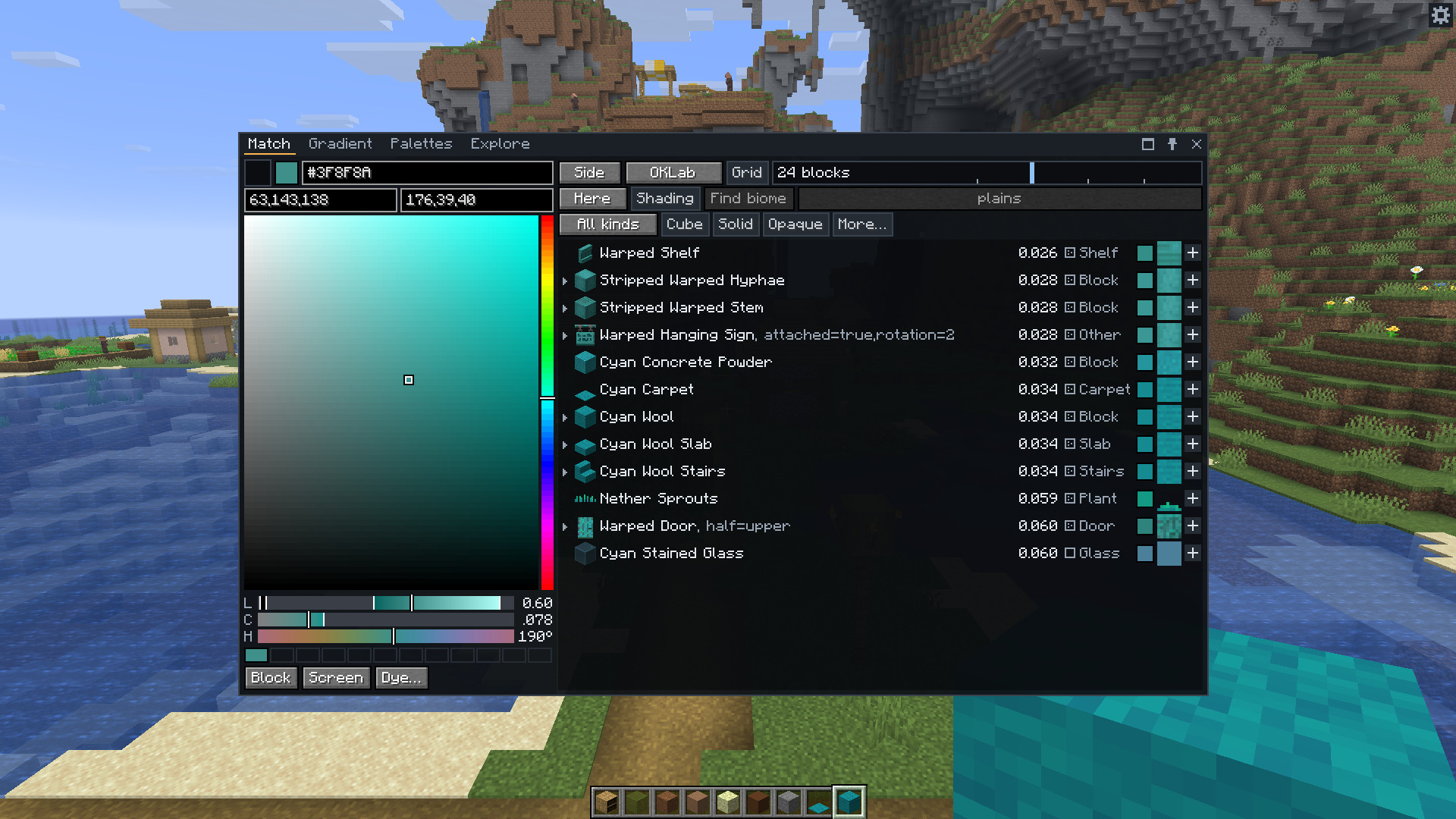
Press C to open the window, and X to read the colour of the block you're looking at.
Chroma Studio compares whole textures rather than just their average colour, and ranks matches by how close the colours look to the eye. It accounts for biome tints and texture busyness too. You can gather a material's slabs and stairs, check your palette for missing shades and export it for Litematica or WorldEdit, all in the same window.
.litematic and .nbt schematics, or copy WorldEdit patterns and commands.Project description from Modrinth.
Pick your setup
Choose the version and loader you play, then open the matching release.
Check the dependencies, then try the file in a copied instance before changing a world you care about.
Recent files
chromastudio-fabric-1.2.0.jar
14 Nov 2026
chromastudio-fabric-1.2.0.jar
14 Nov 2026
chromastudio-fabric-1.2.0.jar
14 Nov 2026
chromastudio-fabric-1.2.0.jar
14 Nov 2026
chromastudio-fabric-1.1.0.jar
20 Oct 2026
chromastudio-fabric-1.1.0.jar
20 Oct 2026
chromastudio-fabric-1.1.0.jar
20 Oct 2026
chromastudio-fabric-1.1.0.jar
17 Oct 2026
chromastudio-fabric-1.0.0.jar
13 Oct 2026
Looking for an older file? The official Modrinth project page is in Resources.