Minecraft version
Back to mods 
Modrinth · Minecraft mod
Chroma Studio
Color picker, find blocks by color, build palettes and gradients, and export them as schematics.
Choose a version Pick your version below, then grab the matching file.
Quick answer
Which Chroma Studio release matches 26.3?
Best match for your filters 1.2.1+mc26.3-neoforge
Game version 26.3
Loader NeoForge
Chroma Studio 1.2.1+mc26.3-neoforge targets 26.3 with NeoForge. Installation on the client is optional. Installation on the dedicated server is optional. No extra mods listed for this file.
Where it goes
Is Chroma Studio required on the client, server, or both?
Installation on the client is optional. Installation on the dedicated server is optional.
Client Optional
Dedicated server Optional
Loader for this release NeoForge
Required install it here Optional supported, not mandatory Not supported do not install here Source doesn’t say do not assume
The source marks this as usable on both the client and server.
What else does Chroma Studio 1.2.1+mc26.3-neoforge need?
1.2.1+mc26.3-neoforge on 26.3. Every mod below is checked against that same setup.
This file does not list any required mods. Do not add a library just because a different file uses it.
This file does not list any required or optional mods.
Before you install it
Add Chroma Studio without breaking your instance.
Built for Chroma Studio 1.2.1+mc26.3-neoforge on 26.3. Pick another file and the loader, install side or required mods may change.
- 01
Stick to this file
Use 1.2.1+mc26.3-neoforge. It targets 26.3 with NeoForge; another release may have different loader, side or dependency requirements.
- 02
Bring the mods it needs
This file does not list any required mods. Do not add a library just because a different file uses it.
- 03
Put it on the correct side
Installation on the client is optional. Installation on the dedicated server is optional.
- 04
Pick the file you checked
Use the “Get this file” button beside 1.2.1+mc26.3-neoforge. It opens that exact file at the source.
About this project
What does Chroma Studio add?


The last colour picker mod you'll need. Simple to use and highly configurable.
Chroma Studio finds the blocks closest to a colour. Build palettes and gradients, then export them as schematics. It runs on your client only, on Fabric and NeoForge, and works on any server.
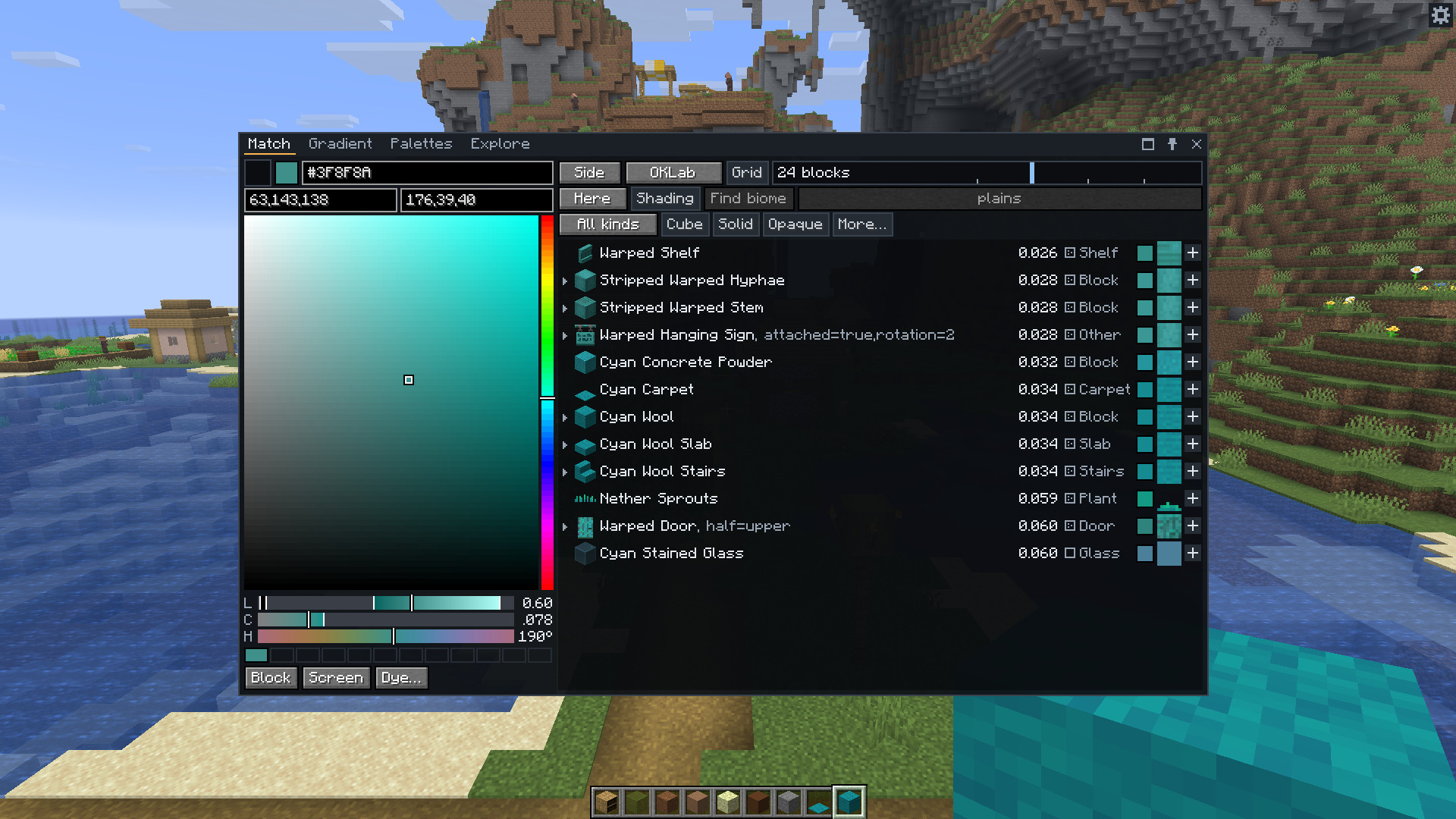
Press C to open the window, and X to read the colour of the block you're looking at.
How is Chroma Studio better?
Chroma Studio compares whole textures rather than just their average colour, and ranks matches by how close the colours look to the eye. It accounts for biome tints and texture busyness too. You can gather a material's slabs and stairs, check your palette for missing shades and export it for Litematica or WorldEdit, all in the same window.
Features
- Pick colours with sliders, hex codes, or the block and screen eyedroppers.
- Match modded blocks and resource packs.
- Filter by block type, mod, colour and texture busyness.
- Turn a material's slabs, stairs and other blocks into a palette in one click.
- Build gradients with multiple colour stops, swap individual blocks, and save them to load later.
- Make palettes from colour harmonies, images or blocks in the world.
- Save palettes with tags and notes, and share them as text.
- Check palettes for missing shades or accents.
- Preview palettes as flat walls or 3D dioramas.
- Export
.litematicand.nbtschematics, or copy WorldEdit patterns and commands. - Fill your hotbar with a palette or gradient, with undo, in creative mode or as an operator.
- Explore every block by hue and lightness.
- Paint shapes with your gradients and palettes in Curve Generator 3.0.0 or newer.
Links
- The wiki contains full documentation on how to use the mod.
- Report a bug or suggest a feature in the issue tracker.
Project description from Modrinth.
Pick your setup
Chroma Studio by Minecraft version and loader
Choose the version and loader you play, then open the matching release.
Minecraft version
26.2
2 loader buildsMinecraft version
1.21.11
2 loader buildsMinecraft version
1.21.1
2 loader buildsMinecraft version
1.21
2 loader buildsCheck the dependencies, then try the file in a copied instance before changing a world you care about.
Recent files
Chroma Studio versions and loaders
1.2.1+mc26.3-neoforge
chromastudio-neoforge-1.2.1.jar
14 Nov 2026
Client Optional Server Optional Dependencies No extras listed Listed on Release listing
Check the 26.3 · NeoForge setup 26.3NeoForge release
1.2.1+mc26.3-fabric
chromastudio-fabric-1.2.1.jar
14 Nov 2026
Client Optional Server Optional Dependencies 1 required · 1 unchecked Listed on Release listing
Check the 26.3 · Fabric setup 26.3Fabric release
1.2.0+mc26.3-neoforge
chromastudio-neoforge-1.2.0.jar
14 Nov 2026
Client Optional Server Optional Dependencies No extras listed Listed on Release listing
Check the 26.3 · NeoForge setup 26.3NeoForge release
1.2.0+mc26.3-fabric
chromastudio-fabric-1.2.0.jar
14 Nov 2026
Client Optional Server Optional Dependencies 1 required · 1 unchecked Listed on Release listing
Check the 26.3 · Fabric setup 26.3Fabric release
1.1.0+mc26.3-fabric
chromastudio-fabric-1.1.0.jar
17 Oct 2026
Client Optional Server Optional Dependencies 1 required · 1 unchecked Listed on Release listing
Check the 26.3 · Fabric setup 26.3Fabric release
1.1.0+mc26.3-neoforge
chromastudio-neoforge-1.1.0.jar
17 Oct 2026
Client Optional Server Optional Dependencies No extras listed Listed on Release listing
Check the 26.3 · NeoForge setup 26.3NeoForge release
1.0.0+mc26.3-fabric
chromastudio-fabric-1.0.0.jar
13 Oct 2026
Client Optional Server Optional Dependencies 1 required · 1 unchecked Listed on Release listing
Check the 26.3 · Fabric setup 26.3Fabric release
1.0.0+mc26.3-neoforge
chromastudio-neoforge-1.0.0.jar
13 Oct 2026
Client Optional Server Optional Dependencies No extras listed Listed on Release listing
Check the 26.3 · NeoForge setup 26.3NeoForge release
Looking for an older file? The official Modrinth project page is in Resources.
 mod
CurseForge · Minecraft
Pool Table 🎱
A full-size 3x5 pool table with real ball physics and pub 8-ball rules. Line up your shot in the ball camera, draw back and shoot, then watch it play out from the table camera. Dyeable cloth, cue racks and a practice mode.
 mod
CurseForge · Minecraft
More Villagers:Missing Buildings
Add missing buildings for More Villagers mod
 mod
CurseForge · Minecraft
Call!
A mod that addresses one of the biggest shortcomings of Copper Golems: the ability to request items.